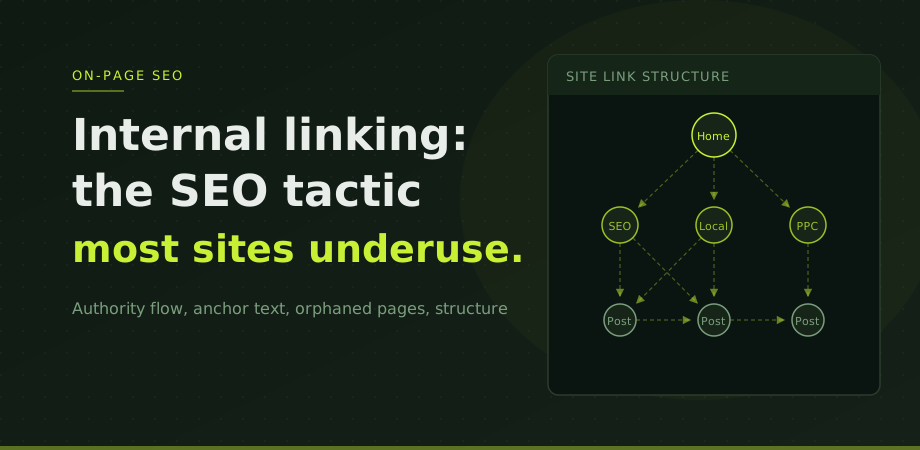
Internal links are hyperlinks from one page on your site to another page on the same site. Every site has them in navigation menus and footers. What most sites do not have is a deliberate strategy for the contextual links that appear within page content, and that is where most of the value is left uncaptured.
Internal linking matters for two distinct reasons. First, it is how Googlebot discovers and crawls pages. A page with no internal links pointing to it may never be found, or may be visited so rarely that it accumulates little authority. Second, internal links pass PageRank (what Google calls link authority) from one page to another. A link from your homepage to a service page transfers some of the authority your homepage has accumulated. The more links a page receives from high-authority pages within the site, the more authority it has to draw on when competing in search results.
How authority flows through the site
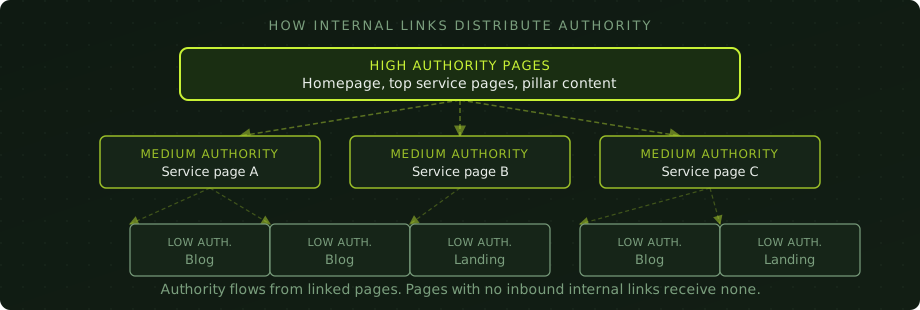
Think of authority as a resource that exists on a site in proportion to the external links it has earned. That authority does not distribute itself evenly. It concentrates on the pages that receive the most links, internal and external, and flows outward from there through the links those pages contain.
The homepage of most sites is the page with the most external links pointing to it. That makes it the highest-authority page. When the homepage links to a service page, it transfers some of that authority to the service page. When the service page links to a blog post, the blog post receives authority from the service page, which itself received authority from the homepage. The chain can extend as many levels as needed, but authority diminishes with each hop.
This has a practical implication: the pages you most want to rank should be as close to the homepage as possible in link depth, and they should receive links from as many high-authority pages as naturally makes sense. A service page buried four levels deep with only one internal link pointing to it is competing with a significant handicap.
The other implication is equally important: any page on your site that receives external links is a potential authority source for other pages. A blog post that earns links from external sites should link internally to the service pages most relevant to its topic. That external link authority is then shared with those service pages, strengthening them without any additional external link building required.
Anchor text: the relevance signal
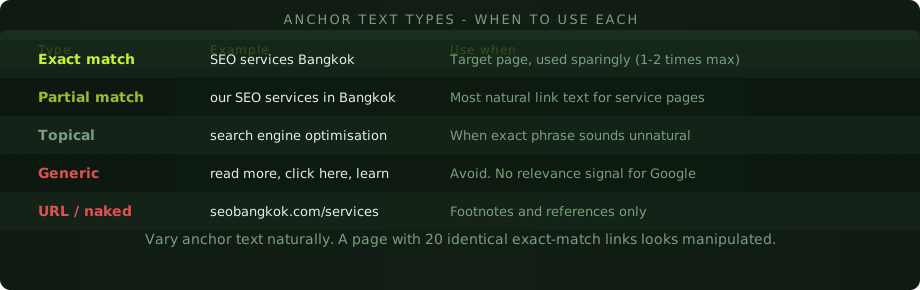
The text of a link tells Google something about what the linked page is about. The distribution rules and the four anchor buckets sit in anchor text best practices for SEO. Linking to a page about SEO services in Bangkok with the anchor text "SEO services Bangkok" reinforces that page's relevance for those terms. Linking to the same page with "click here" passes no topical signal at all.
This does not mean every internal link should use exact-match keyword anchor text. Doing that consistently looks unnatural and creates an over-optimised pattern that can attract Google's attention for the wrong reasons. The goal is to use descriptive, relevant anchor text that a human would naturally write, varied across the multiple links pointing to the same page.
Building a deliberate structure
Most sites accumulate internal links randomly as content is added over time. A blog post written two years ago links to the homepage and nothing else. New service pages have no links from older blog content. The result is a disconnected structure where authority pools in a few pages and cannot reach the others.
A deliberate internal linking strategy starts with identifying your most important pages and working backwards. For most business sites this means the main service pages, the location pages if applicable, and the highest-value landing pages. These are the pages that need the most support.
Once you know which pages matter most, audit what links to them. Use Screaming Frog (free up to 500 URLs) and sort the Inlinks column ascending. Any important page with fewer than three to five contextual internal links from relevant pages is a candidate for improvement. The DIY technical audit guide covers this process in detail.
Then look at your existing content and find pages that discuss topics related to your important pages but do not currently link to them. A blog post about local SEO in Bangkok is a natural place to link to your Local SEO service page. A guide to technical SEO audits should link to the relevant technical service. These connections should exist and often do not.
Contextual links vs navigation links
Google treats links differently depending on where they appear. Navigation links (in headers, footers, and sidebars) are understood to be structural and site-wide. They pass some authority and help with crawling, but they carry less topical weight than contextual links embedded in body content.
A contextual link is one that appears within the natural flow of content on a page, surrounded by text relevant to the linked page's topic. When a paragraph about page speed links to a page about Core Web Vitals, the surrounding content gives that link additional relevance context that a footer link cannot provide.
This is why relying on footer links alone to connect important pages is insufficient. Footer links are valuable for ensuring pages are crawlable, but they do not substitute for contextual links within content. Both have their place, but the contextual ones do the heavier SEO work.
Orphaned pages and how to find them
An orphaned page has no internal links pointing to it. It may appear in your sitemap and be technically accessible via a direct URL, but Googlebot has no natural path to discover it, and no authority flows to it from anywhere on the site.
Orphaned pages are more common than most site owners realise. They accumulate through migrations (old pages get left behind), through CMS changes (links break without notice), and through gradual content growth without a linking strategy. A site that has been running for several years often has dozens of orphaned pages.
Finding them is straightforward with Screaming Frog: run a crawl, export all URLs, and compare against your sitemap. Any URL in the sitemap that does not appear in the crawl data is either blocked or orphaned. Any URL in the crawl with zero inbound internal links is orphaned. Both need attention.
The fix depends on whether the page should exist. If it is valuable content, add internal links from relevant pages. If it has no purpose, redirect or remove it. Keeping orphaned pages that serve no purpose wastes crawl budget and dilutes the site's overall authority pool.
Linking between blog posts and service pages
The most consistently underexploited internal linking opportunity on most business sites is the connection between blog content and service pages. Blog posts typically receive more external links than service pages, because editorial content is more linkable than commercial pages. But that earned authority often stays in the blog section with weak or no paths to the service pages it should be supporting.
Every blog post should link to at least one relevant service page within the body content, using descriptive anchor text. Not in a forced or unnatural way, but as part of a natural signpost for readers who want to take action after reading. This serves both the reader and the SEO function simultaneously.
This site does exactly that. This post links to the SEO service page and the digital consultancy page because those are the services most relevant to readers interested in improving their site structure. A reader finishing this article and wanting professional help has a clear path. Google also sees the topical connection between the blog post and the service page reinforced by that link.
The same principle applies to links between blog posts. A post about title tags should link to a post about heading structure. The on-page foundation that internal linking sits on top of is the heading structure unpacked in heading tags for SEO. A post about indexing should link to a post about the technical audit process. Building these connections creates the topical clusters that strengthen the entire site's authority in a subject area. The post on structured data links here naturally because both topics live under the on-page SEO cluster.
Internal linking questions
How many internal links should a page have?
There is no fixed number. Most pages benefit from three to eight contextual internal links in body content, plus standard navigation links. What matters more than quantity is that your most important pages receive inbound links from multiple relevant pages across the site.
Does anchor text in internal links matter for SEO?
Yes, significantly. Anchor text is a relevance signal to Google about what the linked page is about. Descriptive anchors like "SEO services Bangkok" reinforce topical relevance. Generic anchors like "click here" pass no signal. Vary anchor text naturally across multiple links pointing to the same page.
Should I ever nofollow internal links?
Almost never. Nofollowing internal links wastes the authority they could pass and creates unnecessary complexity. Use nofollow on internal links only in very specific cases like user-generated content sections or paid placement areas, not on standard site navigation or content links.
How do I find pages on my site with no internal links?
Use the free version of Screaming Frog. After crawling your site, sort the main view by the Inlinks column ascending. Pages with zero or one inbound internal link are orphaned or near-orphaned. Cross-reference against your most important commercial pages to prioritise which ones need linking first.