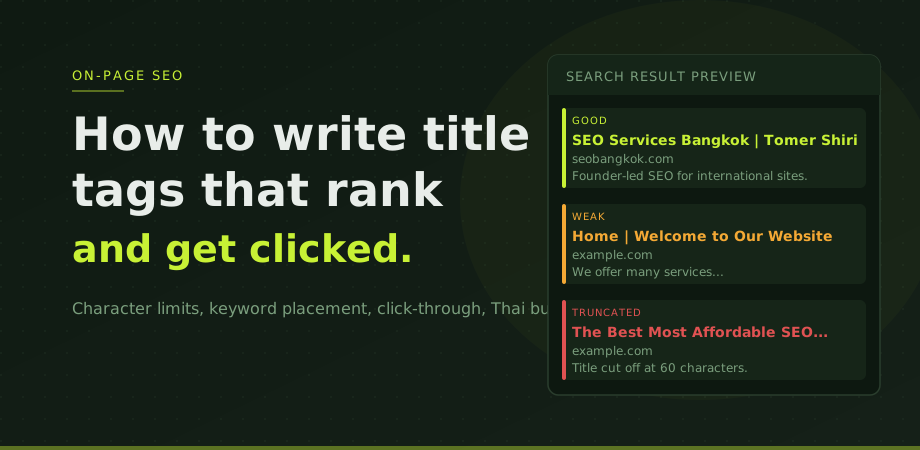
Title tags sit in the head of your HTML and tell search engines what the page is about. They appear as the headline in Google search results, as the tab title in browsers, and as the default text when someone shares your page on social media. Getting them right is one of the highest-return on-page tasks because a single title change on a high-traffic page can meaningfully improve both rankings and click-through rates. See how to write meta descriptions that get clicks.
Title tags are part of what we review in every SEO engagement. Poor titles are among the most common issues on established sites, particularly those built on WordPress or custom CMS platforms where title fields were never properly configured at launch.
The character limit and why it matters
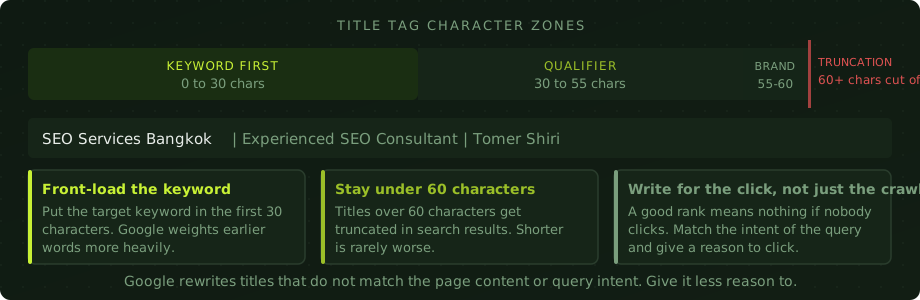
Google does not have a strict character limit for title tags. What it has is a pixel width limit of roughly 600 pixels for how much of the title it displays in search results. For most standard fonts, that translates to approximately 55 to 60 characters.
Titles that exceed this limit get truncated with an ellipsis. The cut-off point depends on which characters are used (wide characters like M or W take more space than narrow ones like i or l), but 60 characters is a reliable ceiling for planning purposes.
Why does truncation matter? Because the part of your title that gets cut off is the part that many searchers never read. If your key message, brand name, or differentiator sits at the end of a long title, a significant portion of your audience will see "The Most Comprehensive Guide to Digital Marketing For Small..." and click elsewhere. Keep titles under 60 characters and put the important information first.
Keyword placement: front of the title, always
Google processes title tags in reading order. Words appearing earlier in the title carry more weight as relevance signals. This is well-established and has been consistently true across every major algorithm update.
The practical implication: your target keyword should appear as close to the start of the title as natural language allows. A title reading "SEO Services Bangkok | Tomer Shiri" is stronger than "Tomer Shiri | SEO Consultant | Bangkok SEO Services" even though both contain the same keywords.
Front-loading also helps with click-through rates. When a searcher types "SEO consultant Bangkok" and your title starts with "SEO Services Bangkok", the visual match is immediate. Starting with a brand name or generic phrase forces the searcher to read further to confirm relevance. Many do not.
Writing for the click, not just the crawl
A title that ranks is only half the job. The other half is convincing the searcher to choose your result over the ones above and below it.
Think about what the searcher is actually looking for and what would make them confident your page will answer it. Commercial intent queries like "SEO agency Bangkok" want to know who you are and what you do clearly. Informational queries like "how to improve page speed" want confirmation that the page contains practical information, not marketing copy.
Specificity helps. "SEO Services Bangkok | Founder-led, 20+ Years Experience" is more compelling than "SEO Services Bangkok | We Can Help". The first version gives the searcher something concrete to evaluate. The second is generic noise.
Numbers and concrete descriptors improve click rates in most categories. "10-step guide", "free tool", "for Thai businesses" are all specificity signals that make a result look more relevant to the right audience. Do not pad titles with adjectives like "best" or "top" that add no information.
When Google rewrites your title
Google rewrites title tags it judges to be a poor match for the page or the query. This happens more often than most site owners realise. Google's own data suggests it rewrites titles on a significant percentage of pages.
The most common triggers for rewriting are: titles that are substantially different from the page's H1, titles containing excessive keyword repetition, titles that are too long, and titles that Google judges to be more about manipulating rankings than describing content. The companion piece on the H1 and the full heading hierarchy lives in heading tags for SEO: H1 to H6 structure.
The best protection against unwanted rewrites is writing accurate, specific titles that genuinely describe the page. A title that matches the H1 in spirit, covers the page's topic honestly, and stays under 60 characters is rarely rewritten. A title stuffed with variants of a keyword is rewritten almost every time.
If Google is rewriting your titles, check the Pages report in Google Search Console. Use URL Inspection on specific pages to see what Google is actually showing in search results. Compare that against what you have written. The gap tells you what Google thinks is missing or wrong.
Title tags for Thai business sites
A few specific patterns come up repeatedly on Thai business sites that are worth calling out directly.
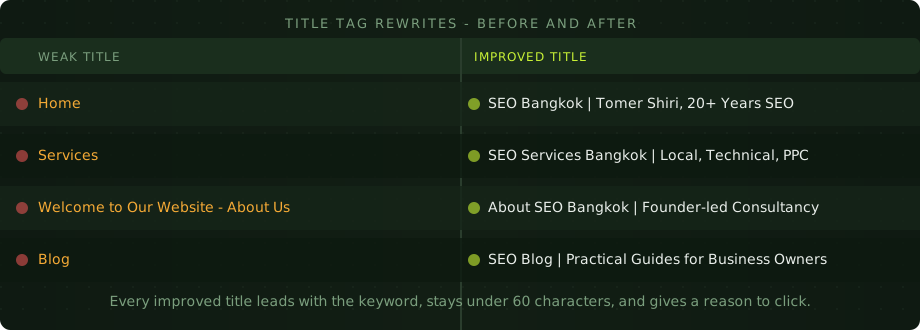
The most common issue is homepage titles that just say the brand name or "Home". This is a lost opportunity on the page that typically has the most authority and the most potential to rank for high-value queries. The homepage title should include the primary keyword the business wants to rank for.
Service pages titled "Services" with no other content are equally common. Each service page needs a title that names both the service and the location or market it serves: "Local SEO Thailand | Google Maps Optimisation" is far stronger than "Local SEO Services".
Bilingual sites add a complication. If the page is in English, the title should be in English. If the page is in Thai, the title should be in Thai. Mixing languages in a single title tag creates a confusing signal and often triggers Google rewrites.
For sites targeting both Thai and international audiences, the better approach is separate pages per language with correctly configured hreflang tags, each with a title appropriate to the language and market. The international SEO guide covers this in more detail.
The practical audit process
To audit your own title tags, use Screaming Frog (free up to 500 URLs). The Page Titles tab shows every title, its pixel width, and flags missing and duplicate titles. Export the list and review it against these criteria: does each title start with the relevant keyword, is it under 60 characters, is it unique, and does it give a reason to click?
Prioritise fixes on pages that are already ranking in positions 5 to 15. These pages are close to higher positions and a stronger title tag is one of the easier levers. Pages ranking below 20 for any keyword likely have deeper issues beyond the title, so focus title work on pages that are already in contention. This is continued in more detail in the DIY technical SEO audit guide.
Title tag questions
How long should a title tag be?
Under 60 characters. Google truncates titles longer than roughly 600 pixels of display width. Shorter is rarely worse. A clear 45-character title outperforms a padded 70-character title that gets cut off mid-message.
Does Google rewrite title tags?
Yes, frequently. Common triggers: titles that do not match the H1, keyword stuffing, titles too long, and titles Google judges as more manipulative than descriptive. The best protection is an accurate, specific title under 60 characters that genuinely describes the page.
Should every page have a unique title tag?
Yes. Duplicate titles tell Google two pages are about the same thing, creating confusion about which to rank. Every page needs a title specific to its content. This is especially common on WordPress sites where archive, tag, and category pages share template-generated titles.
Where should the keyword go in a title tag?
At the start, or as close to the start as natural language allows. Google weights earlier words more heavily and front-loaded keywords present a stronger visual match for searchers scanning results.