Most SEO advice focuses on words and links. Structured data is different. It is code that speaks directly to search engines, not to human readers. You add it to your pages and Google uses it to understand the content more precisely than it can from reading the text alone.
The practical benefit is rich results. When Google understands that a page contains a FAQ, it can display the questions and answers directly in search results as expandable dropdowns. When it recognises a product page with review data, it can show star ratings. See product and review schema. When it knows a page is a business listing, it can pull that information into the Knowledge Panel. None of this happens automatically from good content. It requires structured data.
This is not a ranking factor in the traditional sense. Adding schema markup will not push a page from position 10 to position 3. What it can do is make your result look significantly more useful and prominent in search, which increases click-through rates from the same position. That has real commercial value.
What structured data actually is
Structured data is a standardised format for describing content. The vocabulary most widely used is schema.org, a shared project between Google, Bing, Yahoo, and Yandex. It defines a large library of types: Person, Organisation, Product, Article, Recipe, Event, LocalBusiness, and hundreds of others. Each type has defined properties that describe it. A Product has a name, a price, a description, an availability status. A Person has a name, a job title, an employer, a URL.
You implement structured data by writing this information in a machine-readable format and including it in your page code. The most common format today is JSON-LD: a block of JavaScript Object Notation that lives in a script tag in the page head. It does not change what visitors see. It is purely for search engines and other data consumers.
Google is by far the most important consumer of this data for SEO purposes. It uses structured data to power its rich results features and to build understanding of entities across its index.
The schema types worth implementing
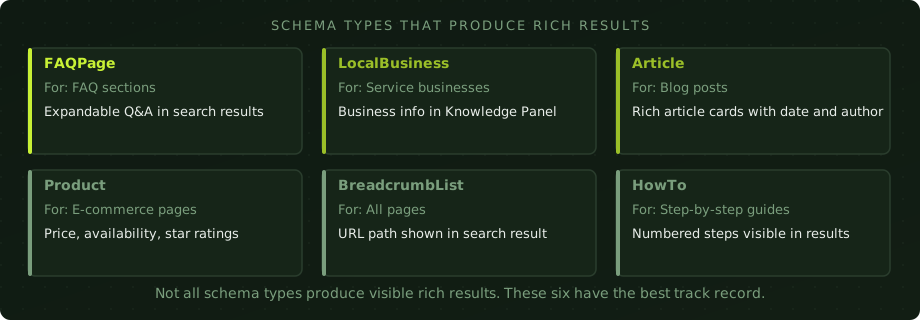
Schema.org lists hundreds of types. In practice, six produce reliable rich results for business sites.
FAQPage is the most immediately useful for most sites. Any page with a question-and-answer section can use it. When implemented correctly, Google will often display two or three of the questions as expandable results directly in the search listing, significantly increasing the space your result occupies on the page. The questions need to be genuine FAQs that appear on the page, not invented just for the schema.
LocalBusiness is essential for any business with a physical location or a defined service area. It tells Google the business name, address, phone number, opening hours, and geographic coverage. This data feeds into the Knowledge Panel and helps with local pack rankings. It should match exactly what is in your Google Business Profile.
Article schema marks up blog posts and editorial content with author, date published, date modified, and the publisher organisation. It does not typically produce a standalone rich result, but it is part of good E-E-A-T signalling and is required for some news and article carousels in Google Discover.
Product schema is for e-commerce pages. When combined with aggregateRating data from reviews, it enables star ratings to appear in organic results. This is one of the higher-value rich results available, with measurable impact on click-through rates. The eligibility criteria are strict: reviews must be genuine, the schema must match the page content, and the page must meet Google's merchant quality requirements. For online stores, this is one part of a broader e-commerce SEO strategy that covers category architecture, product page structure, and platform-specific technical fixes alongside schema.
BreadcrumbList replaces the URL shown in your search result with a readable path. Instead of a long slug, Google shows Home / Services / SEO. This is low effort to add and makes results look cleaner and more trustworthy, particularly on mobile where long URLs truncate badly.
HowTo schema marks up step-by-step guides. When the page describes a process with numbered steps, HowTo schema can make those steps visible in search results on desktop. Useful for tutorial and guide content.
How JSON-LD works in practice
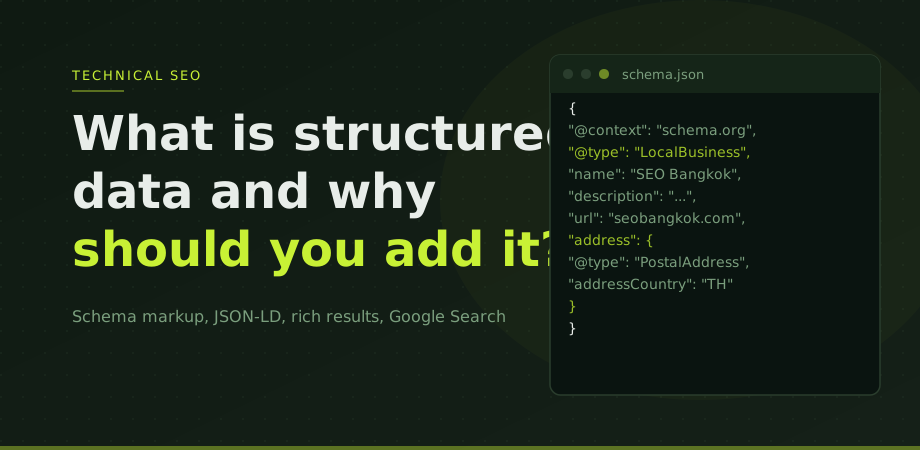
JSON-LD is a block of code that you paste into the head section of your HTML. It looks like this for a simple LocalBusiness implementation:
<script type="application/ld+json">
{
  "@context": "https://schema.org",
  "@type": "LocalBusiness",
  "name": "SEO Bangkok",
  "url": "https://www.seobangkok.com",
  "telephone": "+66-XX-XXX-XXXX",
  "address": {
    "@type": "PostalAddress",
    "addressCountry": "TH",
    "addressLocality": "Bangkok"
  }
}
</script>
The @context tells Google which vocabulary you are using. The @type tells it what kind of thing this page describes. The remaining properties fill in the details. You can include multiple schema objects on the same page by using separate script blocks or an array within one block.
The reason JSON-LD is preferred over older approaches like Microdata is that it is completely separate from the visible HTML. You can add it, update it, or remove it without touching the content visitors see. It also makes it easier to validate because you can copy and paste it directly into testing tools.
How to validate and test your markup
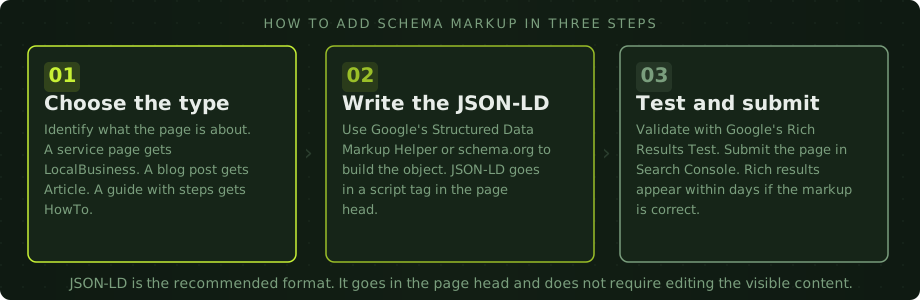
Google provides two tools for this. The Rich Results Test at search.google.com/test/rich-results accepts either a URL or a code snippet. It shows which rich result types the page is eligible for and flags any errors or warnings in the markup. Use it before publishing and after making changes.
Google Search Console has a Rich Results section under the Experience menu once your site has enough indexed pages with schema. It shows counts of valid and invalid pages by type, and surfaces errors that are preventing rich results from appearing. Check it regularly as part of a standard site review.
One thing worth knowing: valid markup does not guarantee rich results. Google decides whether to show them based on additional quality signals. A page with technically correct FAQPage schema may not get the FAQ dropdowns if Google judges the questions to be low quality or the page to be thin. The schema is a prerequisite, not a guarantee.
Common mistakes that break the markup
The most common issue is markup that does not match the page content. If the structured data describes a product price of 500 baht but the page shows 650 baht, Google will flag the mismatch and may demote or ignore the markup. Everything in the schema must accurately reflect what visitors see on the page.
The second common mistake is using schema types on pages where the content does not actually match. Adding FAQPage schema to a page that does not have genuine questions and answers, or Product schema to a category page rather than an individual product page, will result in validation errors and no rich results.
Missing required properties is another frequent issue. Each schema type has required and recommended properties. A Product schema without a name, for instance, will not validate. Google's documentation and the Rich Results Test both show which properties are required for each type.
Finally, duplicate schema is a problem on WordPress sites with multiple plugins adding structured data simultaneously. If Yoast, a theme framework, and a dedicated schema plugin are all generating markup independently, conflicts and duplication errors result. Pick one source of truth for each type and disable the others.
Structured data is one of the more accessible technical SEO improvements for non-developers. The implementation is straightforward, the validation tools are free, and the potential upside in search result appearance is visible and measurable. The Thai-market practical implementation guide that covers what to deploy and how is in schema markup for Thai businesses. If you want to review whether your site is making the most of schema, our technical SEO service covers structured data as part of a full site audit. The SEO audit checklist also walks through the broader technical checks worth running alongside this one.
Structured data questions
Does structured data directly improve rankings?
Not directly. Structured data helps Google understand your content more accurately, which can improve how your pages appear in search results. Rich results like FAQ dropdowns, star ratings, and breadcrumbs can increase click-through rates significantly, which has an indirect positive effect on organic performance over time.
Which format should I use: JSON-LD, Microdata, or RDFa?
JSON-LD. It is Google's recommended format and the easiest to implement. It goes in a script tag in the page head and does not require editing the visible HTML content. Microdata and RDFa embed the markup directly in the HTML, which works but is harder to maintain and update.
How do I know if my structured data is working?
Use Google's Rich Results Test at search.google.com/test/rich-results to validate any URL or code snippet. Google Search Console also has a Rich Results report under the Experience section, which tracks which pages are eligible for rich results and flags errors in your markup.
Do I need a developer to add structured data?
Not necessarily. JSON-LD is a block of code you paste into the head section of any HTML page without touching the visible content. On WordPress, Yoast SEO or Rank Math add many common schema types automatically. For custom or complex types, some technical comfort helps but a developer is not always required.