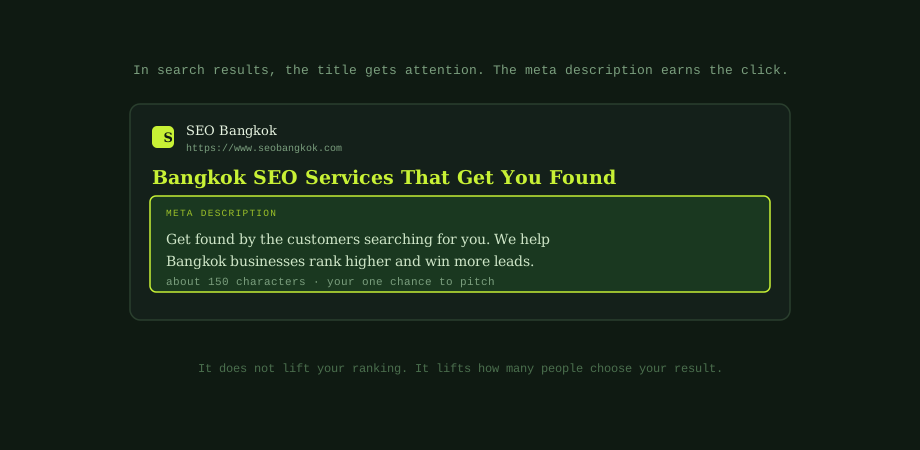
When your page appears in search results, people see three things: your title, your web address, and a short block of text. The heading-tag side of on-page structure sits in heading tags for SEO. That block is your meta description. You write it, and it is your chance to convince someone to click you instead of the result above or below.
It is one of the most undervalued pieces of SEO. Many sites leave it blank or stuff it with keywords. A little care here can lift your click-through rate, which means more traffic from rankings you already have.
What a meta description does, and does not, do
Let us clear up the big misconception first. A meta description is not a ranking factor. The words in it do not push your page up the results. So why bother?
Because it drives clicks. Two results can sit next to each other, and the one with the clearer, more appealing description wins more clicks. Those clicks bring traffic, and a healthy click-through rate is a good signal in its own right. So the description does not change where you rank, but it changes how much you get out of that ranking. Think of it as the partner to your title tag, written for a different job. The title catches the eye; the description closes the deal.
The right length
Aim for around 150 to 160 characters. That is roughly what search engines show before they cut your text off with an ellipsis. Go much longer and the end, often your call to action, gets chopped. Go too short and you waste space you could use to persuade.
A useful habit is to put the most important part, the benefit and the keyword, in the first 120 characters. That way, even if it gets trimmed on a small screen, your key message survives. Treat the limit as a guide, not a hard rule. A natural, useful description beats one squeezed to hit an exact count.
The six rules for descriptions that get clicks
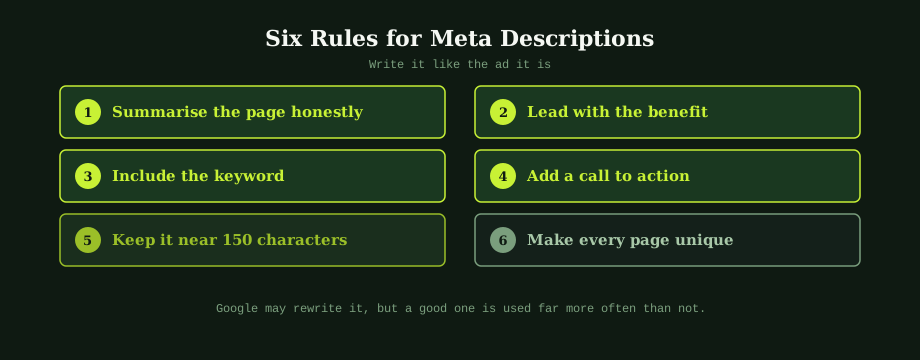
1. Summarise the page honestly
The description should tell people what they will get if they click. If it promises something the page does not deliver, they bounce straight back, which helps no one. Accurate beats clever.
2. Lead with the benefit
Open with what the reader gains, not with your company name. "Get found by the customers searching for you" is stronger than "We are a Bangkok SEO agency." Answer the question on their mind: what is in it for me?
3. Include the keyword
When your description contains the words someone searched, search engines bold them in the result. That bolding catches the eye and signals relevance. Include the main keyword naturally, the same way you would in good blog content that ranks.
4. Add a call to action
Tell people what to do next: "Get a free quote," "See our prices," "Read the guide." A gentle nudge lifts clicks. Match it to the page, so a service page invites contact and a guide invites reading.
5. Keep it near 150 characters
Stay within the visible space so nothing important gets cut. Front-load the key message, and check how it looks on both desktop and mobile, since mobile shows less.
6. Make every page unique
Each page does a different job, so each needs its own description. Duplicate descriptions across pages waste the chance to pitch each one, and they can trigger warnings in Search Console. Your key pages deserve individual attention.
Why Google sometimes ignores yours
You may notice Google showing a snippet you did not write. This is normal. When Google thinks a different sentence from your page better matches a specific search, it uses that instead, especially for unusual or long-tail queries.
This is not a penalty, and it is not a reason to stop writing descriptions. Google still uses your written version a large share of the time, particularly for your main keywords. Write good ones, and accept that for some searches Google will pick its own. You are writing for the queries that matter most, and there your description usually wins.
A quick way to improve yours
You do not need to rewrite every description at once. Start where it counts:
- Find pages with missing or duplicate descriptions. Search Console flags these.
- Prioritise your money pages. Home page, key services, top products, best content.
- Rewrite using the six rules. Benefit first, keyword in, call to action, right length.
- Check your click-through rate over time. Search Console shows whether the new descriptions are winning more clicks.
Meta descriptions are a small, quick win that too many sites ignore. A focused afternoon on your most important pages can lift the traffic you get from rankings you have already earned.
Title and description writing across a whole site is one of the highest-ROI tasks in SEO, partly because it is the easiest part to do badly in a rush. Worth treating like product copy, not metadata. Our SEO services include the on-page work that turns rankings into traffic. As a Bangkok SEO consultancy, we review current snippets and rewrite the ones costing clicks.
Common questions
Do meta descriptions affect SEO rankings?
Not directly. A meta description is not a ranking factor, so the words in it do not push your page up the results. But it matters a lot for an indirect reason: it heavily influences how many people click your result. A clear, compelling description can win clicks from a position below a competitor with a dull one. Those extra clicks bring more traffic, and a healthy click-through rate is a positive signal in its own right. So while you should not expect a meta description to lift your ranking on its own, writing good ones is well worth the effort because more clicks mean more visitors and more business.
How long should a meta description be?
Aim for around 150 to 160 characters. That is the length search engines typically display before cutting the text off with an ellipsis. If you go much longer, the end of your description, often where your call to action sits, gets truncated and lost. If you go too short, you waste the space you have to make your case. A good habit is to write the most important part, the benefit and the keyword, in the first 120 characters, so even if it gets trimmed on some devices, the key message survives. Treat the limit as a guide rather than a hard rule.
Why does Google rewrite my meta description?
Google rewrites meta descriptions when it thinks a different snippet better matches the specific search. It often pulls a relevant sentence from your page instead of using your written description, especially for long-tail or unusual queries where your description does not mention the exact terms searched. This is normal and not a penalty. It does not mean your description is bad or that you should stop writing them. Google still uses your written description a large share of the time, particularly for your main keywords. The best response is to keep writing strong, relevant descriptions.
Should every page have a unique meta description?
Yes, every important page should have its own unique meta description. Duplicate descriptions across many pages waste the opportunity to pitch each page accurately, and they signal a lack of care that can show up as a warning in Search Console. Each page does something different, so its description should reflect that and speak to the specific search it targets. For very large sites where writing thousands by hand is impractical, a sensible approach is to write custom descriptions for your most important pages and use a sensible template for the rest.