Most pages are full of images, and most of those images are doing nothing for SEO, or are actively hurting it. The good news is that fixing this is some of the easiest, highest-return technical work you can do.
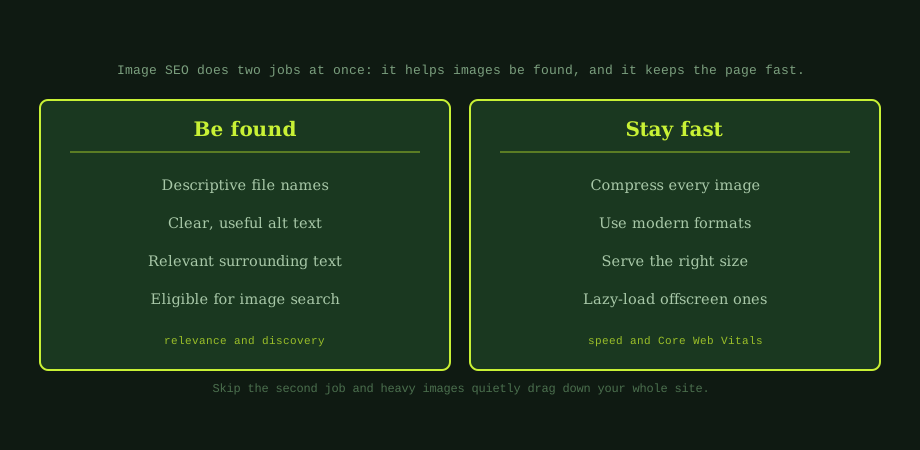
Image SEO comes down to two jobs. The first is making sure your images can be found and understood. The second is making sure they do not slow your page down. Skip the first and you miss free traffic. Skip the second and your whole site feels sluggish. Let us cover both.
Job one: help your images be found
Search engines cannot see an image the way you can. They rely on the clues around it to understand what it shows. Give them good clues and your images can appear in image search and strengthen your page's relevance.
Use descriptive file names
A file called "IMG_4827.jpg" tells search engines nothing. A file called "stainless-steel-water-bottle.jpg" tells them exactly what the image shows. Rename your images with short, descriptive, hyphen-separated names before you upload them. It takes seconds and it helps.
Write useful alt text
Alt text is a short description of the image. Its first job is accessibility: screen readers read it aloud to people who cannot see the image. It also helps search engines understand the picture. Describe what is actually there, naturally:
- Good: "A stainless steel water bottle on a wooden desk."
- Bad: "water bottle buy cheap bottle Bangkok bottle shop."
Describe, do not stuff. If an image is purely decorative, you can leave the alt text empty so screen readers skip it.
Give images relevant context
Search engines also use the text around an image to understand it. An image of a product sits best near text about that product. This is part of writing well-structured pages, the same thinking behind writing title tags that rank: every signal should point the same way.
Job two: keep your images fast
Images are usually the largest files on a page, so they are often the main reason a page is slow. A few unoptimised photos can weigh several megabytes. That hurts your Core Web Vitals and frustrates visitors, especially on mobile. Here is how to keep images light.
Compress every image
Compression shrinks the file size with little or no visible quality loss. A photo straight from a camera or phone is far bigger than it needs to be for the web. Always compress before uploading. Many tools do this in seconds, and the saving is often huge.
Use modern formats
Modern formats like WebP produce much smaller files than older JPEG and PNG at the same quality. Switching formats can cut image weight significantly with no visible difference. Most platforms now support WebP, and many can convert automatically.
Serve the right size
Do not load a 4,000 pixel wide image into a space that only shows it at 800 pixels. The browser still downloads the whole huge file. Resize images to the dimensions they are actually displayed at, and use responsive images so mobile devices get smaller versions.
Lazy-load offscreen images
Lazy loading means images further down the page only load when the visitor scrolls near them, instead of all at once. This makes the first view load much faster. Most platforms support it with a simple attribute. Just do not lazy-load your most important top-of-page image, which should load immediately.
All of this feeds directly into page speed, which we cover from a business angle in page speed for business owners and in how page speed affects rankings and conversions.
Image SEO matters most for online shops
Anyone selling products images carry extra weight. They are central to the buying decision, so they must look good and load fast, and they are a discovery channel, because people search visually. For an online shop, that means:
- Compress product photos so pages stay quick.
- Use descriptive file names and alt text so products are found.
- Add product structured data so images can show in rich results, which builds on structured data basics.
This connects directly to product page SEO, where strong, fast images are one of the biggest levers you have.
A simple routine
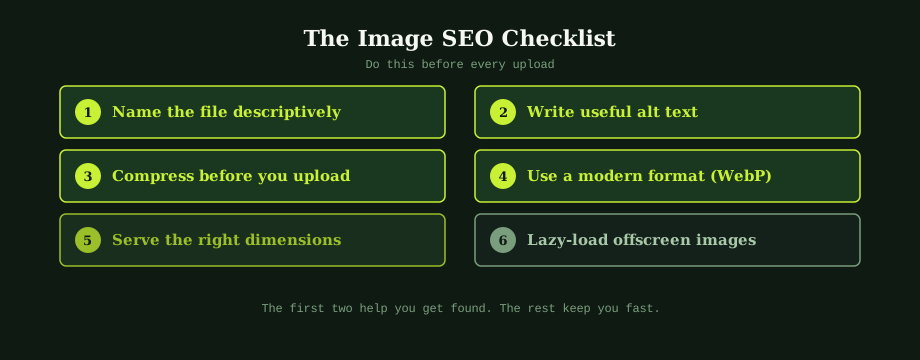
You do not need to overhaul everything at once. Build a habit for every new image: rename it, compress it, save it as WebP, size it correctly, add alt text, and lazy-load it if it is below the fold. Six small steps, done each time, keep your image SEO healthy without extra effort.
Image-heavy sites lose more conversions to slow page speed than they lose impressions to bad alt text. Our SEO services cover both the technical compression work and the on-page optimisation. An experienced SEO consultant in Thailand can audit how much of your slowness comes from images and what to do about it.
Common questions
What is image SEO?
Image SEO is the practice of optimising the images on your site so they help rather than hurt your search performance. It has two sides. The first is discovery: helping search engines understand what an image shows, through descriptive file names, useful alt text, and relevant surrounding content, so the image can appear in image search and support the page's relevance. The second is performance: keeping images from slowing your pages down, through compression, modern formats, correct sizing, and lazy loading. Both matter. Good descriptions with no performance work leaves your pages slow, and fast images with no descriptions miss discovery.
What should alt text say?
Alt text should describe what the image shows, clearly and concisely, as if you were explaining it to someone who cannot see it. That is its first purpose: accessibility for people using screen readers. It also helps search engines understand the image. Describe the content naturally, for example a stainless steel water bottle on a wooden desk, rather than stuffing keywords. If the image is purely decorative, the alt text can be left empty so screen readers skip it. Avoid starting with image of, since the context already makes that clear. Good alt text is simply an accurate, natural description of what is in the picture.
How do images affect page speed?
Images are often the single biggest reason a page is slow, because they are usually the largest files on it. A few uncompressed photos can weigh several megabytes, which is slow to load, especially on mobile. This hurts both user experience and your Core Web Vitals, which are part of how Google assesses pages. The fixes are straightforward: compress images so they are as small as they can be without looking bad, use modern formats like WebP that are far smaller than old JPEGs and PNGs, serve images at the size they are actually displayed, and lazy-load images that are offscreen so they only load when needed.
Does image SEO help e-commerce?
Yes, a great deal, because product images do double duty. They are central to the buying decision, so they must look good and load fast, and they are also a discovery channel, since people search for products visually and through image search. For an online shop, that means compressing product photos so pages stay fast, using descriptive file names and alt text so products can be found, and adding product structured data so images can appear in rich results. Done well, image SEO improves both how quickly your product pages load and how easily shoppers find them, which feeds directly into sales.