Paid keyword tools are marketed as essential for SEO. They are not. They are useful for scale, for competitive analysis, and for the kind of detailed data that professionals need when managing large campaigns. For most business owners doing their own keyword research, they are unnecessary. The broader Thai-market methodology that this budget-tool guide sits inside is in SEO keyword research for Thai businesses. The data you need is available for free, and in some cases the free sources are more accurate than paid tool estimates because they come from Google directly.
This method works for businesses in Thailand and internationally. It is particularly well suited to markets like Thailand where paid tool data is less reliable because the tools are calibrated for larger English-language markets. Google Search Console data is your data, from your site, from your actual audience. It does not get more accurate than that.
Why most keyword research starts wrong
The most common mistake is starting with a keyword tool and searching for terms you think you should rank for. The wider competitor-focused approach is in how to run a competitor SEO analysis. This approach generates a list of terms that may or may not match what your audience actually searches for, and the difficulty and volume estimates are modelled numbers that can be significantly off for regional or niche markets.
A better starting point is to work from evidence of what is already working. If you have an existing site with any traffic at all, Google Search Console contains the most valuable keyword data you will find. If you are starting from zero, Google's own autocomplete is directly sourced from real search behaviour and is completely free. Starting from what Google already shows you, rather than from modelled estimates, produces a more accurate and more actionable keyword list.
Before diving into keyword research, it also helps to understand search intent, since keywords only become useful once you know which page type to target them with. The search intent guide covers that in full.
Step 1: Start with what you already know
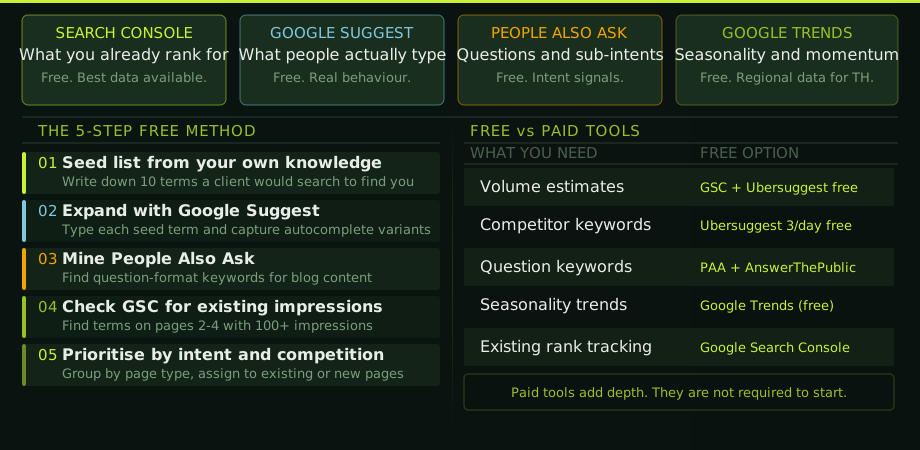
Write down 10 to 15 terms a potential client would type into Google to find your business. Not your internal jargon or the terms your industry uses internally. The terms an outsider would use. For an SEO consultancy in Bangkok, this might include: "SEO agency Bangkok," "SEO consultant Thailand," "local SEO Thailand," "how to improve Google rankings," "SEO for e-commerce Thailand."
These are your seed keywords. The rest of the method expands on them. Keep the list focused on terms that are genuinely relevant to what you do and who you serve. Twenty focused seed keywords is more useful than a hundred vague ones.
Step 2: Expand with Google Suggest
Type each seed keyword into Google search and stop before pressing enter. The autocomplete suggestions are real searches people have made. They reflect actual search behaviour, volume, and phrasing far more accurately than any modelled data. Capture the suggestions that are relevant to your business.
Then do it again with a modifier. Type the keyword followed by a space and each letter of the alphabet in turn. "SEO a..." "SEO b..." and so on. This is tedious but produces a comprehensive set of real variations. You do not need to do every letter for every seed keyword. Focus on the seeds most relevant to your core services and do a full alphabet expansion on those.
Also check the "Related searches" at the bottom of the results page. These are different from autocomplete and often surface adjacent queries that your initial list missed.
Step 3: Mine People Also Ask
The People Also Ask box in Google results contains question-format keywords that are almost always informational intent and almost always suitable for blog post content. For each of your seed keywords, search it in Google and capture every PAA question that is relevant to your business.
PAA questions are particularly valuable for two reasons. First, they are confirmed real search queries. Second, they already tell you the intent and the format: they are questions, so the right answer is a clear, direct response in a guide or article format. They also make excellent H2 headings for blog posts because Google has already validated that users want these questions answered in the context of your seed keyword.
For a site covering SEO in Thailand, PAA questions around seed keywords will often surface terms like "how long does SEO take in Thailand," "what does an SEO consultant cost in Bangkok," or "how do I rank on Google Maps in Thailand." These are lower competition than the main terms and are often exactly what potential clients search just before they decide to contact someone.
Step 4: Find quick wins in Search Console
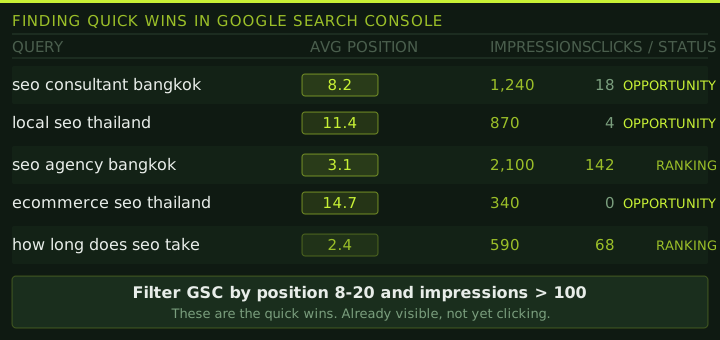
When your site has any existing traffic or rankings, this step is the highest-ROI action in this entire guide. In Google Search Console, go to the Performance report and filter for the last three months. Sort queries by average position and look for anything ranking between position 8 and position 20 with at least 100 impressions.
These are pages that are already being shown to users but are not generating clicks because they are not in the top three results. Position 8 on page one generates maybe 3% of clicks. Position 1 generates 25 to 35%. Moving a page from position 8 to position 2 or 3 is dramatically easier than getting a brand new page to rank, and the traffic impact is significant.
For each of these quick-win queries, look at the page that is currently ranking for it, compare it to the top three results for the same query, and identify what those pages do better. Usually it is one of three things: more comprehensive content, better internal linking to the page, or a more intent-matched page structure. The on-page optimisation guide covers exactly what to check and fix on those pages.
Step 5: Prioritise and assign to pages
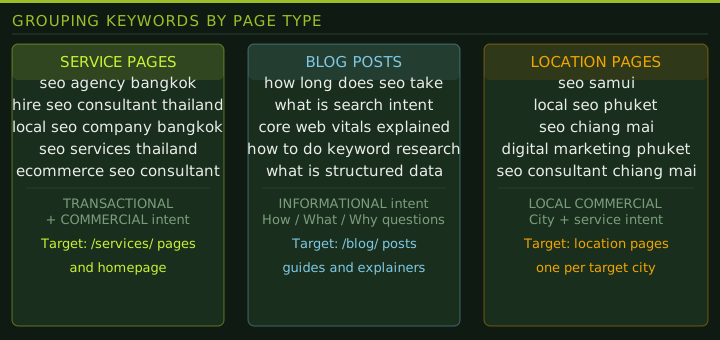
By now you have a list of keywords from autocomplete, PAA, related searches, and Search Console. The next step is to group them by intent and assign each group to a page type.
Transactional and commercial queries go to service pages or your homepage. Informational queries go to blog posts. Local commercial queries go to location-specific pages. Each keyword should be assigned to one page. If two keywords would logically target the same page, they belong on the same page. If they would logically need different pages, each gets its own.
This grouping step prevents keyword cannibalisation, where two pages on the same site compete for the same query and both rank poorly as a result. It also gives you a complete content plan: every group with no existing page assigned is a page you need to build. The groups assigned to existing pages tell you which pages to improve.
When prioritising what to build or improve first, rank by three criteria: commercial value of the query (transactional queries for your core services first), current ranking position (quick wins in the 8-20 range second), and estimated competition level based on the quality of pages currently ranking. Start with whatever combination of high commercial value, existing ranking signal, and achievable competition gives the most return for the effort.
When to get a paid tool
Paid tools become useful when you need volume estimates more accurate than what Search Console provides for new or low-traffic keywords, when you are doing competitive gap analysis at scale, or when you are managing multiple sites and need to work faster than the manual method allows.
For most single-site business owners in Thailand, the free method above will get you further than a paid tool used without a clear process. A well-prioritised list of 30 keywords identified through Search Console and Suggest will outperform a 500-keyword export from Ahrefs that nobody has time to act on.
Keyword research scales fine for a few dozen terms and gets exhausting somewhere around a few hundred. Our website SEO consultant include the full keyword map as part of the initial engagement, using the same methodology described above with paid tools to make the volume manageable.
Keyword research questions
Can I do keyword research without paying for tools?
Yes. Google Search Console, Google Suggest, People Also Ask, and Google Trends together cover the most important keyword research tasks for most business sites. These four free sources are enough to build a working keyword list and content plan without a paid subscription.
What is the best free keyword research tool?
Google Search Console is the best free keyword research tool for sites with any existing traffic. It shows your actual search queries, impressions, positions, and clicks. For new sites, Google Suggest and People Also Ask are the best starting points because they reflect real search behaviour rather than modelled estimates.
How do I find quick win keywords in Google Search Console?
Go to Performance, set the date range to the last three months, and filter queries by position 8 to 20 with at least 100 impressions. These are pages almost visible on page one. They need targeted improvement work, not new content, and they are the highest ROI SEO investment most sites can make.
How many keywords do I need to target?
A small business site typically needs 5 to 15 core commercial keywords and 20 to 50 informational keywords for blog content. Ten well-chosen keywords, correctly mapped to the right pages with proper intent matching, will outperform 200 keywords spread across poorly structured content.
Should I do keyword research in Thai and English?
With your business serves Thai customers, yes. Thai-language searches for most business categories have significant volume that English-only research completely misses. Do English research first using this method, then replicate for Thai-language queries using Google Suggest in Thai. You will often find Thai-language variants that are lower competition and higher intent.