When a Google Ads campaign is underperforming, the instinct is to add more positive keywords, change the ad copy, or rebuild the landing page. Sometimes one of those is the issue. More often, the keywords are fine, the copy is fine, the landing page is fine, and the campaign is wasting half its budget on searches that should never have triggered ads in the first place. The fix is not more positive keywords. It is negative keywords.
This is the post most paid search resources skip past because it feels less exciting than keyword research or ad copywriting. It is also the post that produces the largest immediate impact on cost per acquisition in most accounts, because every wasted click that gets blocked is money flowing back to the conversions that matter.
What a negative keyword actually does
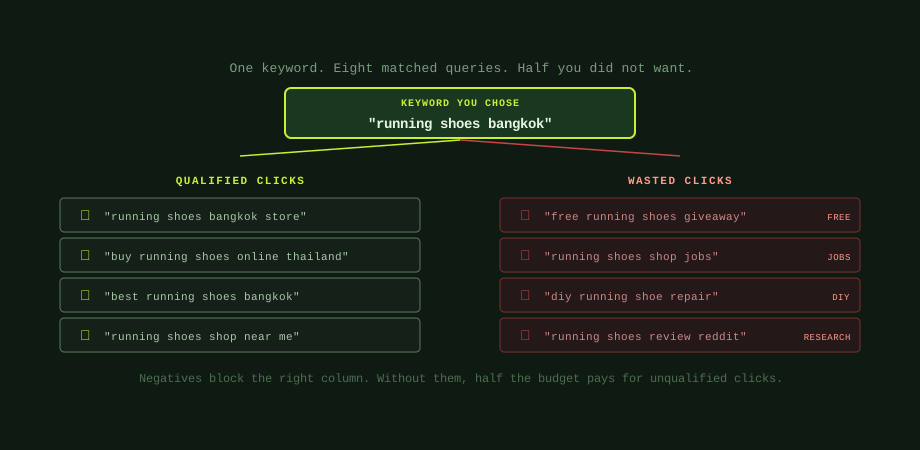
A negative keyword tells Google not to show your ads for searches containing that term, even if those searches would otherwise match one of your positive keywords. If you target "running shoes Bangkok" and add "free" as a negative, the search "free running shoes giveaway" will not trigger your ad despite containing your keyword. The match is suppressed by the negative before Google enters the auction.
This sounds simple. The complication is that Google's keyword matching is much looser than most advertisers realise. A keyword targeted on broad match (or even phrase match in many cases) will match hundreds of variations of search queries, many of which share words with your keyword but represent completely different intent. The single keyword "running shoes Bangkok" can match a few dozen real-world queries per week, and a meaningful percentage of them will not be people who want to buy running shoes from a Bangkok retailer. They will be job seekers looking for shoe shop positions, students researching shoe manufacturing, parents looking for free school giveaways, and so on. Without negatives, you pay for every one of those clicks.
Why negatives matter more than positives
The asymmetry is straightforward. Adding a positive keyword exposes your ads to more searches; whether you spend on them depends on bids, auction dynamics, and which other advertisers are competing. Adding a negative keyword removes specific searches from your matching entirely; the budget that would have gone there is now available for searches that match better.
In practical terms, positive keywords let you compete for traffic; negative keywords protect your budget from traffic you do not want to compete for. The first is offensive, the second defensive, and most accounts have far better offensive structures than defensive ones because positive keyword research is what consultants and tools mostly produce. Building the negative keyword list requires looking at what is actually happening in the account rather than what could happen, which is slower and less glamorous, but it is also where the biggest performance gaps live.
For an account that has been running for any meaningful time without active negative keyword management, the typical situation is that 20 to 40% of clicks are unqualified by intent. Blocking those searches with negatives produces an immediate proportional reduction in cost per acquisition without any other change. This is the lever everyone talks about but few accounts use systematically.
The Search Terms report is the entire workflow
Google Ads has a built-in report that shows the actual search queries that triggered your ads in the past period, alongside their click and cost data. It is called the Search Terms report, and finding it is the entire workflow for ongoing negative keyword management. The report lives under Campaigns > select a campaign > Insights & reports > Search terms. It shows each search query as a row, with columns for impressions, clicks, cost, conversions, and which keyword matched the query.
The work is to sort the report by cost or clicks (descending), and read through the top entries asking one question of each: "is this a person who could become my customer?" If the answer is yes, the search is qualified and no action is needed. If the answer is no, the search query is a candidate for a negative keyword. Add the offending word or phrase as a negative keyword at the appropriate scope (more on scopes shortly) and move on to the next row.
This is slower than it sounds the first time you do it. Reviewing the top 100 search terms in a busy campaign takes 20 to 40 minutes if you are being thoughtful. The payoff is also slower than people expect: each negative keyword stops a few wasted clicks per week. The compound effect across hundreds of negatives over months is what produces the dramatic CPA improvements that get attributed to "campaign optimisation."
For new campaigns, the cadence should be daily Search Terms review for the first two weeks, then weekly until the campaign stabilises, then bi-weekly for mature campaigns. The diminishing returns curve is steep; most of the gains come from the first few weeks of attentive review when the obvious wasted searches are still appearing.
The universal negative keyword list every account should start with
Some negative keywords are universally applicable across almost any account. Starting a new campaign without these baseline negatives means watching them appear in your Search Terms report over the first few weeks and adding them reactively, paying for the wasted clicks until you do. The pragmatic move is to add them all up front.
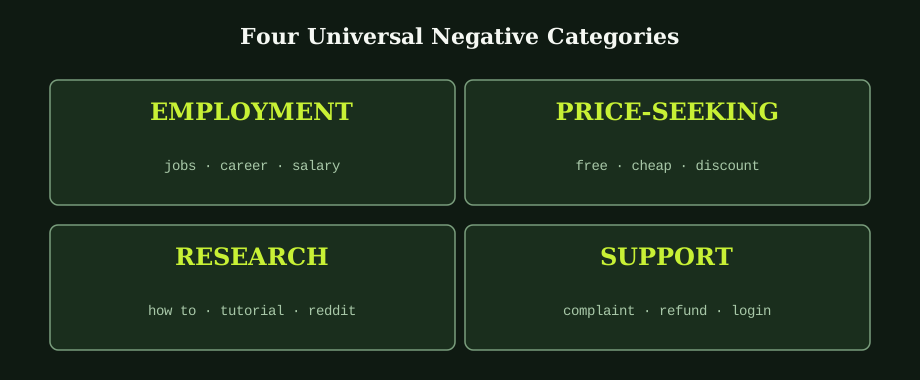
The four categories above cover most universal cases. Employment terms (jobs, career, salary, hiring, vacancy, recruiter, internship) catch searches from people looking to work in your industry rather than buy from it. These produce no commercial value and add up quickly in some verticals.
Price-seeking terms (free, cheap, discount, coupon, promo code, giveaway, trial) catch users hunting for handouts rather than purchases. Be careful with this category for businesses that genuinely offer trials or discount codes as part of the funnel; in those cases, the corresponding terms should not be negatives. For most B2B and premium-priced businesses, these are pure waste.
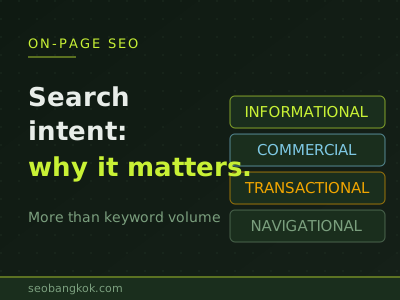
Research and education terms (how to, tutorial, course, what is, definition, wikipedia, reddit, forum) catch users in research mode rather than buying mode. For SaaS and high-consideration purchases, some research-stage traffic can be valuable for top-of-funnel content marketing, but on direct-response Google Ads campaigns these terms typically convert poorly and should be blocked.
Support and existing-customer terms (complaint, refund, broken, return, cancel, login, contact, support) catch existing customers looking for help, not new prospects. These users are valuable to retain but not through Google Ads spend; let your support pages serve them organically.
Industry-specific negatives need active discovery
Universal negatives are a starting point. Most of the negative keyword value in any account comes from industry-specific terms that you discover through the Search Terms report over time. A Bangkok law firm advertising on commercial law terms will discover negatives like "study," "exam," "definition," "case study," and many others that universal lists do not cover. An e-commerce store selling kitchen knives will discover negatives like "kitchen knife training," "kitchen knife throwing," "vintage kitchen knife collection," and so on.
The pattern is that each campaign accumulates a specific negative keyword list over its first 3 to 6 months that reflects the actual search behaviour around its target keywords. Building this list well is what separates a campaign managed by someone paying attention from one running on autopilot. The same Google Ads account with active Search Terms review will have a markedly lower CPA than the same account left unattended for the same period, often by 30 to 50%.
Where to add negative keywords in the account structure
Google Ads lets you add negatives at three different scopes, and choosing the right scope matters. Negative keyword lists (in the Shared library) apply across multiple campaigns and are the right place for universal negatives that should never trigger any campaign in your account: employment terms, support terms, definition-type research terms. Create one master list, add it to every campaign, and maintain it centrally.
Campaign-level negatives apply across all ad groups in one campaign. These are right for terms that are negative for this specific campaign's offer but might not apply to other campaigns. A campaign targeting commercial buyers might add "personal" as a campaign-level negative; the same word might be neutral or positive for a consumer-focused campaign in the same account.
Ad group-level negatives are the tightest scope and apply only within one ad group. Use these when you have multiple ad groups in one campaign that target related but distinct intents, and a search term that is wrong for one ad group is correct for another. For example, in a campaign with separate ad groups for "running shoes men" and "running shoes women," adding "women" as a negative in the men's ad group prevents mismatched intent without affecting the women's ad group.
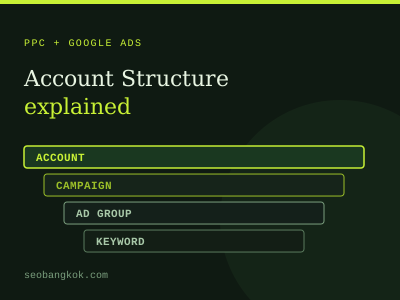
The structural decisions follow from the broader principles in the Google Ads account structure post: tight ad groups make negative keyword management easier, because each ad group has clear intent and the wrong searches are obvious. Loose ad groups make negative management harder because almost any search term could plausibly fit somewhere.
Negative match types: the part that trips people up
Negative keywords have their own match types, and they work differently from positive keyword match types. Negative broad match does NOT match all variations the way positive broad match does; it only blocks the exact word or phrase as a substring. Negative phrase match blocks the phrase in order. Negative exact match blocks only the exact query.
The practical implication: negative broad match is safer than people assume. Adding "free" as a negative broad match blocks searches containing the word "free" but does not block synonyms or close variants. If you also want to block "complimentary" or "no cost," you have to add those separately. Negative keywords do not auto-expand the way positive ones do.
The most common mistake is adding a long phrase as a negative broad match expecting it to block similar phrases, then being surprised when those still appear in the Search Terms report. The fix is to add the specific words you want to block individually, not the full phrase.
Maintenance, not setup, is where the gains live
A starter negative keyword list is easy to build. The gains compound from ongoing maintenance, which is also where most accounts fail. The Search Terms report needs to be looked at on a schedule, and someone has to take the time to add negatives to the right scope and consider whether each addition might also block legitimate searches.
For accounts spending more than a few thousand baht per month, this is genuinely worth structured attention. For small budgets, the same principles apply but the absolute dollar impact is smaller; a 30% CPA reduction on a 10,000 baht budget is worth 3,000 baht per month, which is real but not transformative. For accounts spending more, the same percentage gain is meaningful enough to justify dedicated PPC management.
Structured negative keyword management is one of those tasks that runs forever and rewards consistency more than cleverness. Our Google Ads management service handles it as part of ongoing optimisation. A second opinion from a PPC consultant Bangkok on the current state of your negatives is usually worth the time.
Common questions
What is a negative keyword in Google Ads?
A negative keyword is a term you tell Google Ads not to show your ads for, even if it would otherwise match one of your positive keywords. If you target the keyword "running shoes Bangkok" and add "free" as a negative, then searches like "free running shoes giveaway" will not trigger your ads, even though they contain your keyword. Negative keywords are added at either the campaign level (block searches across all ad groups in that campaign) or the ad group level (block only within one ad group), and they have their own match types (broad, phrase, exact) that work slightly differently from positive keyword match types.
How often should I review and update my negative keyword list?
For active campaigns, weekly review is the practical cadence. Open the Search Terms report (Campaigns > a campaign > Insights > Search terms), sort by cost or clicks, and look for any term that is generating spend but is clearly outside your target audience or intent. New negatives get added at the appropriate level. For mature campaigns where Smart Bidding has been running for months, bi-weekly or monthly review may be sufficient because the bidding algorithm increasingly recognises unprofitable matches itself. The exception is right after a campaign launch, when daily Search Terms review for the first two weeks catches obvious wasted spend before it accumulates.
Should I use account-level, campaign-level, or ad group-level negatives?
All three, used for different purposes. Account-level negative lists (called Negative keyword lists in the Shared library) work best for universal terms that should never trigger any campaign in your account: employment terms like jobs and salary, education terms like tutorial and how-to, support terms like complaint and refund. Campaign-level negatives apply across all ad groups in one campaign and suit terms that are negative for that campaign's offer but might be positive for another. Ad group-level negatives are the tightest scope and prevent the wrong intent within a campaign that has multiple themed ad groups.
Why are negative keywords more important than positive ones?
Because adding a positive keyword does not directly cost you money; clicks on it do. Adding a negative keyword stops money leaving your account on searches you do not want, which has an immediate impact on cost per acquisition. Positive keywords compete with each other and with broader matches; well-chosen negatives are pure subtraction from waste. A new account typically has dozens of unqualified searches in its first month that no amount of positive keyword optimisation will fix because the searches are matching keywords correctly under Google's rules but landing wrong audiences. Negative keywords are the only direct lever to remove that waste.