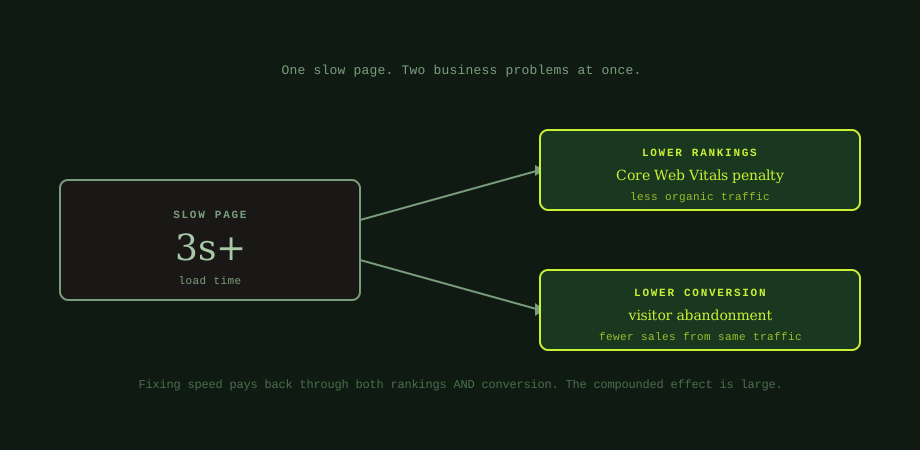
Page speed is usually framed either as a ranking issue (the SEO conversation) or as a conversion issue (the CRO conversation). The Thai-market context where mobile-first page speed becomes a primary conversion lever is in conversion rate optimization in Thailand. The network-specific calibration that this performance work requires for Thai-market sites is in Core Web Vitals for Thai networks. Treating it as one or the other misses the point. A slow page is both at the same time, and the compounded effect across both channels is what makes speed the highest-ROI piece of technical work on most business websites. The same one-second improvement reduces bounce rate, lifts conversion, improves engagement signals, and removes a Core Web Vitals penalty all from the same change.
This post is the operational view: how speed affects rankings, how it affects conversion, what to measure, where to fix first, and the Thailand-specific context that affects how this plays out for sites hosted on local infrastructure or built by local developers. It is not a deep technical reference on web performance optimisation; the developer doing the implementation needs deeper material, and this post points at the right operational decisions for a business owner to make.
The ranking side: Core Web Vitals
Google has confirmed Core Web Vitals as ranking signals since the Page Experience update in 2021. The signal is real but not enormous; on its own, going from a "poor" Core Web Vitals score to a "good" one does not move a page from position 30 to position 3. Where the effect bites is on competitive queries where multiple pages are otherwise similar in content quality and authority. The faster page wins the tiebreaker.
The three Core Web Vitals are LCP (Largest Contentful Paint), INP (Interaction to Next Paint), and CLS (Cumulative Layout Shift). LCP measures how long the main content takes to render; the target for a "good" score is under 2.5 seconds. INP measures how responsive the page is to user input; the target is under 200 milliseconds. CLS measures how much visual elements jump around as the page loads; the target is under 0.1. Pages that fall into the "needs improvement" or "poor" buckets across any of these face the ranking penalty.
The data source that matters is field data, not lab data. Google measures Core Web Vitals on real user devices, not on a fast laptop with a fibre connection. The PageSpeed Insights tool will show you both lab and field data; the field data (labelled "Discover what your real users are experiencing") is the one that actually affects rankings. A site that scores 95 in the lab test but has poor field data is being ranked on the field data, not the lab score.
Google Search Console includes a Core Web Vitals report that shows how many of your URLs fall into good, needs-improvement, and poor buckets, grouped by URL pattern. This is the report to check first when diagnosing speed-related ranking issues; if the report shows hundreds of URLs in the poor bucket, that is the priority work regardless of what other audits say.
The conversion side: visitors who never see the offer
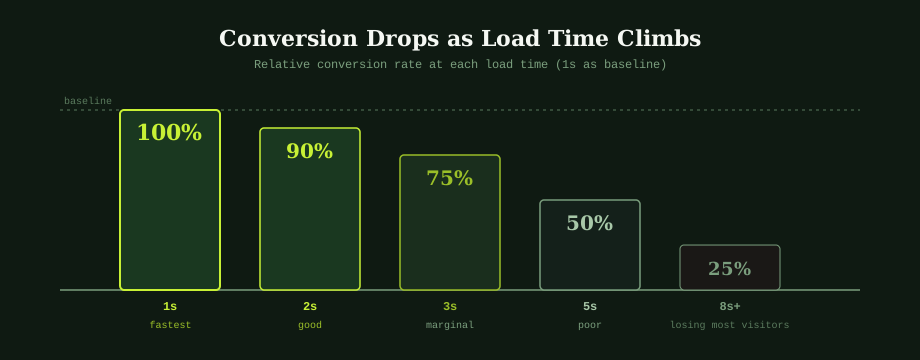
The conversion impact is larger than the ranking impact and easier to measure directly. The relationship between load time and conversion rate is consistent across many industries and well documented: conversion rate drops by roughly 4 to 7% for every additional second of load time after the first 1 to 2 seconds. A page that loads in 1 second produces roughly twice the conversion rate of the same page loading in 5 seconds.
The compounding aspect matters. Every visitor who bounces because the page was slow is a visitor that some upstream marketing channel paid to deliver. An SEO programme spent months getting the page to rank, an ads programme spent baht to send the click, a social post earned the attention. All of it converges on the moment when the page either loads in time or it does not. Lost speed converts directly into wasted acquisition spend.
The connection to the broader conversion rate optimisation conversation runs through this point. Many businesses spend significant resources on CRO work (testing headlines, adjusting CTAs, restructuring forms) on pages that are losing more visitors to slow loading than to any other issue. The most cost-effective conversion lift on a slow site is making the site faster; only after that does fine-grained CRO work start producing its expected results.
The Thailand context: where speed usually breaks
Thai-built business websites tend to share a specific cluster of speed issues that come from common local practices in web design and hosting. None of these are unique to Thailand, but they recur frequently enough on local sites that they are worth naming explicitly.
Image-heavy homepages. The pattern most Thai sites share is a homepage stuffed with large hero images, slide carousels (often three to five slides each with a full-resolution photo), and image galleries that load all images on initial page load. The fix is image compression, modern formats, and lazy loading for images below the fold. This single category of work moves load times by seconds on most sites, not fractions.
Cheap shared hosting. Many small Thai business sites are hosted on the lowest-tier shared hosting plans, often through bundled offerings from local web design agencies. The hosting itself is the speed bottleneck; the same WordPress site on quality hosting versus the cheapest shared hosting can differ by 2 to 3 seconds in time-to-first-byte. The fix is moving to a better hosting tier; the cost difference is usually a few hundred baht per month and the speed benefit is immediate.
WordPress with too many plugins. A Thai WordPress site that has been operated by multiple agencies over several years tends to accumulate plugins, each contributing some load to every page render. Audits often find 25 to 40 plugins active where 10 to 15 would do the same work. The fix is plugin audit and deactivation; the speed benefit is meaningful even when no individual plugin looks like a serious offender.
No CDN for international audiences. Thai sites with significant international audiences (tourism, hospitality, expat-facing services) often serve all content from a Thai server, which produces slow loads for users in the US, UK, Europe, or Australia who would benefit from edge-served content. The fix is a CDN like Cloudflare (free tier works for most small sites). For sites with purely Thai audiences, the CDN benefit is much smaller because the users are already geographically close to the server.
How to measure speed accurately
The free tools good enough for most business decisions: PageSpeed Insights at pagespeed.web.dev, which gives both lab and field data for any public URL and breaks down the specific issues; Google Search Console's Core Web Vitals report, which shows the aggregate picture across all URLs grouped by URL pattern; Chrome DevTools Lighthouse, which gives more detailed lab analysis directly in the browser for any page you can load.
The right test conditions matter. Test on mobile, not desktop; mobile is what Google measures for rankings and what most of your users actually experience. Use throttled connection settings to simulate a 3G or slow 4G connection rather than your office fibre; many speed issues only show up on slower connections. Test multiple pages, not just the homepage; the homepage is often the most optimised page on a site while inner pages carry the actual speed problems.
What to track over time: median LCP across your highest-traffic URLs, percentage of URLs in the "poor" Core Web Vitals bucket, and time-to-first-byte from your hosting. Significant changes in any of these usually point at specific issues (a new plugin, a configuration change, a content type that loads differently). Speed regressions are often easier to fix when caught early than to diagnose months later.
What to fix first (in order of impact)
For most business websites, the order of speed wins by impact is fairly consistent. Image optimisation usually produces the biggest single improvement: compressing all images to appropriate dimensions and quality, adopting WebP or AVIF where browser support allows, and enabling lazy loading for images below the fold. On image-heavy sites, this work alone can cut load times by 30 to 60%.
Reducing plugin and theme bloat is the next priority for WordPress sites. Many sites carry plugins that were installed for one feature and never removed when that feature was no longer used, or themes that include framework code for features the site does not use. Plugin audit, deactivation of unused plugins, and switching to a leaner theme can produce meaningful improvements.
Browser caching and minification are typically smaller wins individually but easy to implement (most WordPress caching plugins handle both with default settings; on custom sites, the developer needs to configure caching headers and minify CSS/JS as part of the build). The combined effect is meaningful and the work is one-time.
CDN deployment matters for sites with international audiences and helps less for purely local audiences. Cloudflare's free tier covers most small business needs; the upgrade path to paid plans is for sites with specific requirements (image optimisation as a service, additional security features, faster routes for specific regions).
Hosting tier upgrade is the last lever to consider because it costs ongoing money, but for sites stuck on the cheapest shared hosting it can be the unlock that everything else depends on. Without adequate hosting, image compression and plugin reduction only get you so far.
The detailed treatment of these as part of a broader audit sits in the SEO audit checklist. The speed work intersects with the foundation work unpacked in the SEO-ready website post; getting speed right at build time is much cheaper than retrofitting it later.
The combined effect and why speed pays back fastest
The reason speed is usually the highest-ROI technical work is the multiplicative effect across rankings and conversion. A site that improves from 5-second loads to 2-second loads sees a meaningful ranking lift (better Core Web Vitals), a meaningful conversion lift (less abandonment), and the two effects multiply rather than add. Doubling traffic at the same conversion rate doubles customers; improving conversion at the same traffic doubles customers; doing both at once quadruples customers from the same starting state. That is what fixing speed often delivers, because the same change moves both metrics.
For most business websites, this makes speed a higher priority than fine-grained CRO testing or additional content production. The speed work has to be done first because it sets the ceiling that all other improvements operate under. A perfectly optimised landing page on a 6-second site is still losing most of its visitors before they see the optimisation work.
For businesses that want their site audited for the specific speed issues that are most affecting both rankings and conversion, our web design and development service includes performance work as part of new builds and existing-site audits. An experienced SEO specialist in Bangkok can identify which of the speed issues are actually costing your business the most and prioritise the fixes accordingly.
Common questions
How much does page speed affect SEO rankings?
Page speed affects rankings through Core Web Vitals, which Google has confirmed as ranking signals since 2021. The effect is not as large as content quality or backlinks, but it is meaningful enough to matter for competitive queries: when two pages are otherwise similar, the faster one tends to rank higher. The bigger effect is indirect: slow pages produce higher bounce rates and lower engagement, which feed back into the quality signals Google uses. A site sitting at the threshold of poor Core Web Vitals (LCP over 4 seconds, INP over 500 milliseconds, CLS over 0.25) is unlikely to rank competitively for commercial queries regardless of how good its content is.
How much does page speed affect conversion rate?
The effect on conversion rate is larger than the effect on rankings, and more directly measurable. Across many industries, conversion rate drops by roughly 4 to 7% for every additional second of load time after the first 1 to 2 seconds. A page that loads in 1 second produces roughly twice the conversion rate of the same page loading in 5 seconds. Every visitor who bounces because the page was slow is a visitor that all upstream marketing investment (SEO, ads, social) spent budget to deliver, only to lose them at the page.
What are the Core Web Vitals and what should I aim for?
The three Core Web Vitals are LCP (Largest Contentful Paint), INP (Interaction to Next Paint), and CLS (Cumulative Layout Shift). The targets for a 'good' score are: LCP under 2.5 seconds, INP under 200 milliseconds, and CLS under 0.1. Scores between those thresholds and a higher one (LCP 2.5 to 4s, INP 200 to 500ms, CLS 0.1 to 0.25) are 'needs improvement', and scores beyond the higher thresholds are 'poor'. Google measures these on real user devices, not lab conditions, so testing on a fast desktop with a good connection can give a misleadingly positive picture.
What is the biggest single thing I can do to speed up my site?
For most business websites, image optimization produces the largest single speed improvement. Sites built without image discipline routinely serve full-resolution photos as homepage hero images (5MB or more), use raster images where SVG would work better, and skip the lazy loading that prevents off-screen images from loading until needed. Compressing all images to appropriate dimensions and quality, adopting modern formats (WebP, AVIF) where supported, and enabling lazy loading on images below the fold can cut load times by 30 to 60% on image-heavy sites with no other changes.