Most websites get built in the wrong order. The brand and visual design come first, the content gets drafted in parallel, and the technical SEO foundations get treated as an afterthought somewhere near launch or, frequently, after launch when the first SEO audit reveals what was missed. The pattern is so consistent that a sizable fraction of every SEO engagement involves fixing foundation issues that should have been done correctly at build time.
This post is for business owners briefing developers about a new website or a rebuild. It is the list of structural decisions that need to be made before any content work matters, and the reasoning behind each one so you can have a useful conversation with the people doing the build. It is not a deep technical reference for developers; the developer should already know how to implement these, and your job as the business owner is to know enough to specify them.
Why the foundation matters more than the content on top
The reason foundation work outweighs content quality is that the foundation determines whether content even has a chance to rank. A perfectly written blog post on a site with broken internal linking, no canonical tags, and a deep nested URL structure will sit invisibly in Google's index, getting crawled occasionally, ranking for nothing, while a mediocre post on a structurally sound site climbs steadily and earns position-three rankings within a few months.
The mechanics are not mysterious. Google has to discover the page, crawl it, decide which version is canonical, evaluate its quality signals, and understand its relationship to the rest of the site. A site with weak foundations fails at one or more of those steps; the content never gets its fair chance because the surrounding structure prevents it.
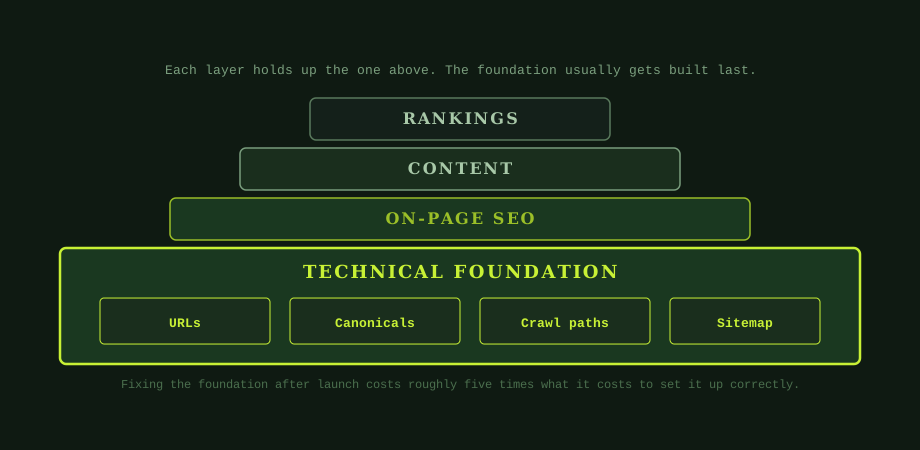
The economic point matters too. Fixing the foundation after launch involves changing URLs (which requires redirects to avoid losing existing rankings), restructuring navigation (which can affect every page on the site), and rebuilding internal linking patterns (which can take weeks of manual work). All of this would have been roughly an hour of developer time at build time. The five-times-cost rule of thumb is approximate but consistent: a foundation fix after launch costs around five times what the same work would have cost during the build.
Clean URL architecture: the decision that costs most to reverse
URLs are the structural skeleton of the site. They affect crawling, ranking, click-through from search results, internal linking, and analytics tracking. They are also the single most expensive thing to change after launch because every URL change requires a redirect and produces some temporary loss of ranking equity during the transition.
The pattern that works for almost every business website: short, descriptive, hierarchical URLs that mirror the content structure. /services/seo-bangkok is better than /page?id=42 for obvious reasons, but it is also better than /seo-bangkok if SEO is a sub-category of services, because the hierarchical version makes the relationship explicit and helps Google understand the site structure. The trade-off is depth; URLs more than three or four levels deep get unwieldy and produce weak ranking pages because they sit far from the homepage's link authority.
Specific decisions to lock in at build time. Use hyphens between words, not underscores or spaces. Use lowercase throughout. Do not include dates in URLs of evergreen content (a 2024 in a URL becomes a liability when you update the content in 2026). Do not include the CMS-generated slug ID alongside the human-readable slug (/services/seo-bangkok-42 is worse than /services/seo-bangkok). Avoid stop-word stuffing; /the-best-seo-services-in-bangkok reads as keyword bait while /services/seo-bangkok reads as natural site structure.
One pattern worth specifying explicitly to the developer: trailing slashes. Both /services/seo-bangkok/ and /services/seo-bangkok work, but you have to pick one and redirect the other. Sites that serve both versions as separate URLs are creating duplicate content for themselves at the URL level, which is exactly the kind of foundation issue this post is about preventing.
Canonical tags: the duplicate content insurance
Most sites generate duplicate URLs without realising it. The same page can be accessible via http://yoursite.com/page, https://yoursite.com/page, https://www.yoursite.com/page, and https://www.yoursite.com/page/. E-commerce sites generate URL variations for filters and sort orders (/category?sort=price&color=red). Pagination generates page 2, 3, 4 variants of the same parent. Without canonical tags telling Google which version is the master, Google has to pick one itself, and may pick the wrong one or split ranking authority across the variants.
A canonical tag is a single line in the page head: <link rel="canonical" href="https://www.yoursite.com/page" />. It tells Google "this is the preferred URL for this content; consolidate any ranking signals to this version." Every page on the site should have a canonical tag, even if the canonical points to itself (which it usually should). Pages that are intentional duplicates of others (filter results, pagination beyond page 1, tracking-tagged URLs) should canonical to the master version.
The pattern that fails most often is the self-referential canonical being wrong by one character: pointing to http:// instead of https://, missing the www, or pointing to a trailing-slash version when the URL is non-trailing. Each of these is a small bug that compounds. Verifying that every page's canonical points to the right version is part of the launch checklist, not something to discover months later.
Crawl paths and no orphaned pages
A search engine discovers pages by following links. A page with no incoming internal links is "orphaned": it exists on the site but is hard for Google to discover, gets crawled less often, and accumulates less of the internal link authority that helps it rank. Orphaned pages usually arrive accidentally: a page is published, the navigation is not updated, the sitemap may or may not include it, and the page exists in a kind of indexing limbo.
The rule for an SEO-ready site is that every page is reachable from at least one other internal link, ideally a contextually relevant link rather than just a footer mention. Category pages link to their products. Pillar posts link to their cluster posts. The homepage and main navigation link to top-level service or category pages. The blog index links to every recent post. No page is more than three or four clicks from the homepage.
This is a design and information architecture decision as much as a technical one. The site map (the human-readable list of all the pages and how they relate to each other, not the XML sitemap) should be drawn before development starts and used to verify that the eventual build has working paths to every page. Sites that get built without this step inevitably produce orphans because navigation design and content production happen on different timelines.
XML sitemap and robots.txt
The XML sitemap (/sitemap.xml) is the explicit list of every page on the site that you want Google to know about. It is generated automatically by most CMSs (WordPress with Yoast or RankMath, Shopify natively, etc.) or generated and maintained manually for custom sites. The sitemap should be referenced in robots.txt and submitted to Google Search Console, which gives Google a reliable way to find every page even if some internal linking is weak.
robots.txt is the simple text file at the site root that tells search engines what they can and cannot crawl. For most sites it is short: allow everything except the admin area and any other paths that should not appear in search results. The most common robots.txt mistake is the one that disables indexing of the entire site during development and then never gets reverted at launch; the symptom is a brand new site that ranks for nothing and turns out to have Disallow: / still in place.
HTTPS, mobile, and speed
These three are now baseline rather than differentiators, but the consequences of missing any of them are significant. HTTPS is required for trust signals, secure connections, and modern browser compatibility; HTTP-only sites are flagged as "not secure" in Chrome and lose meaningful conversions before any SEO question is even considered. SSL certificates are free through Let's Encrypt and most hosting platforms include automatic renewal; there is no operational reason for a new site in 2026 to launch on HTTP.
Mobile-responsive layout is a hard requirement because Google indexes the mobile version of pages first (mobile-first indexing). A site that renders correctly on desktop but breaks on mobile gets indexed in its broken state and ranks accordingly. The pragmatic test: open the site on a phone or in Chrome's mobile device emulator and verify that every page is readable, every form is usable, and every CTA is tappable without zooming.
Page speed affects both ranking (Core Web Vitals are measured ranking factors) and conversion (every second of load time costs measurable conversion rate). The build-time decisions that matter most: choose hosting appropriate for the traffic (cheap shared hosting produces slow sites), optimise images before upload (full-resolution photos as homepage hero images are a common offender), and avoid bloat from unused theme features or plugins. The detailed treatment is in how page speed affects rankings and conversion, and as part of the broader SEO audit checklist.
WordPress, custom, or other CMS
The CMS choice affects how much of the foundation work happens for you versus how much you have to specify explicitly. WordPress with a competent theme and a solid SEO plugin (Yoast, RankMath, or similar) produces an SEO-ready site by default for the foundations in this post; the work shifts to verifying that the defaults are correctly applied to your specific content rather than building each foundation manually. The trade-off is bloat: WordPress sites can carry significant plugin and theme overhead that affects speed.
Custom-built sites give the developer full control, which can produce faster and cleaner results but requires the developer to actively implement each foundation rather than inheriting it from the CMS. Custom builds also make CMS-level features like sitemap generation and canonical management your developer's responsibility rather than the platform's. For a business owner who is not technical, custom builds carry more risk because there is no fallback if the developer skips a step.
Shopify, Squarespace, and similar hosted platforms handle most of the foundations automatically and well. The trade-off is flexibility: when you do need to customise something (a specific URL pattern, a custom redirect, a non-default canonical), the platform's limitations show up. For most small businesses these limitations are acceptable; for larger or more complex sites they can become deal-breakers.
The launch checklist
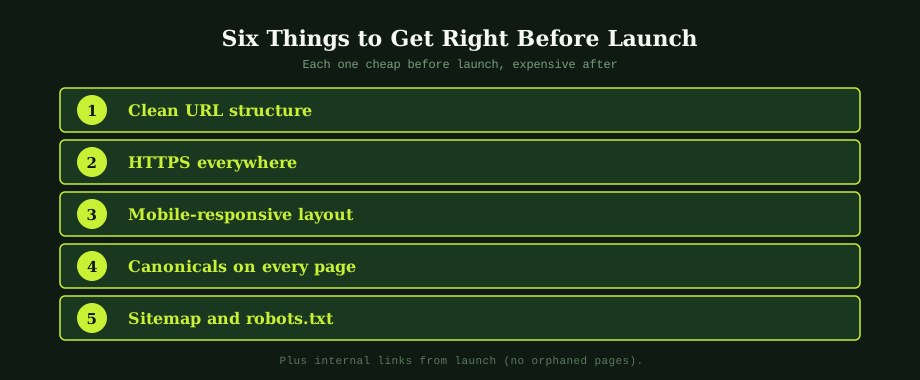
Before any content programme begins, verify that the technical foundation is in place. The minimum: every URL follows the agreed structure pattern; every page has a self-referential canonical pointing to the canonical URL form; HTTPS works site-wide with no mixed content warnings; the site renders correctly on mobile; an XML sitemap exists and is referenced in robots.txt; robots.txt is not blocking indexing of pages that should be indexed; Google Search Console is set up and verified for the domain; Google Analytics 4 (or your analytics platform of choice) is installed and reporting; every page on the site is reachable from at least one internal link.
The content programme outlined in the content strategy post only produces results if these foundations are in place. The individual posts that get written and published only have a chance to rank if the structure underneath them is solid, see also the blog post ranking guide. The two layers reinforce each other; neither alone produces the outcome a business actually wants.
For businesses planning a new website build or a rebuild, our web design and development service handles these foundations as part of the build rather than as something to retrofit later. An experienced SEO specialist in Bangkok can also audit an existing site against this checklist and identify the specific foundation gaps that are limiting your content's ability to rank.
Common questions
What does SEO-ready mean for a new website?
SEO-ready means the technical foundations are in place so that any content added later can rank on its merits rather than fighting the site's own structure. The foundations include clean URL architecture (no /?page=123 or /index.php?id=45 patterns), HTTPS across every page, mobile-responsive layout, canonical tags on every page, an XML sitemap submitted to Google Search Console, a working robots.txt, and an internal linking structure that means every page is reachable from at least one other page (no orphans). A site without these foundations can still be made to rank, but each piece of content has to overcome the structural drag.
What URL structure should a business website use?
Use readable, hierarchical URLs that describe the page content: /services/seo-bangkok, not /page?id=42. Keep URL slugs short and use hyphens between words, not underscores or spaces. Reflect the site's content hierarchy in the URL path so that both users and Google can understand the relationship between pages from the URL alone. Avoid deep URL nesting beyond three or four levels. Once URLs are set at launch, they are expensive to change because every change requires redirects, so getting the structure right at the start matters more than at any later point.
What is an orphaned page and why does it matter for SEO?
An orphaned page is a page that exists on the site but has no internal links pointing to it from any other page. Search engines discover pages by crawling links; a page with no incoming internal links is harder to discover, gets crawled less often, and accumulates less of the internal link authority that helps it rank. The fix is to add at least one internal link to every page on the site, ideally from a contextually relevant page (a category page links to its products, a pillar post links to its cluster posts, the homepage or main navigation links to top-level pages).
Should I use WordPress or a custom-built site for SEO?
Both can rank well if built correctly; both can rank poorly if built badly. WordPress has the advantage of being a known quantity for SEO: most technical issues have documented fixes, plugins exist for sitemap generation, schema markup, and other SEO work. Custom-built sites can be faster and more flexible, but they require the developer to actively build in the SEO foundations rather than inheriting them from a CMS that includes them by default. For most small to mid-sized business websites, WordPress is the lower-risk choice.