For most businesses in Thailand running a bilingual site, hreflang is relevant. A company that has Thai-language pages and English-language pages covering the same services needs hreflang to prevent the wrong version appearing for the wrong audience. Without it, Thai users searching in English might land on the Thai page, and English-speaking tourists searching in English might land on a Thai page with no clear path to the English version.
This is a practical companion to the Thai and English SEO guide, which covers the strategic decision of whether to target both languages. This post covers the technical implementation once you have decided to do so.
When hreflang actually applies
Hreflang is needed in two scenarios. The first is when you have the same content in multiple languages such as an English service page and a Thai service page covering the same offering. The second is when you have the same content targeting different regional variants of the same language (English for the US and English for Australia, for example).
It is not needed for a site that is entirely in one language with no regional variations. A Bangkok restaurant with a Thai-only website does not need hreflang. A hotel with an English-only site targeting international travellers does not need hreflang unless it also has a Thai version of its site.
The common mistake is adding hreflang to a site that does not have genuine language alternates. If your "Thai" page is just the English page with a Thai flag icon and the text is still in English, implementing hreflang creates a signal Google cannot verify and will likely ignore.
The structure: what the tag actually says
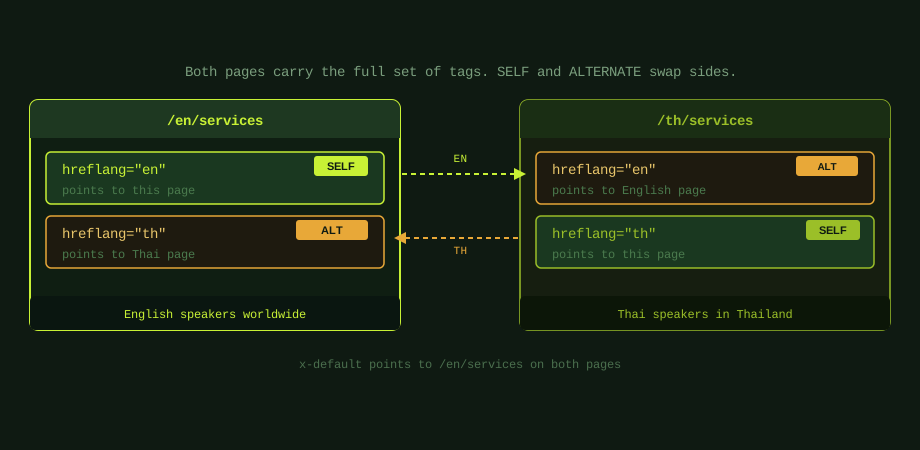
Each hreflang tag goes inside the <head> of a page and follows this structure:
<link rel="alternate" hreflang="en" href="https://example.com/en/services">
The hreflang attribute takes a language code (ISO 639-1 format: en, th, zh, ja) and optionally a region code appended with a hyphen (en-US, en-GB, zh-TW). For most Thai businesses targeting Thai users and international English speakers, the two tags needed are th and en.
The x-default tag is a special value that designates the fallback version for users whose language does not match any available alternate. Point it at your primary language version. For a Bangkok business with Thai and English pages, this is typically the English version since most unmatched users will be more comfortable with English than Thai.
Every page in the alternate set must carry the complete set of tags. The English page must have both the en tag and the th tag. The Thai page must also have both the en tag and the th tag. This bidirectional requirement is where most implementations fail.
The five errors that break hreflang
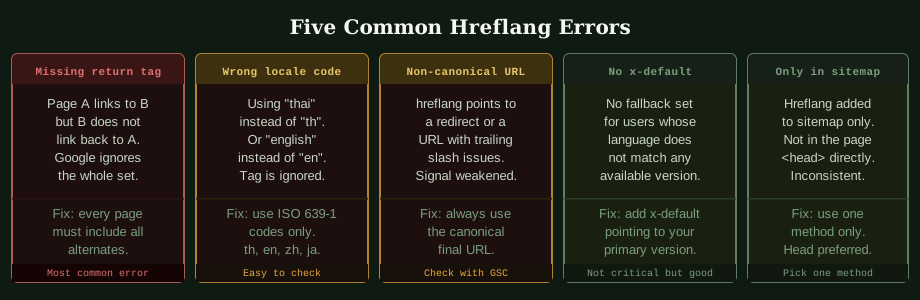
Missing return tags. This is the most common error by far. If the English page includes a hreflang tag pointing to the Thai page, the Thai page must include a hreflang tag pointing back to the English page. Google requires this bidirectional confirmation. A one-directional implementation is treated as invalid and the entire signal is ignored.
Wrong locale codes. Language codes must follow ISO 639-1 format. th for Thai, en for English, zh for Chinese, ja for Japanese. Writing thai, english, or TH (uppercase) produces an invalid tag. Region codes must follow ISO 3166-1 alpha-2 format and are written after a hyphen: en-US, en-GB, zh-TW. The language code is lowercase; the region code is uppercase.
Non-canonical URLs. Every URL in a hreflang tag must be the canonical, final destination URL. If your site has inconsistent trailing slashes (some pages use /services, others use /services/), you must use the canonical version consistently. Pointing hreflang at a URL that redirects to another URL also undermines the signal.
No x-default. Not strictly an error, which is not strictly an error since the implementation will still work,but a best practice gap. Without x-default, users whose language matches none of the available versions have no designated fallback. Google will make a guess, which may or may not serve the right version.
Inconsistent implementation methods. Hreflang can be implemented three ways: in the <head> of each page, in the XML sitemap, or via HTTP headers for non-HTML files. Using multiple methods simultaneously creates conflicting signals. Pick one and use it consistently across the entire site. For most sites, the <head> implementation is the most reliable and easiest to audit.
How to validate after implementation
Google Search Console has an International Targeting report under Legacy Tools that shows hreflang errors across the site. It flags missing return tags, invalid language codes, and URLs that return errors. Check this report two to four weeks after implementation to confirm the tags are being read correctly.
For a more immediate check, you can inspect any page using the URL Inspection tool in Search Console and look at the detected hreflang tags under the HTML section of the coverage report. This shows exactly what Google crawled rather than what you think you implemented, which is often revealing.
Third-party tools like Ahrefs and Semrush also flag hreflang errors in their site audit reports. The free version of Screaming Frog can crawl your site and export all detected hreflang tags alongside the pages that carry them, which is the fastest way to audit a large implementation.
Hreflang and the Thai market
For businesses in Thailand, the most common implementation scenario is en and th language targeting without regional differentiation. Thai is spoken almost exclusively in Thailand, so a regional variant like th-TH adds nothing over plain th. English is used for international visitors from multiple countries, so en without a region code is the correct approach unless you are specifically targeting one English-speaking market.
A Phuket hotel targeting both Thai domestic travellers and international tourists would implement th for the Thai version, en for the English version, and x-default pointing to the English version. Any visitor whose browser is not set to Thai will see the English version by default, which is appropriate for that customer profile.
For businesses expanding into multiple ASEAN markets, adding Chinese, Japanese, or Korean language versions,the same principles apply for each additional language. Each new language version requires its own set of return tags on every page in the alternate group, which makes implementation complexity grow proportionally with the number of languages.
The broader international SEO guide covers the URL structure decisions (subdirectory vs subdomain vs ccTLD) that affect how hreflang is implemented at the site architecture level. The strategic context for using hreflang as part of an ASEAN expansion is in how to build an SEO strategy for ASEAN expansion. The strategic context for which ASEAN markets to target is in SEO for Southeast Asia. Hreflang works across all three structures but the implementation details differ slightly for each.
For international SEO services including hreflang implementation and validation, the audit process starts with the existing site structure and identifies both whether hreflang is needed and whether the current implementation, if any, is functioning correctly.
Common questions
Do I need hreflang if my site is only in English?
No. Hreflang is only relevant when you have the same content available in more than one language or targeting more than one regional variant of the same language. A single-language site with no regional variants does not need hreflang tags.
Does hreflang affect rankings?
Hreflang does not directly boost rankings. Its purpose is to ensure the correct language version appears in the correct country's search results. Without it, a Thai-language page might appear for English searches and vice versa, which harms click-through rates and user experience. Correctly implemented hreflang improves targeting accuracy rather than rankings themselves.
What is the difference between hreflang and the HTML lang attribute?
The HTML lang attribute (for example lang="en" on the html element) tells browsers and assistive technology what language a page is written in. Hreflang tags tell Google that alternate language versions exist and which users each version should be shown to. Both should be present: the lang attribute for accessibility, hreflang for search engine language targeting.
How do I check if my hreflang is working?
Google Search Console is the primary tool. The International Targeting report flags errors in hreflang implementation. You can also use URL Inspection to see exactly what Google detected on a specific page. After implementation, give Google two to four weeks to recrawl the affected pages before checking whether the correct versions are appearing in the target country search results.