
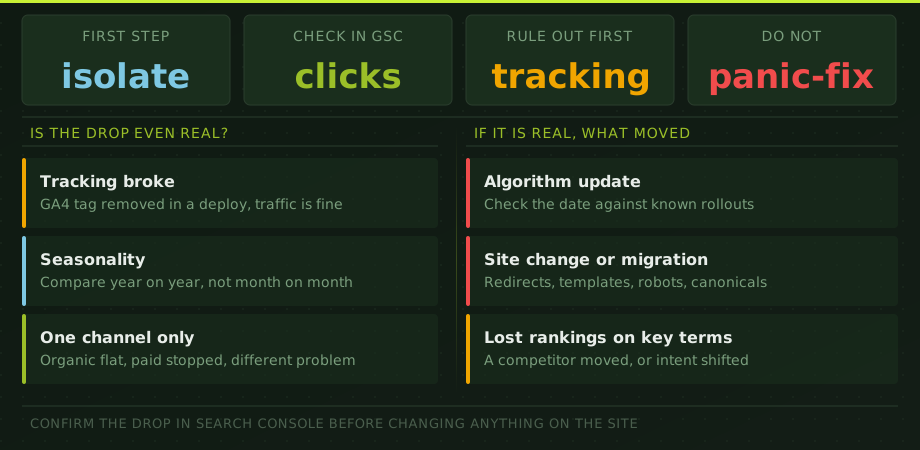
The first hour after discovering a traffic drop should be boring. Export the data. Confirm the dates. Check whether analytics is still firing. Look at which pages and channels changed. Do not launch a redesign, delete content or blame a Google update because someone posted about one on LinkedIn.
This diagnostic is designed to get you from “traffic is down” to a specific working hypothesis that can be tested.
First decide whether the drop is real
Open Google Search Console and GA4 for the same date range. Compare against the previous period and the same period last year where possible. Then check:
- GSC clicks: did organic clicks fall?
- GSC impressions: did search visibility fall, or only clicks?
- Average position: did rankings move, or did demand and click-through rate change?
- GA4 organic sessions: does analytics show the same timing and shape?
- All-channel sessions: is the problem organic only or sitewide?
If Search Console is stable but GA4 organic sessions collapsed, start with measurement. Consent changes, tag failures, redirects, cross-domain configuration and channel attribution can make traffic disappear from reports without making users disappear from the website.
If Search Console clicks and impressions fell on the same date, the loss is more likely to be a real search problem.
Classify the shape of the drop
| Pattern | Common causes | First check |
|---|---|---|
| One-day cliff | Tracking failure, release, noindex, robots, redirects, outage, manual action | Deploy log, tags, GSC Pages report, URL Inspection |
| Step down over several days | Google update rollout, template change, lost links, major competitor change | Affected pages and queries by date |
| Gradual decline over months | Content decay, competition, demand shift, weak maintenance, cannibalization | Year-over-year page and query trends |
| Seasonal wave | Normal market demand | Same period last year and Google Trends |
| One directory drops | Template, canonical, internal links, inventory or content issue | Segment affected URL pattern |
| Clicks fall, impressions stable | CTR loss, SERP features, title changes, brand demand | Query CTR and result appearance |
Check measurement before SEO
Measurement failures are common because they often happen during unrelated work. A consent banner is updated, a tag manager container is replaced, a checkout moves to another domain or a script is deferred for performance. Nobody thinks “SEO,” but the organic report changes.
Check the GA4 Realtime report, browser network requests for the measurement ID, consent state, referral exclusions and whether the same landing pages still appear. If lead or purchase events changed, inspect those separately from sessions. A traffic report can be correct while conversion tracking is broken, or the reverse.
Our guide to GA4 conversion tracking covers the event layer in more detail.
Check what changed on the website
Pull the release history for the two weeks before the drop. Look for changes to:
- robots.txt and meta robots tags
- canonical tags
- redirect rules and URL patterns
- navigation and internal links
- JavaScript rendering
- title tags and main content
- pagination, filters and product availability
- HTTP status codes and server performance
- XML sitemaps
A single template error can affect thousands of URLs. If product or category traffic fell together, inspect the shared template before reviewing individual copy. If one subfolder disappeared, crawl that subfolder and compare headers, canonicals and indexability with a working section.
Use page groups, not sitewide averages
“Organic traffic fell 30%” is not a diagnosis. Export Search Console pages and calculate the loss by landing page. Group URLs by template or purpose: services, categories, products, blog posts, locations and brand pages.
Then answer three questions:
- Which page group accounts for most of the lost clicks?
- Did those pages lose impressions, position or click-through rate?
- Do the affected queries share one intent, country, device or brand pattern?
A 30% sitewide decline caused by five old articles requires a different response from a 30% decline across the product catalogue. The total is the same. The business risk is not.
Separate branded and non-branded demand
Branded search can fall because advertising stopped, news coverage faded, offline activity changed or fewer people are looking for the company. That is a demand problem, not necessarily an SEO failure.
Non-branded traffic is more useful for judging search coverage. Build a simple brand filter in the query export and compare the two groups. If branded impressions fall but non-branded rankings are stable, do not rewrite the service pages. If non-branded commercial queries fell while brand stayed stable, the SEO diagnosis becomes more likely.
Check Google updates without using them as an excuse
Compare the drop dates with Google's public update timeline, but do not stop there. An overlap is evidence, not proof. A release on your site can happen during an update. Competitors can improve at the same time. Demand can change independently.
If the timing matches an update, compare winners and losers at page and query level. Look for patterns in content usefulness, intent match, site reputation, spam signals or link profile. Our Google algorithm recovery guide explains the next stage.
Check whether the market moved
Sometimes your site did not become worse. The result page changed. Google may add shopping blocks, local results, video, forums or AI summaries. Competitors may launch stronger category pages or improve pricing and availability. Search demand may shrink.
Review the actual result pages for the queries that lost clicks. Compare current competitors with archived or earlier ranking data if available. Use Google Trends to check demand direction. If impressions are stable and positions are stable but clicks fell, SERP layout and CTR deserve more attention than technical SEO.
What not to do
- Do not delete low-traffic pages before checking whether they support internal links or conversions.
- Do not rewrite every title tag because sitewide CTR fell.
- Do not disavow links because a tool called them toxic.
- Do not publish large volumes of generic content to “show freshness.”
- Do not change technical, content and architecture layers at once.
- Do not measure recovery only with average position.
Preserve a clean baseline and change the smallest set of things that addresses the strongest diagnosis. That is how you learn whether the fix worked.
A practical recovery sequence
- Preserve: export 16 months of Search Console query and page data plus GA4 landing-page data.
- Verify: confirm analytics, indexability, status codes, canonicals and recent releases.
- Segment: isolate the pages, queries, countries and devices responsible for the loss.
- Diagnose: choose the most likely cause and list evidence for and against it.
- Prioritize: fix blockers first, then relevance, internal links, content and authority.
- Measure: annotate implementation dates and review leading indicators before waiting for revenue.
If the cause is still unclear after those steps, the right next move is a focused SEO audit in Thailand, not a generic monthly package. The audit should produce a cause, evidence, prioritized fixes and a verification plan.
Traffic drop questions
Why did my website traffic suddenly drop?
A sudden drop is commonly caused by analytics or consent changes, a release that affected tracking or indexation, server downtime, accidental noindex or robots rules, redirects, canonical changes, a manual action or a Google update. Check measurement and technical changes before rewriting content.
How can I tell whether it is an SEO problem?
Compare Google Search Console clicks and impressions with GA4 organic sessions. If both fall on the same dates, the loss is probably real and search-related. If GA4 falls while Search Console remains stable, investigate tracking, consent and channel attribution first.
Should I change pages immediately?
No. Preserve the baseline, identify which pages and queries lost visibility, and rule out measurement and technical failures first. Broad changes made before diagnosis can remove evidence and make recovery harder.
How long does recovery take?
Tracking fixes can restore reporting immediately. Technical fixes may show within days or weeks after recrawling. Competitive or quality-related recovery usually takes months, and algorithmic recovery may require later Google reassessment cycles.