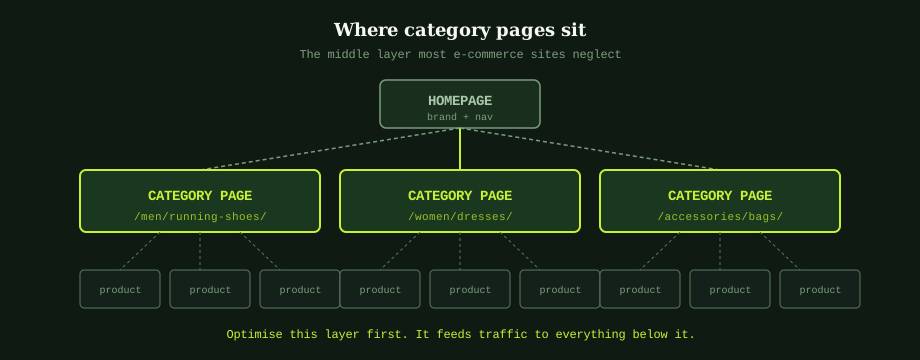
Most e-commerce SEO work concentrates on two layers: the homepage and individual product pages. The middle layer, category pages, gets treated as functional plumbing. They display the products and let users filter; nobody writes copy for them, nobody optimises the H1, nobody worries about internal linking from them. See faceted navigation and SEO for handling filters. Yet category pages are where the broadest, highest-volume keywords live, and they are usually the easiest fix on an e-commerce site that already has a strong product catalogue.
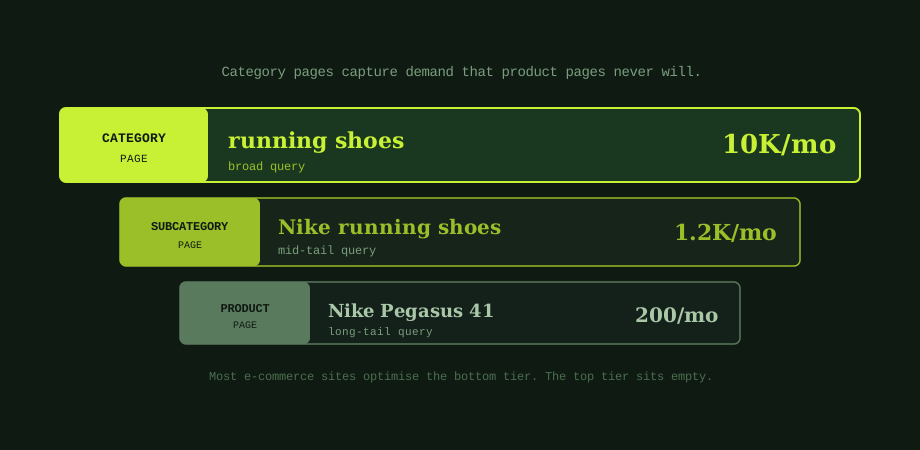
The math is straightforward. A search for "running shoes" in Thailand gets roughly 10,000 searches per month. A search for a specific product like "Nike Pegasus 41 men's" might get 200. If your product page ranks for the specific term, you capture maybe 50 clicks. If your category page ranks for the broad term, you capture 1,000 to 1,500. Same SEO effort, ten to thirty times the traffic, and the visitors land on a page designed to help them compare options rather than commit to one specific product they may not have decided on yet.
Why category pages get neglected
The reason is structural. Product pages have content built in: the product name, specifications, price, images, often customer reviews. Even a poorly optimised product page has something for Google to index. Category pages, by default, have almost nothing. The page title is "Shop," the H1 says "Category Name," and below that is a grid of product thumbnails with no surrounding context. From Google's perspective, the page is mostly product links with no signal about what the category is, who it is for, or why this version is worth ranking over a competitor's.
Fixing this requires deliberate work that does not exist for product pages. Someone has to decide what each category is for, write the copy that explains it, and structure the page so the copy serves both users and Google's understanding of the page's intent. That work rarely fits into standard e-commerce platform templates, which is why it does not happen by default.
What an optimised category page actually contains
Five elements separate a category page that ranks from one that does not: the title tag, the H1, an introduction above the product grid, supporting content below the grid, and internal links to and from the page. The pattern is the same across e-commerce platforms; the implementation differs depending on whether you are on Shopify (the bigger picture is in the Shopify SEO configuration guide), WooCommerce, Magento, or a custom build.
The title tag should follow a clear formula: [Category Name] + [Modifier] + [Brand or Store] | [Site Name]. For example, "Men's Running Shoes - Nike, Adidas, Asics | YourStore." This gives Google the category term, the brand context, and the site identifier in roughly 60 characters. Avoid generic titles like "Shop Now" or "Collection" that tell Google nothing about what the page covers. The title tag patterns that work for product pages apply here, with the difference that category titles describe a set of products rather than a single one.
The H1 should match how users actually search, not how your internal taxonomy names the category. If your nav structure uses "Footwear > Running," but users search for "running shoes," the H1 should say "Running Shoes" or "Men's Running Shoes," not the nav term. The H1 is one of the strongest on-page signals; matching it to actual search behaviour rather than internal navigation is often the single highest-impact change.
The intro paragraph above the product grid is the foundation of category page content. A short intro (100 to 200 words) explaining what the category covers, who it serves, and what makes the selection useful tells both users and Google that this page has substance beyond a product list. The intro should naturally use the category keyword and related variations, but the priority is genuine usefulness, not keyword density. Read it back: would a person landing on this page from a search find it informative? If not, rewrite it.
Supporting content below the product grid adds the depth Google uses to rank for broader queries. This is where you can include buying guidance, related considerations, frequently asked questions, or comparison content. The trap to avoid is dumping 1,500 words of generic SEO filler at the bottom of every category. The content should be specific to this category and useful to someone who scrolled past the products looking for more context.
The fifth element, internal linking, is the structural signal that ties everything together. The category page should link out to all its products with descriptive anchor text, not just thumbnails. Products should link back to their parent category with the category name as anchor text. Related categories should cross-link to each other where it serves users. This network of links is how Google understands which pages belong together and how to flow authority between them. Internal linking generally matters everywhere, but on e-commerce sites the category-to-product linking pattern is where most of the leverage sits.
How to find which categories deserve the work first
With limited time, the right question is not "should we optimise category pages?" but "which categories will produce the most traffic if we optimise them?" Three signals identify the best targets.
The first signal is in Google Search Console. Filter the Performance report to pages matching your category URL pattern (e.g., URLs containing /category/ or /collections/), and sort by impressions. Categories getting high impressions but low CTR or low average position are ones where Google is already showing your pages to people, but the page is not winning the click. These are the easiest wins because the search visibility already exists; the page just needs to convert that visibility into traffic.
The second signal is keyword volume. Use any keyword research tool (Google Keyword Planner is free and adequate for this) and look at search volume for terms that map to your existing categories. Categories with high search volume for their core keyword but limited current performance are the highest-leverage targets. Categories with low search volume regardless of optimisation are lower priority unless they convert exceptionally well.
The third signal is product overlap. If 30 of your products share a descriptive attribute that does not have a dedicated category page (vegan, gluten-free, waterproof, suitable for kids), you may have a missing category opportunity. The test is whether users actually search for that attribute. If they do, building a category page that filters to those products gives you a new ranking entry point.
Pagination and the multiple-page problem
Most category pages on stores with substantial catalogues span multiple paginated pages. The SEO question is how to handle pages 2, 3, and beyond. Google no longer uses rel=prev/next as a pagination signal (this was deprecated in 2019), which simplifies the implementation: each paginated page should be a real URL with a self-referencing canonical, a slightly different title tag (Page 2, Page 3 appended), and the same intro content as page 1 stripped down or omitted.
The instinct to noindex paginated category pages is usually wrong. Page 2 of "Running Shoes" still contains running shoes; if it is noindexed, Google has less context for how deep your selection is. Keep paginated pages indexable. Just make sure each one is technically distinct (different content, self-referencing canonical) and that the products are crawlable from each paginated URL.
Infinite scroll without crawlable pagination is a different problem. If your category implements infinite scroll purely client-side, Google may only see the first batch of products and never discover the rest. The fix is either real pagination as the underlying URL structure (with the infinite scroll as a UX enhancement on top) or a "load more" button that updates the URL with a page parameter. Pure JavaScript-loaded infinite scroll without URL changes is the version to avoid.
The category page work that competes with marketplaces
For Thai e-commerce stores, the unavoidable context is that Shopee and Lazada compete for the same category queries. As walked through in the product page SEO post, competing on identical signals against marketplaces with massive domain authority is rarely productive. The same applies to categories. What works is differentiation on signals the marketplace category pages do not have.
Shopee and Lazada category pages typically have: minimal unique content beyond a search-filter interface, no buying guidance, no expert context about how to choose between products in the category, and very little long-form content. Your category pages can outrank marketplace listings on category queries when the page offers genuine help to someone making a choice: a buying guide, comparison criteria, expert recommendations, and the kind of context that turns the page from a product list into a useful resource.
The query types where this works best are mid-tail terms: not the broadest possible category (where the marketplace usually wins by sheer authority) but specific variations like "best running shoes for flat feet" or "waterproof hiking boots Thailand" where the content depth matters more than domain strength. Build out these variant category pages, link them from your main category, and you accumulate ranking surface area on terms the marketplaces are not specifically optimising for.
What to do first
The sequence that produces the most traffic in the shortest time on most e-commerce stores: identify the top five category pages by current GSC impressions, write a 150-word intro and 200-word supporting content for each, fix their title tags and H1s if generic, and audit their internal linking from the homepage and main navigation. This is a one-week project on most stores and typically lifts category page traffic by 30 to 80% within three months as Google reprocesses the pages.
The work is unglamorous. There is no clever technical fix that substitutes for actually writing the content. But unlike many SEO interventions, category page optimisation is largely a one-time investment per page. Once the intro, supporting content, title, H1, and internal links are right, the page generally keeps performing without ongoing maintenance. The compound traffic over months and years is substantial relative to the up-front work.
For stores looking to make this work part of a wider SEO programme, our e-commerce SEO agency includes category page audits and content prioritisation. The broader e-commerce SEO fundamentals post covers site-level architecture decisions that affect how categories perform. For an experienced second opinion on your category structure, an SEO company in Bangkok can map the gaps between your current category pages and the search demand you are not yet capturing.
Common questions
How much unique content does a category page need to rank?
Between 150 and 400 words of genuinely useful content is the practical target for most category pages. The lower end works for narrow subcategories where there is not much to say; the upper end suits broad categories where buyers genuinely need orientation. What matters more than word count is whether the content actually serves the user. A 250-word intro that explains what the category covers, who it is for, and how to choose between the products in it will outperform a 1,500-word essay padded with generic copy. The risk with long category content is pushing the actual products too far down the page, which hurts both user experience and the signals Google uses to assess whether the page satisfies search intent for a commercial query.
Should category content go above or below the product grid?
A short intro above the grid (100 to 200 words) followed by deeper content below the products is the pattern that works for most categories. The above-the-fold intro confirms to users they are in the right place without delaying their access to products. The below-grid content adds the supporting depth Google needs to rank the page for broader queries, without compromising the shopping experience. Putting all category content above the products is a common mistake; it makes the page feel like a blog post rather than a shoppable category, and degrades the conversion rate even if rankings hold.
Should I use pagination or infinite scroll on category pages?
Pagination with crawlable links is safer for SEO than infinite scroll for most stores. Infinite scroll works visually but if the underlying implementation does not produce crawlable paginated URLs, Google may only ever see the first batch of products. The hybrid approach (load more buttons that update the URL with a page parameter, plus crawlable pagination in the HTML) gives you both. Note that rel=prev/next pagination markup is no longer supported by Google as a ranking signal; the practical implementation is just to ensure each paginated page is a real URL with crawlable links to the next page, a self-referencing canonical, and clear unique titles like Page 2, Page 3 within the title tag.
How do I find which categories have the most search demand?
Three sources, in order of usefulness. First, Google Search Console: filter Performance data to pages matching your category URL pattern, sort by impressions, and look for high-impression pages with low CTR or low average position. Second, keyword research tools: plug your category names in and look at related keyword volumes, particularly broader terms above your current category structure. Third, your own product names: if many products share a descriptor that is not yet a category, that is a missing category page opportunity. The goal is to find the gap between what users search and what categories you have built pages for.