
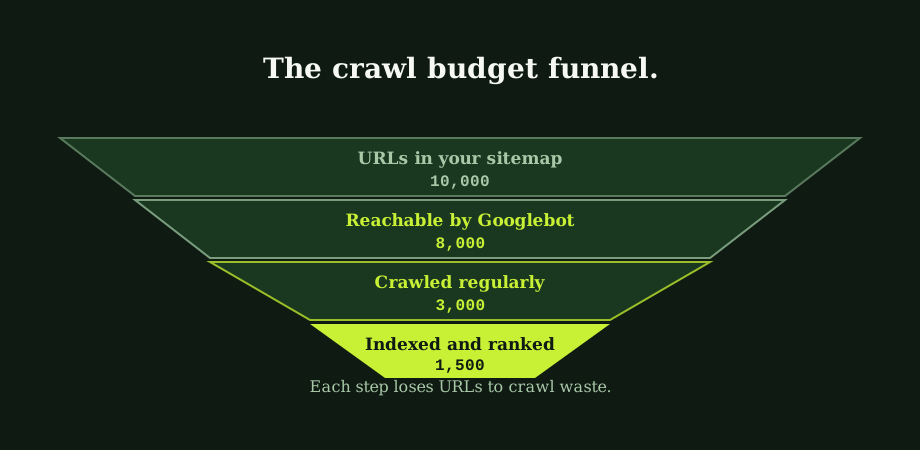
Before the mechanics, the disqualification. Crawl budget is a topic that gets attention out of proportion to the number of sites it affects. For the small to mid-sized business sites that make up most of the web, it does not apply. Your site gets crawled. The pages that should rank, rank. The SEO work that matters is keyword targeting, content quality, internal linking, and trust signals. Crawl budget is none of these.
The audiences this post is actually for are e-commerce catalogues, news and content sites, large forums, real estate aggregators, classifieds, and the occasional very mature blog. For those, crawl budget can be the ceiling no one has noticed.
What crawl budget actually is
Google defines crawl budget as the multiplication of two factors. The first is the crawl rate limit, which is how many parallel connections Googlebot can make to your server without slowing it down or causing errors. A fast, healthy server gets a higher cap; a slow or error-prone one gets throttled. The second is crawl demand, which is how often Google decides your pages are worth refetching. Pages that update often, get linked to often, or rank for queries that get searched often, generate higher demand. Pages that sit unchanged for months and are not linked to anywhere generate almost none.
Multiplied, those two factors decide how many URL fetches your site gets in a given period. For a small site, that number is comfortably above the site's URL count, and everything gets seen often. For a large site, it is not, and choices have to be made about what gets the budget.
When crawl budget becomes a real problem
The threshold is not a single number but a rough range. A few useful signals.
- Under ten thousand URLs. Crawl budget is almost certainly not your bottleneck. Time spent on it is time not spent on content and links.
- Ten thousand to a hundred thousand URLs. Worth checking the Crawl Stats report in Search Console. If everything important is getting fetched within a week, no problem yet. If some content has not been touched for a month, the budget is starting to bite.
- Above a hundred thousand URLs. Almost certainly a real constraint. Faceted navigation, parameter URLs, archive pages, and pagination patterns are likely each eating a meaningful share of the budget.
The number of pages in your CMS is not the same as the number of URLs Google sees. A WooCommerce store with 5,000 products easily reaches millions of crawlable URLs once you count category pages, tag pages, filter combinations, sort orders, and pagination variants. Many sites that think they are at the ten thousand mark are actually well past a hundred thousand from Google's perspective.
The two factors, in practice
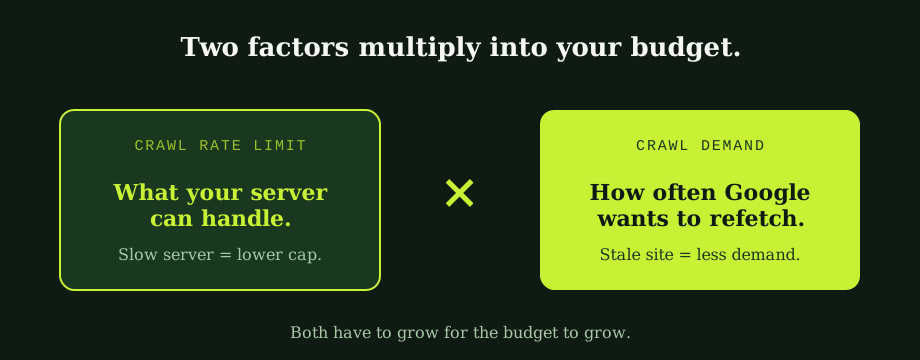
The crawl rate limit responds to server health. A page that returns in 200 milliseconds gets fetched several times faster than one that returns in 2 seconds, and Google will scale back parallel connections if it sees error responses or timeouts. So one half of crawl budget improvement is server work: caching, fewer database hits per page, a CDN, removing render-blocking dependencies. The mechanics of measuring this overlap with page speed for business owners.
Crawl demand responds to signals that suggest your site is worth coming back to. Update frequency on important pages, fresh content being published, internal links pointing to deeper content, and external links from active sites. A site that publishes nothing for a year sees its crawl demand shrink steadily. A site that publishes regularly and surfaces new content prominently sees it grow.
Both halves have to move for the budget to grow meaningfully. A fast server crawling a stale site does not get high demand. A fresh site on a slow server hits the rate limit before it gets through everything.
Where crawl budget gets wasted
For sites that do have a budget problem, the fix is rarely "get Google to crawl more." It is "stop wasting the budget you already have." A small list of the most common leaks, drawn from actual audits.
- Faceted navigation and URL parameters. Filter combinations on category pages generate exponential URL counts. A category with eight facets and three options each produces over six thousand URL variations per category before adding sort orders or pagination. The fix is some combination of canonicalisation, parameter handling in Search Console, robots.txt exclusion, and rel=nofollow on filter links. The wider mechanics sit in the plain guide to robots.txt and canonical tags.
- Soft 404s. Pages that return a 200 OK response but display a "no results" or "out of stock" message look like real pages to Google and get re-crawled indefinitely. The fix is to return a real 404 or 410 status when there is nothing useful at the URL.
- Long redirect chains. Every hop in a redirect chain costs a fetch. Chains of three or four redirects, common after multiple site migrations, eat budget on every revisit. Consolidate to single-hop 301s wherever possible.
- Calendar and pagination patterns. Calendar widgets that allow navigation to any past or future date generate effectively infinite URLs. Pagination on archive pages or category listings can produce hundreds of pages per category, most of them with thin content. Both deserve careful indexation rules.
- Slow server response time. Every slow page is two costs: it eats budget that could have crawled another URL, and it lowers the rate cap for the rest of the site. Server work compounds.
- Duplicate content via tracking parameters. The dedicated view of duplicate URL costs and fixes is in duplicate content in SEO: costs and fixes. UTM parameters, session IDs, and analytics tags appended to URLs create duplicate-content versions of every page they touch. Either canonicalise them properly or strip them server-side.
Each of these fixes is template-level: solve it once in the codebase or server configuration, and the entire site benefits. Per-URL fixes are rarely the right approach at scale.
How to check if you have a problem
Google Search Console's Crawl Stats report, under Settings, shows the last ninety days of Googlebot activity. Four things to look at.
- Total crawl requests, trended over ninety days. Flat or growing is healthy. Declining is a warning.
- Average response time. Anything above one second is worth investigating. Above two seconds is a real problem.
- Crawl request breakdown by file type and response code. A healthy site shows mostly HTML fetches with mostly 200 responses. A high share of 404s, 301s, or non-HTML resource fetches suggests budget is being spent in the wrong places.
- Crawl request purpose. Google splits fetches into "discovery" (new URLs) and "refresh" (known URLs). Most should be refresh on a stable site; a sudden spike in discovery often indicates a parameter or filter URL explosion.
The broader diagnostic flow for any indexation issue sits in how to fix indexing problems in Google Search Console, which intersects with crawl budget anywhere the issue is "the page exists but isn't being seen."
Fixing the budget without asking Google for more
There is no button to request more crawl budget. The strategy is always to make your existing budget go further. The fix order that produces the best return on most large sites.
- Audit the URL universe. Run a full crawl with Screaming Frog, Sitebulb, or similar. Compare the total crawlable URL count to the number of pages you actually want in Google's index. The gap is the budget problem.
- Plug the largest leak first. For most e-commerce and content sites, that is faceted navigation. For news sites, it is often calendar and tag archives. Diagnose, fix once at the template level, then re-crawl to confirm.
- Improve server response time. The cap on parallel connections moves with server health. Caching, CDN, database optimisation, and reducing per-page database hits all help.
- Refresh the sitemap. Submit a clean, accurate XML sitemap that excludes the URLs you do not want crawled. XML sitemaps explained walks through the construction.
- Strengthen internal linking to important pages. Pages that get linked to from multiple high-priority pages get more crawl demand. Pages buried at the end of a paginated archive get almost none.
The order matters. Plugging leaks before improving server speed produces a faster improvement because the wasted crawls are no longer in the way.
The honest answer to the crawl budget question
For most sites, "do I have a crawl budget problem" answers itself: no, the SEO programme will handle whatever needs ranking. For the sites where it does apply, the work is mostly architectural rather than tactical. URL structure, parameter handling, soft-404 prevention, and server speed are template-level decisions that compound across millions of URLs. Single-URL optimisation is the wrong unit of analysis at this scale.
Our SEO Bangkok handles crawl budget audits for the kind of large sites where it matters, usually as part of a wider technical engagement. Our technical SEO services in Thailand include the URL-universe audit and the template-level fixes that bring most leaks down to a manageable rate. An SEO consultant in Bangkok can run the Crawl Stats diagnostic on your highest-traffic site sections in less time than reading this post took.
Common questions
What is crawl budget?
Crawl budget is the number of URLs Googlebot will fetch from your site in a given period. Google describes it as the multiplication of two factors. The first is crawl rate limit, which is how many simultaneous parallel connections Googlebot can make to your server without overwhelming it; faster, healthier servers get a higher cap. The second is crawl demand, which is how often Google decides your pages are worth refetching, based on signals like update frequency, popularity, freshness, and content quality. Most sites never run into the limit because the budget Google allocates is comfortably above what the site needs.
Do small sites need to worry about crawl budget?
In almost all cases, no. Sites with a few hundred to a few thousand pages are crawled fully and frequently by Google, and crawl budget concerns are not where ranking effort should go. The rest of the SEO programme will catch and surface anything important. Crawl budget moves from theoretical to practical roughly at the ten-thousand-URL threshold and becomes a meaningful constraint above the hundred-thousand mark.
How do I check my crawl budget?
Google Search Console has a Crawl Stats report under Settings, accessible to verified property owners. It shows the total number of crawl requests over the past ninety days, the average response time of those requests, what file types Googlebot is fetching, what response codes it is getting, and the purpose of each fetch. Two indicators tell you whether you have a problem: whether the total fetched URLs has been declining over time, and whether the file types and response codes look healthy.
Where does crawl budget get wasted most often?
Faceted navigation and URL parameters are the largest waste source for e-commerce sites: every combination of filters generates a unique URL, multiplied across hundreds of products and dozens of facets, easily reaching millions of crawlable variations from a few thousand real products. Soft 404 pages, long redirect chains, calendar and pagination patterns, and slow server response times are other common sources. The fixes are usually template-level rather than per-URL.
Crawl budget problems are almost always template-level, which makes them expensive to guess at. A large-site SEO audit identifies which rules are generating the waste before anyone touches code.