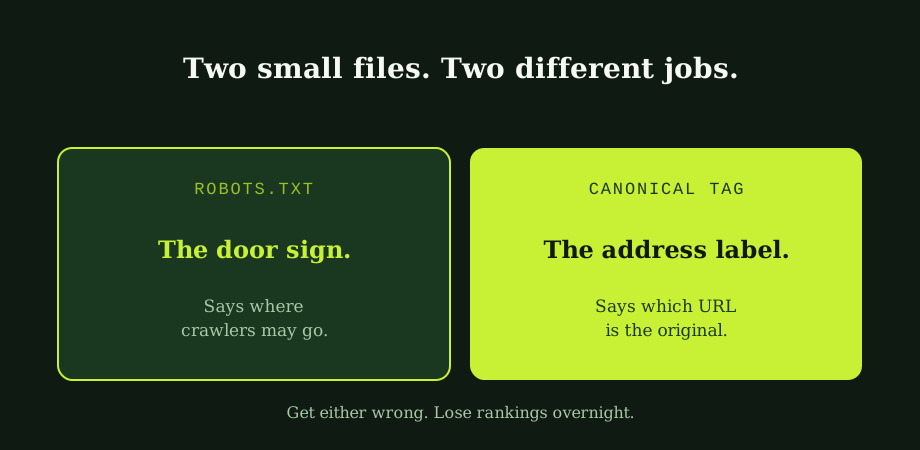
Think of them as a door sign and an address label.
The door sign sits at the entrance to your site and tells anyone arriving where they may and may not go. That is robots.txt. The address label sits on individual pages and tells anyone reading "this is the real version of this content, not the dozen near-duplicates floating around." That is the canonical tag. The wider duplicate-content programme that canonicals are the primary fix for is in duplicate content in SEO: costs and fixes. They are not interchangeable, and confusing them is where most of the damage gets done.
Robots.txt: the door sign
Every site has one (or should). It lives at one fixed address, the root of your domain, slash robots-dot-txt. You can read your own right now by typing yourdomain.com/robots.txt into your browser. If you have never looked, look today.
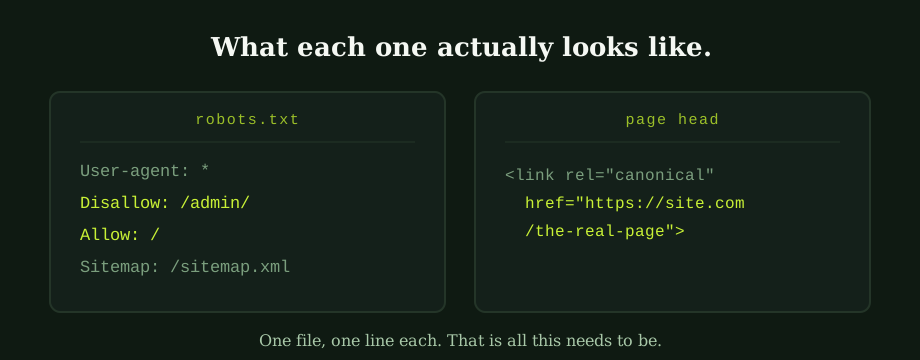
What it does is simple. It tells web crawlers which parts of the site they are permitted to fetch. A working production robots.txt usually says: "Anyone can crawl anything except the admin area, and here is where to find the sitemap." That looks like four lines of text. The same controls become crucial on large sites; the wider context lives in crawl budget for SEO and why it matters for large sites. Nothing more.
What it does not do, despite the name, is decide what gets shown in Google. Here is the subtle part most people get wrong. Robots.txt controls crawling, not indexing. Blocking a URL in robots.txt does not remove it from search results. The URL can still appear, often with no description, because Google knows it exists from links pointing at it but was not allowed to read the page. To actually keep a page out of search results, you need a noindex meta tag on that page. And the page has to be crawlable for Google to see the noindex. Block it in robots.txt and add noindex, and you have just told Google "do not read this page, and also do not read the instructions on this page." The noindex never lands.
So when do you actually use robots.txt? For genuine "do not fetch" areas. Admin panels. Internal search results pages. Filtered URLs you do not want crawled. Big files Google has no reason to download. That is it.
Canonical tags: the address label
Now the second file, which is not really a file but a single tag inside a page. The canonical tag goes in the head of the HTML and looks like this: <link rel="canonical" href="...">.
Its job is to tell Google: "This URL you are looking at, the real one for this content is over here." That matters because URLs duplicate themselves more easily than people realise. Tracking parameters appended by ad campaigns. Filter and sort variations on product listings. Trailing slash versus no trailing slash. Uppercase versus lowercase. HTTP versus HTTPS. Each one is a distinct URL to Google, even if a human sees the same page.
Without a canonical, Google is left guessing which version is the original, which splits the page's ranking power across all the duplicates. With a canonical pointing every variation back to a chosen URL, the signals consolidate where they should.
There is also the self-canonical, a page whose canonical points at its own URL. Recommended on every important page as a baseline. It costs nothing and prevents tracking-parameter duplicates from quietly stealing ranking signals.
Where the two collide
Most disasters come from people using one to do the other's job. Disallow a URL in robots.txt because you want to keep it out of search, and Google may still index the URL stub. Point a canonical at a page that is blocked in robots.txt, and Google cannot read the canonical, so the signal is wasted. Set both for the same problem, expecting them to reinforce each other, and they cancel out instead.
The rule, simply: robots.txt for genuine "do not fetch" areas, canonical tags for duplicate-handling between pages Google is allowed to read. Anything more clever than that is usually an accident waiting to happen.
The mistakes that cost real money
A short list, but the patterns repeat across hundreds of sites:
- Disallow slash, left in production. A staging site needs robots.txt to block crawling. When the site goes live, someone forgets to remove that block. The whole site disappears from Google. This is the single most expensive mistake in the category. The migration playbook exists partly to prevent it.
- Blocking the canonical target. A page's canonical points to a URL that is blocked in robots.txt. Google cannot read the target. The signal is ignored. Duplicates start ranking instead of the original.
- Canonicalising paginated pages to page 1. Tempting, often wrong. Page 2 onwards has its own products or articles, and pointing them all at page 1 hides them from Google.
- Canonical to a different page entirely. Someone copied a template and forgot to update the URL. Every product on the site canonicalises to the homepage, which Google sees as everything being a duplicate of the homepage.
- Conflicting canonicals. Page A says "I am canonical for myself." Page B says "I am also canonical for page A." Google has to pick. It usually picks the wrong one.
Checking yours, in five minutes
Two checks worth doing right now.
Robots.txt. Open yourdomain.com/robots.txt in a browser. Read it line by line. If you see Disallow: / on its own, alarm. If you see disallows for important sections you actually want crawled, alarm. If you see no sitemap line, add one. The sitemap guide sits next to this one if you need the detail.
Canonical tags. Right-click any important page, view source, search the page for "canonical". You should see one tag, pointing to a URL you would consider the real one for that content. If you find none, the page has no canonical signal, which is usually fixable in your CMS or template. If you find more than one, even worse. Pick the right one and remove the rest. If you find a canonical pointing somewhere unexpected, that is a clue. Find the template responsible and correct it.
For pages stuck out of Google's index in spite of all this, the diagnostic flow in how to fix indexing problems covers what to do next.
Why this matters more than it looks
Two tiny files. Combined, they decide what gets crawled, what gets indexed, and which URL gets the ranking signals when duplicates exist. Get them right and you rarely think about them again. Get them wrong and the damage shows up months later, when traffic is gone and nobody can quite trace why.
The good news: both are cheap to check, cheap to fix, and a routine part of any honest technical audit. A 20-minute review every few months is enough. We do it as part of our technical SEO services, and it is also worth a second pair of eyes any time a site changes platform or template. Talk to an SEO consultant in Thailand who knows where to look, or read these two files yourself. They are short. They are public. The wrong setting in either one is one of the cheapest things to fix and one of the most expensive things to ignore.
Whoever wrote our last redesign learned that the hard way. Most sites learn it the same way, at the same cost. Reading the door sign and checking the address label takes ten minutes. That is the entire ask. The result is the cheapest SEO insurance policy you can buy, which is part of why a quietly competent SEO in Bangkok partner will check both before doing anything else.
Common questions
Does robots.txt control whether a page is indexed?
No, and this is the single most common misunderstanding in technical SEO. Robots.txt controls crawling, not indexing. When you disallow a URL in robots.txt you are telling search engines they may not fetch that URL, but the URL itself can still appear in search results if other sites link to it. Google will index a stub that says the URL exists, often with no description because the crawler was never allowed to read the page. To actually keep a page out of search results you need a noindex meta tag or HTTP header on the page, which requires the page to be crawlable. Block a page from crawling and add noindex at the same time and the noindex never gets seen, because the crawler never reads it.
When should I use a canonical tag?
Whenever the same content can be reached at more than one URL. Product pages with filters that create query-string variations, printer-friendly versions, tracking parameters appended to a link, http vs https, www vs non-www, trailing slash vs no trailing slash, and uppercase vs lowercase characters all create duplicate URLs that point to identical or near-identical content. Pick one URL as the canonical and use the canonical tag on every duplicate to point back to it. The canonical tag is a hint to Google, not a hard instruction, but in practice Google follows clear, consistent canonical signals most of the time.
Can robots.txt and canonical tags conflict with each other?
Yes, and the conflicts are usually accidental. If you disallow a URL in robots.txt, Google cannot fetch it, which means it also cannot see any canonical tag on the page. So pointing a canonical at a URL that is blocked in robots.txt cancels out the canonical entirely. The same is true the other way: if you canonicalise a page to one that is blocked, Google cannot read the target and may ignore the signal. The rule of thumb is that any URL involved in canonical signals must be crawlable.
How do I check my robots.txt and canonical tags are correct?
Open them yourself. Robots.txt sits at the root of your domain, at example.com/robots.txt, and you can read it directly in a browser. If it contains a line that says Disallow followed by a slash on its own, search engines are being told to ignore the whole site, which is occasionally what staging sites need but is catastrophic in production. For canonical tags, view the page source of an important page and search for the word canonical. You should see a single self-referencing canonical on most pages, and on duplicate pages the canonical should point at the chosen original.