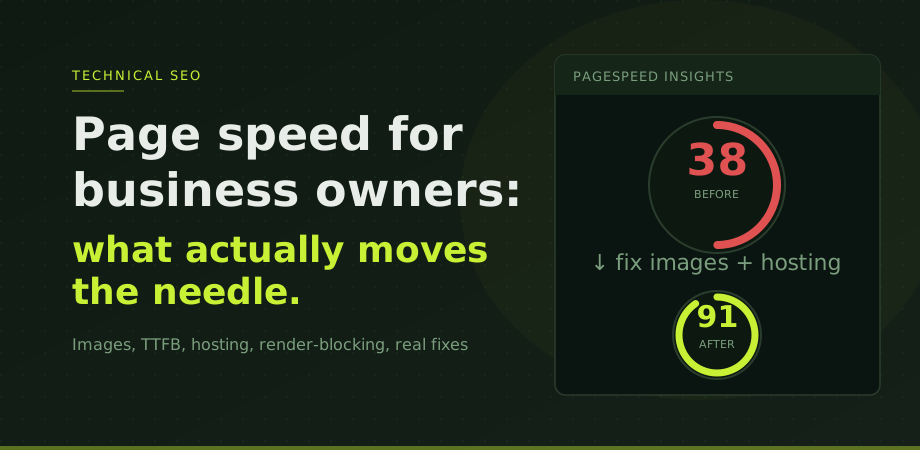
Page speed matters for two reasons. It is a ranking signal through Core Web Vitals, and it directly affects whether visitors stay on your site long enough to become customers. The compound effect on rankings AND conversion is more on that in how page speed affects both rankings and conversion. A page that takes five seconds to show its main content loses a significant portion of its visitors before any of your SEO or conversion work has a chance to matter.
The problem with most page speed advice is that it is written for developers, not for business owners making decisions about where to spend time and money. PageSpeed Insights returns 40 separate recommendations. Most of them will move the score by less than two points. A few of them will move it by 20 or 30 points. This guide is about the few that actually matter.
To get to understand how page speed fits into the broader Google ranking picture, the Core Web Vitals guide covers the three specific metrics Google measures and what each threshold means.
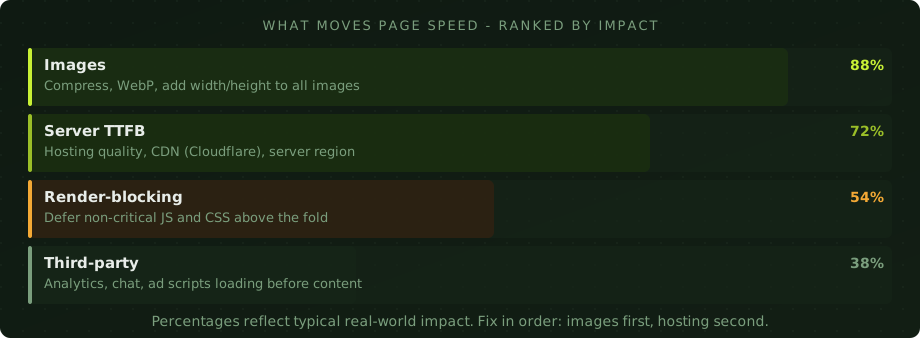
Images: the biggest lever by far
On the majority of slow websites, images are the primary cause of poor speed scores. A single unoptimised hero image can add two to four seconds to LCP on its own. Most business sites have several of them.
The fixes are straightforward. First, convert images from JPEG or PNG to WebP. WebP files are typically 25 to 35 percent smaller than JPEG at equivalent visual quality. Every modern browser supports WebP. There is no reason not to use it. Tools like Squoosh (free, browser-based) or Shortpixel (WordPress plugin) handle this without developer involvement.
Second, compress images before uploading. Uploading an image directly from a camera or design tool means serving a file many times larger than necessary. A hero image should rarely exceed 150KB. A product thumbnail should be under 40KB. If yours are larger, they are slowing the page.
Third, add explicit width and height attributes to every image in the HTML. This tells the browser how much space to reserve before the image loads, which prevents layout shift (CLS) and lets the browser start rendering the rest of the page without waiting. It is one line of change per image and has a disproportionate effect on scores.
Fourth, for your main hero image specifically, add fetchpriority="high" to the img tag and loading="eager". This tells the browser this is the most important image on the page and should be loaded as a priority. For the LCP element, this alone can cut loading time noticeably.
Server response time: the Thailand problem
Time to First Byte (TTFB) is the time between a user requesting a page and their browser receiving the first byte of the response from the server. It happens before any image, script, or visible content starts loading. If TTFB is 800 milliseconds or above, the page is starting behind before anything else has happened.
In Thailand and across Southeast Asia, shared hosting on local servers frequently produces TTFB values between 800 milliseconds and 1.5 seconds. I have audited sites in Bangkok where TTFB alone accounted for the majority of the LCP score failure. No amount of image optimisation compensates for a server that is simply slow to respond.
The fastest fix is adding Cloudflare in front of your existing host. The free tier takes about 30 minutes to configure and typically cuts effective TTFB by 40 to 60 percent for repeat visitors through caching and CDN delivery. For sites serving international audiences, Cloudflare delivers content from a data centre geographically close to each visitor, which reduces the distance the data has to travel.
If Cloudflare does not resolve the TTFB, the server itself is the problem. Moving to a VPS or a managed hosting provider with SSD storage and better regional infrastructure is the next step. This is an infrastructure decision, not a code decision, and it applies equally to WordPress sites, static HTML sites, and anything else.
Page speed is closely connected to your overall SEO performance. Fixing TTFB is often the first recommendation in a full technical SEO engagement because it sits underneath everything else.
Render-blocking resources: the developer fix
Render-blocking resources are JavaScript and CSS files that load in the head of the page and prevent the browser from rendering visible content until they finish downloading. A page with several render-blocking scripts can add a second or more to the time before the user sees anything on screen.
The fix for JavaScript is adding defer or async to script tags. Deferred scripts load after the page has parsed, meaning they do not block rendering. For most analytics scripts, chat widgets, and marketing tools, deferred loading has no visible effect on functionality.
For CSS, the approach is to identify which styles are needed to render the above-the-fold content (critical CSS) and inline those styles directly in the HTML head, while loading the rest of the stylesheet asynchronously. This is more involved and typically requires developer time, but the impact can be significant on content-heavy pages.
This fix requires more technical involvement than image optimisation, which is why it sits lower on the priority list. Fix images and TTFB first. If the score is still poor after those two changes, render-blocking is the next place to look.
Third-party scripts: the hidden cost
Every third-party script on your page is a dependency outside your control. Google Analytics, Facebook Pixel, Google Tag Manager (loading other scripts through it), live chat tools, A/B testing platforms, cookie consent managers, social sharing buttons: each one adds network requests, parsing time, and potential blocking behaviour.
The accumulation effect is significant. A site with eight or nine third-party scripts loading on every page will consistently score worse than a cleaner site, regardless of how well-optimised the site itself is. I regularly see this as the limiting factor on sites that have fixed images and hosting but still cannot get past a certain score threshold.
The audit is straightforward: open PageSpeed Insights, scroll to the Reduce the impact of third-party code section, and look at which scripts are contributing the most delay. Then ask honestly whether each one is actively generating business value. Tools that were added and forgotten are common. A live chat widget that nobody monitors is adding load time for zero benefit.
For scripts that cannot be removed, the next best option is loading them after user interaction rather than on page load. Google Tag Manager supports trigger-based loading. Some scripts can be loaded via a Web Worker to move them off the main thread. These are developer-level solutions, but the business decision of whether to load the script at all is yours to make first.
The Thailand hosting context
It is worth being direct about hosting quality in the Thai market because it comes up constantly in technical audits. Many Thai-built websites are hosted on shared servers with local providers that prioritise cost over performance. These servers produce TTFB values that would be considered unacceptable in Western hosting markets but are treated as normal here.
The good news is that the fix is accessible and cheap. Cloudflare's free plan handles CDN, caching, and basic performance optimisation in a way that brings Thai-hosted sites much closer to international performance benchmarks without requiring a server migration. For sites with a global audience, it is close to mandatory.
For sites that need higher baseline performance, VPS hosting with providers like DigitalOcean, Vultr, or Linode costs between five and twenty dollars per month and produces TTFB values under 200 milliseconds. Compared to the revenue impact of a faster site, the hosting cost is negligible.

The right order to fix things
The order matters because each fix builds on the previous one. Starting with render-blocking optimisation before fixing images and hosting is working in the wrong direction: the downstream improvements will be masked by the upstream problems.
Start by checking Google Search Console for Core Web Vitals field data. Identify which pages are scoring Poor. Run PageSpeed Insights on those specific pages. Look at the field data panel first, not the lab score. Fix images: compress, convert to WebP, add dimensions, set fetchpriority on the hero. Check TTFB: if it is above 600 milliseconds, add Cloudflare or address the hosting. Then look at render-blocking resources. Finally, audit third-party scripts and remove anything that is not earning its place.
If speed issues are a recurring problem or you want a professional assessment of where your site stands technically, our digital consultancy service covers page speed as part of a broader technical review. The SEO audit checklist also walks through how page speed fits alongside other technical factors worth reviewing.
Page speed questions
Does page speed directly affect Google rankings?
Yes, through Core Web Vitals. LCP, INP, and CLS became confirmed ranking signals in 2021. A poor score is unlikely to undo strong content and authority, but in competitive searches it acts as a tiebreaker. More immediately, slow pages lose visitors before any ranking benefit can be realised.
What is the single biggest page speed fix for most sites?
Images. Converting to WebP, compressing properly, and adding explicit width and height attributes typically produces the largest LCP improvement for the least effort. On most sites this single set of fixes moves the score more than everything else combined.
My lab score is good but my site still feels slow. Why?
Lab scores are simulated under controlled conditions. Real users visit from different devices, networks, and locations. Poor hosting TTFB affects real users but may not show up clearly in a lab simulation. Check field data in Google Search Console and PageSpeed Insights, which reflects actual Chrome user experience.
How much does page speed affect conversion rates?
Significantly. Pages loading under two seconds consistently convert better than those taking four or more seconds. The relationship is not always linear, but faster pages lose fewer visitors before they have a chance to convert. For e-commerce and lead generation sites, a one-second improvement in load time typically produces measurable revenue impact.