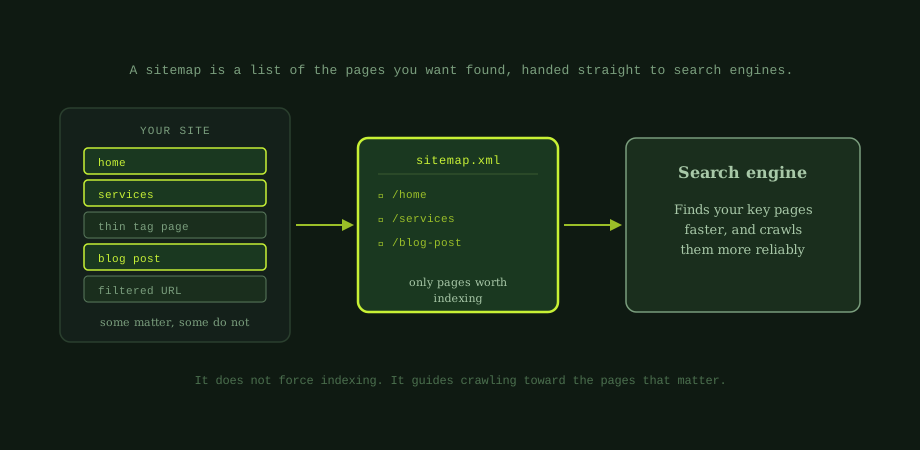
Imagine handing a new visitor a simple map of your building that marks only the rooms worth seeing. That is what an XML sitemap does for search engines. It is a file, usually at yoursite.com/sitemap.xml, that lists the pages you want them to find and crawl. Sitemap discipline matters most on sites large enough to have a crawl-budget ceiling; read alongside crawl budget for SEO.
It is written for machines, not people, so it looks like code. But the idea is plain: here are my important pages, please find them. Let us clear up what it does, what it does not, and how to keep yours useful.
What a sitemap does, and does not, do
A sitemap helps search engines discover your pages efficiently and understand your site structure. This matters most in three cases:
- Large sites, where there are many pages to find.
- New sites, with few external links pointing to them yet.
- Sites with buried pages, that are hard to reach through normal navigation.
Now the important part, what it does not do. A sitemap does not force pages to be indexed, and it is not a ranking factor. Listing a page does not guarantee it appears in search, and leaving a strong page off your sitemap does not mean it cannot rank. It is a discovery aid, not a magic switch. If a page is not getting indexed, the sitemap is only part of the picture; the bigger picture is in fixing indexing problems in Search Console.
The golden rule: only your good pages
Here is the single most important principle. Your sitemap should list only the pages you actually want indexed. Your canonical, indexable, valuable pages, and nothing else.
A common mistake is dumping every URL on the site into the sitemap, including ones you do not want in search. That sends search engines mixed signals: the sitemap says "index this," while a noindex tag or canonical says "do not." A clean sitemap that lists only good pages is far more useful than a bloated one that lists everything.
The six rules for a clean sitemap
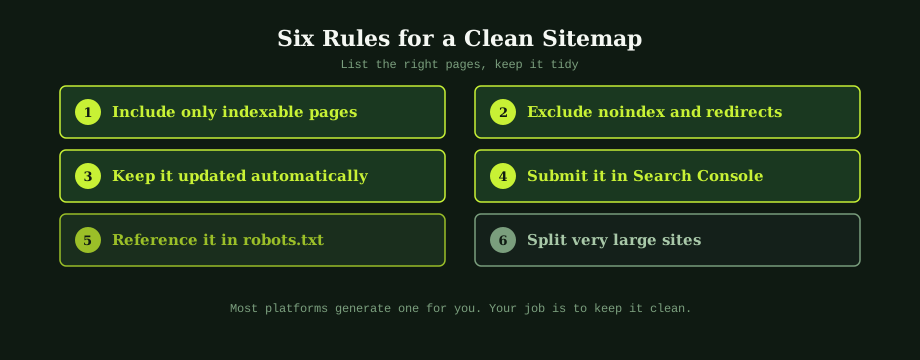 the plain guide to robots.txt and canonical tags.txt, and split very large sites" style="width:100%; border-radius: var(--r-md);" loading="lazy" width="920" height="360">
1. Include only indexable pages
Every URL in your sitemap should be one you want to appear in search: live, canonical, and worth indexing. If you would be happy to see it rank, it belongs.
2. Exclude noindex, redirects, and duplicates
Leave out anything marked noindex, anything that redirects elsewhere, duplicate pages, pages blocked in robots.txt, and thin URLs like endless filter combinations. The last of these is the same problem behind faceted navigation: do not list URLs you would not want indexed.
3. Keep it updated automatically
Your sitemap should reflect your site as it changes. When you add or remove pages, it should update too. Most platforms do this automatically, which is by far the most reliable approach. A stale, hand-made sitemap quickly drifts out of date.
4. Submit it in Search Console
Tell Google where your sitemap is by submitting it in the Sitemaps section of Search Console. Google then reports how many URLs it found and flags any errors, which is genuinely useful for spotting problems early.
5. Reference it in robots.txt
Add a line to your robots.txt file pointing to your sitemap's full URL. This lets search engines discover it on their own, even before you submit it. It is a small step that helps.
6. Split very large sites
A single sitemap has limits, 50,000 URLs or 50MB. Large sites split their URLs across multiple sitemaps, tied together by a sitemap index file. Most platforms handle this for you, but it is worth knowing if your catalogue is huge.
How a sitemap fits your wider SEO
A sitemap is one piece of your technical foundation, and it works best alongside the others. A clean URL structure makes your sitemap easy to read. A logical site with good navigation means search engines can find pages even without it. And checking your sitemap is part of any basic technical SEO audit, where you confirm it lists the right pages and nothing else.
For most businesses, the practical takeaway is short. You almost certainly already have a sitemap, generated by your platform. The job is not to build one from scratch; it is to make sure it is clean, current, and submitted. Check what it contains, remove anything that should not be there, and confirm Google can see it.
Technical foundations including the sitemap, crawling, and indexing are part of every audit we run, because the simplest problem often hides the biggest one. Our best SEO Bangkok cover all of it. An SEO expert in Bangkok can review what your sitemap lists today and fix anything sending the wrong signal.
Common questions
What is an XML sitemap?
An XML sitemap is a file that lists the pages on your site you want search engines to find and crawl. It is written in a format made for machines rather than people, and it usually lives at a path like yoursite.com/sitemap.xml. Think of it as a guide you hand to search engines, saying here are the pages that matter. It does not force anything to be indexed, and it is not a ranking factor, but it helps search engines discover your important pages efficiently and understand your site. This matters most for large sites, new sites with few links, and sites with pages that are hard to reach through normal navigation.
Do I need an XML sitemap?
Most sites benefit from one, and there is little reason not to have one. It is especially valuable if your site is large, if it is new and has few external links pointing to it, or if some pages are buried deep in your navigation and hard for crawlers to reach. For a very small, well-linked site, a sitemap matters less, because search engines can find everything through links anyway. But since most website platforms generate a sitemap automatically and submitting it is simple, the sensible default is to have one. It helps search engines find your pages and gives you useful coverage data in Search Console.
What should I include in my sitemap?
Include only the pages you actually want indexed: your canonical, indexable, valuable pages. Exclude anything that should not appear in search, such as pages marked noindex, pages that redirect elsewhere, duplicate pages, pages blocked in robots.txt, and thin or low-value URLs like endless filter combinations. A common mistake is dumping every URL into the sitemap, including ones you do not want indexed, which sends search engines mixed signals. A clean sitemap that lists only your good pages is far more useful than a bloated one. If a page is not good enough to want in search results, it does not belong in your sitemap.
How do I submit my sitemap to Google?
Submit it through Google Search Console. In the Sitemaps section, enter the path to your sitemap, usually sitemap.xml, and submit it. Google will then process it and report how many URLs it found and any errors, which is useful for spotting problems. You should also reference your sitemap in your robots.txt file, by adding a line pointing to its full URL, so search engines can discover it on their own. Together, these two steps, submitting in Search Console and referencing in robots.txt, make sure search engines know where your sitemap is and can use it to find your pages.