When you add a keyword to Google Ads, you also choose how strictly it must match a search. That choice is the match type. It is the difference between your ad showing only for the exact thing you sell, or for a wide range of loosely related searches.
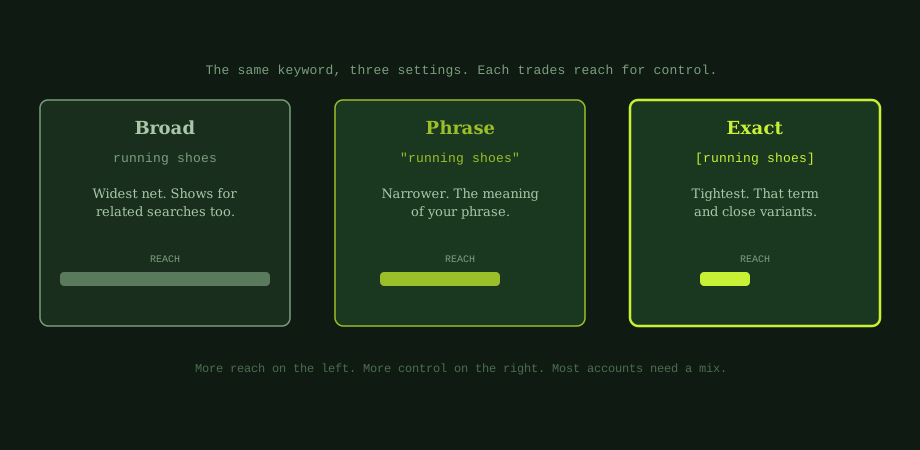
There are three match types: broad, phrase, and exact. They run along a simple scale. Broad gives the most reach and the least control. Exact gives the most control and the least reach. Phrase sits in between. Understanding this scale is the key to spending wisely.
Broad match: the widest net
Broad match is the default, and the riskiest if you are not careful. You write it with no symbols, just the words: running shoes.
With broad match, Google can show your ad for a wide range of searches it thinks are related, even ones that do not contain your words at all. Someone searching "jogging trainers" or "marathon gear" might see your ad. The upside is reach. The downside is that you can pay for clicks that are only loosely relevant. Broad match needs tight controls to be safe.
Phrase match: a controlled middle
Phrase match narrows things down. You write it in quotation marks: "running shoes".
Now your ad shows for searches that include the meaning of your phrase. "Best running shoes for beginners" or "buy running shoes online" would match, because they contain the idea of running shoes. A search for unrelated footwear would not. Phrase match is a good balance of reach and control for most situations.
Exact match: the tightest control
Exact match is the most precise. You write it in square brackets: [running shoes].
Your ad shows only for that term and very close variants, like small misspellings or reordering. This gives you the most control and usually the most relevant, highest-converting traffic. The reach is smaller, but every click is closely matched to what you offer. Exact match is where you want your proven, money-making keywords.
When to use each
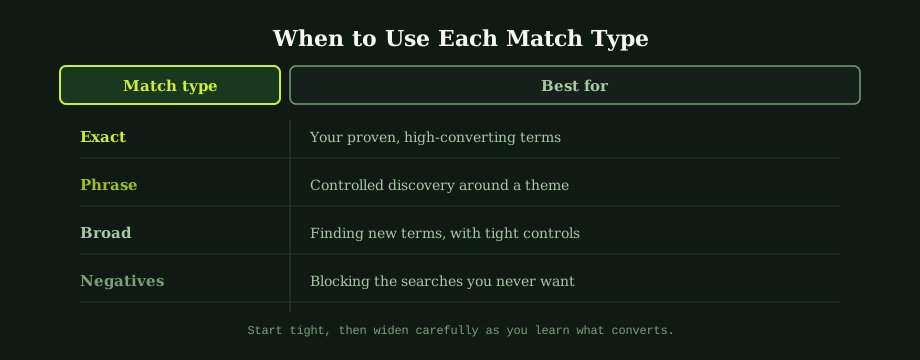
Here is a simple way to decide.
- Exact match for your proven, high-converting terms. You know they work, so you want tight control and predictable results.
- Phrase match for controlled discovery. It captures relevant variations around a theme without going too wide.
- Broad match only when you want to find new terms, and only with tight controls in place.
A good general approach is to start tight. Begin with exact and phrase, learn what converts from your search terms report, then widen carefully. This is far safer than starting broad and trying to rein in wasted spend later. It also keeps your ad groups focused, which supports your Quality Score and lowers your cost per click.
Negative keywords: the other half of control
Match types decide what can trigger your ad. Negative keywords decide what never can. They work together.
A negative keyword tells Google to never show your ad for searches containing that word. If you run a premium service, you might add "free" and "cheap" as negatives, so bargain hunters never cost you a click. With broad match especially, a strong negative keyword list is essential, because broad match reaches widely by design.
The habit that ties this together is reviewing your search terms report. It shows the actual searches that triggered your ads. Use it to spot irrelevant searches and add them as negatives, and to find good new terms worth targeting with exact match. This pre-qualifying mindset is the same one behind writing ad copy that gets clicks: focus spend on the right people.
Match types and your budget
It all comes back to budget. Every loosely matched click is money that could have gone to a buyer. Match types are how you keep your spend pointed at the searches that matter. Used well, they make a modest budget perform like a larger one, which is the goal we set out in how to set a Google Ads budget. They also depend on a clean account, more on that in Google Ads account structure.
Wrong match types and weak negative lists are how most Google Ads budgets quietly leak. Our Google Ads management in Thailand handles the structure, targeting, and ongoing refinement. An experienced PPC consultant Bangkok can audit a current account and tell you where the leaks are.
Common questions
What are keyword match types in Google Ads?
Match types are settings that tell Google how closely a search must match your keyword before your ad can show. There are three: broad, phrase, and exact. Broad match casts the widest net, showing your ad for related searches as well as your keyword. Phrase match is narrower, showing your ad for searches that include the meaning of your phrase. Exact match is the tightest, showing your ad for that term and close variants only. The trade-off runs from reach to control: broad reaches the most people but with the least control over relevance, while exact reaches fewer but with the most control. Most accounts use a mix.
What is the difference between broad, phrase, and exact match?
The difference is how much freedom Google has to match your keyword to searches. With broad match, written as running shoes, Google can show your ad for related searches, even ones that do not contain your words, which gives wide reach but less control. With phrase match, written as "running shoes" in quotation marks, your ad shows for searches that include the meaning of that phrase, giving moderate reach and control. With exact match, written as [running shoes] in square brackets, your ad shows only for that term and very close variants, giving the tightest control and the most relevant traffic.
Which match type should I use?
Most accounts should use a mix, matched to how proven a keyword is. Use exact match for your proven, high-converting terms, where you want tight control and predictable results. Use phrase match for controlled discovery around a theme, capturing relevant variations without going too wide. Use broad match only when you want to find new terms, and only with tight controls: strong negative keywords, careful bidding, and close monitoring of the search terms report. A good general approach is to start tight with exact and phrase, learn what converts, and widen carefully from there.
Do I still need negative keywords with match types?
Yes, negative keywords matter regardless of match type, and they matter most with broader ones. A negative keyword tells Google never to show your ad for searches containing that word, no matter what. This is how you block irrelevant or unprofitable searches that your match types would otherwise allow. For example, a premium service might add free and cheap as negatives. With broad match especially, a solid negative keyword list is essential to prevent wasted spend, because broad match deliberately reaches widely. Reviewing your search terms report and adding negatives is one of the most reliable ways to keep a campaign efficient.