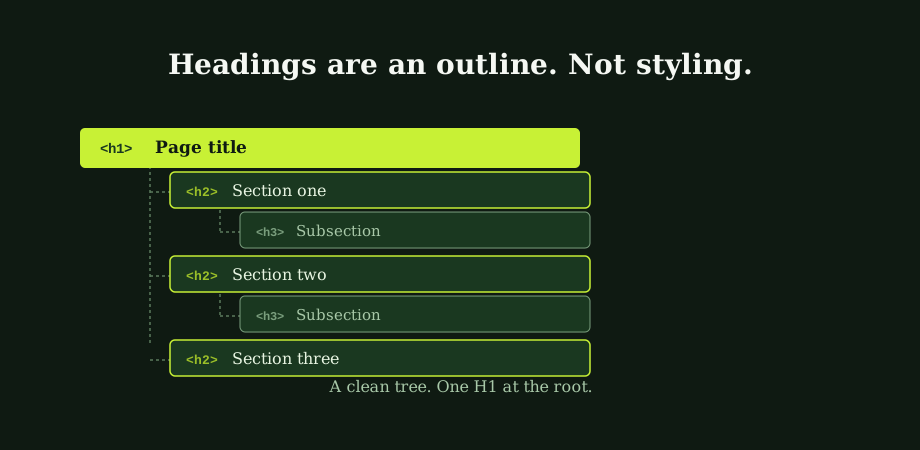
The history of headings on the web is one of design decisions overriding structural ones. HTML defined H1 through H6 as semantic markers for a document's outline. The H1 was the title. The H2s were sections. The H3s were subsections. The visual rendering, with each level a bit smaller than the last, was a consequence of the structure. It was not the point of it.
What happened in practice is that web designers started using H tags as styling shortcuts. The visual designer wanted a slightly smaller "header look" so the developer reached for H3. Eventually CSS could style anything to look like anything. But the habit persisted. The result is heading structure that reflects which size of text the writer wanted at each moment. Not what each section actually is in the page outline. Google notices.
What heading tags are for
The standard model is the document outline. Headings give a page its skeleton. H1 for the main title. H2s for the top-level sections. H3s for the subsections of each H2. H4s for the subsections of each H3. And so on through H5 and H6. The outline reads top to bottom as a hierarchical table of contents.
Two things to understand about that model. The first is that it is the structure a screen reader uses to let a blind user navigate a page. Jumping H2 to H2 is how a screen reader user skims an article. The second is that it is the structure Google's parser builds when it indexes a page. Clean heading structure makes the page easier to understand. Easier to understand makes it easier to rank. Easier to rank makes it more likely to appear in featured snippets and answer boxes that pull H2 or H3 text directly. The overlap between accessibility and SEO is largest at headings. Both consumers parse them the same way.
Should every page have exactly one H1?
The simplest rule is: one H1 per page. It aligns with how the document outline is meant to work. It aligns with how accessibility tools parse content. It aligns with how SEO crawlers report on heading structure. The H1 is the page title. You have one of those per page.
Google has stated publicly that multiple H1s do not cause a penalty and that the parser handles them without confusion. The HTML5 specification permits multiple H1s in nested sectioning elements. Both statements are true. Neither is a recommendation. They describe what is tolerated, not what is ideal. A page with a single H1 is unambiguous. A page with three H1s asks Google and screen readers to guess which one is the actual page title. The cost of getting it wrong is small. So is the cost of just having one.
The cases where multiple H1s show up most often are CMS templates that mark the site logo as an H1, or where the page title and the article title both get the H1 treatment by default. Both are template-level fixes worth making once.
How Google reads heading structure
Heading tags are one of many signals Google uses to understand what a page is about. The signal is not the strongest one. But it carries hierarchical weight. H1 weighs more than H2. H2 more than H3. And so on. A page with a clear H1 and a few well-named H2s sends a stronger signal than a page where the headings are styling decisions in disguise.
The bigger effect of clean heading structure is indirect. Pages with good outlines are more readable. More readable pages get longer dwell time, lower bounce, and more sharing. All three feed engagement signals that compound over time. Clean headings also produce the table-of-contents text that featured snippets often pull. That can drive a substantial share of organic traffic on informational queries.
The deeper view of how on-page signals interact with off-page ones sits in on-page versus off-page SEO.
The most common heading mistakes
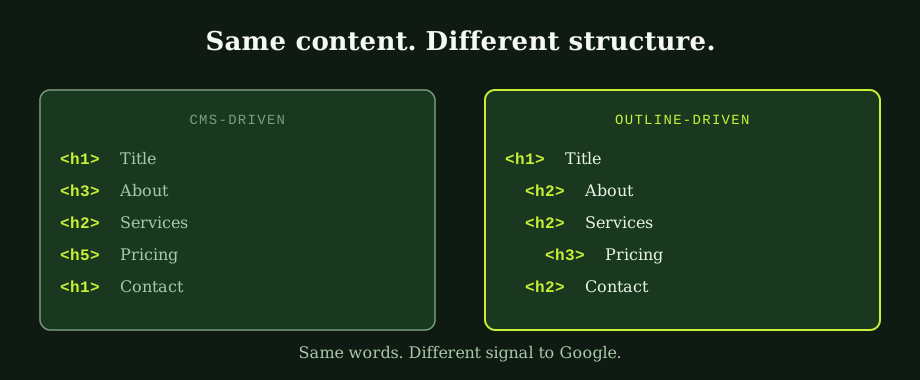
The patterns that come up most often in heading audits.
- Skipping levels. H1 jumps to H3 with no H2 between them. The outline parser sees a gap and either guesses or marks the structure broken. Easy to fix; common to find.
- Levels chosen by visual size. The writer wanted a heading slightly smaller than the section header, so they picked H4 even though the content is a sibling of the surrounding H3s. The visual works; the semantic structure does not.
- Multiple H1s from the template. The site logo, the article title, and a sidebar widget all happen to render as H1. Fix it once in the template.
- Empty headings. An H2 wrapping nothing but an icon or a decorative element. Google reads the tag and finds no content, which contributes nothing to the outline and quietly noises the parser.
- Keyword stuffing. Every H2 contains a slight variation of the target keyword. Reads to Google as low-effort optimisation; reads to readers as a page that does not describe its own sections.
- Headings for non-headings. Marking up calls to action, prices, or product names as H tags because they look like headings visually. The H tags say "this is a structural section." Buttons are not sections.
None of these is a penalty. All of them quietly weaken the outline signal. Most of them are fixable in a single template edit or content-audit pass.
Keyword usage in headings, without overdoing it
The keyword principle for headings is the same as for the rest of on-page SEO. Include the target keyword once where it belongs. Let the rest of the headings describe the content of their sections honestly. The primary keyword in the H1 should read like a real page title. Not like a search query pasted into HTML. Related terms in H2s are useful where they describe the section accurately. The mistake to avoid is using every H2 and H3 to repeat slight variations of the target keyword.
The simplest test: if the headings would read as a useful table of contents for someone scanning the page, they are doing their job. If they read as a list of search-engine-optimised phrases that all mean roughly the same thing, the page has been over-optimised. That often costs more than it gains.
This connects to the wider on-page question of how the title tag and the meta description should differ from the heading. The title tag mechanics live in how to write title tags that rank and get clicked. The meta description companion lives in how to write meta descriptions that get clicks.
The H1 versus title tag question
The most common confusion in heading discussions is the relationship between the H1 tag and the title tag. They are different elements that do different jobs.
The title tag lives in the HTML head. It never appears on the visible page. It is what shows in the browser tab and the search-engine result. The H1 lives in the HTML body. It appears on the page as the main heading. It is what the reader sees first. They describe the same page in different contexts.
Well-built pages have title tags optimised for search-result click-through (often including brand or location). H1s optimised for the on-page reading experience. They should be consistent in meaning but they do not need to be identical strings. Pages that ignore this difference and use the same string for both often have a title tag that is too short for search results or an H1 that is too long for visual hierarchy.
Headings and accessibility
Accessibility tools rely on heading structure to give blind and partially sighted users a way to navigate pages. Screen readers expose the heading outline as a navigable list. Users jump between H2s the way sighted users use a sidebar table of contents. A page with broken heading structure is harder to navigate for screen reader users. In roughly the same way it is harder for Google to parse. Both consumers want a clean outline. Both produce a worse outcome when the outline is broken.
The overlap is meaningful for SEO programmes because the same fixes serve both goals. Site audits that include accessibility checks usually catch heading issues alongside the SEO ones, and the fixes cost the same.
The honest version of heading optimisation
Heading tags are a modest direct ranking signal and a meaningful indirect one. Pages with clean outlines are easier for Google to parse, easier for users to scan, easier for accessibility tools to navigate, and more likely to surface in featured snippets. The work to clean them up is template-level on most sites. A one-time review of which CMS elements get which H tag by default. Plus a content audit for the worst offenders. The investment is small. The payoff is consistent across the entire site.
Our best SEO in Bangkok work routinely starts with a heading-structure pass during the initial audit. It is the single cheapest source of on-page improvement on most CMS-built sites. The full technical SEO service includes the template-level fixes that produce site-wide gains. Not just per-page edits. An SEO consultant in Thailand can audit your heading structure and identify the highest-impact fixes in a single session for a small site.
Common questions
How many H1 tags should a page have?
One. The standard advice for most pages is one H1 per page, used for the main title of the page. Google has said publicly that multiple H1s do not cause a penalty and that it can parse pages with several H1s without confusion, but those statements describe what Google tolerates rather than what is ideal. The simplest rule that aligns with how the document outline is meant to work, how accessibility tools parse content, and how SEO crawlers report on heading structure is: one H1 per page, used for the main page title.
Do heading tags affect SEO rankings?
Yes, but indirectly and modestly. Google uses heading tags as one of many signals about what a page is about, with the H1 carrying more weight than the H2, which carries more weight than the H3, and so on. The signal is not strong enough on its own to rank a page that does not deserve to rank, but a page with no clear heading structure is harder for Google to understand. The bigger effect is indirect: pages with good heading structure are more readable, get better engagement signals, and feed featured snippets and answer boxes where Google pulls the matching H2 or H3 text as the snippet.
Should I use keywords in heading tags?
Yes, but naturally and selectively. The primary target keyword should appear in the H1 in a way that reads like a genuine page title, not like a search query stuffed into HTML. Related keywords and topic variations can appear in H2s and H3s where they describe the actual content of those sections. The mistake to avoid is using every H2 and H3 to repeat slight variations of the target keyword: this looks artificial to both Google and readers, and it tends to produce a page that is hard to skim. The simplest test: if the headings would read as a useful table of contents when extracted from the page, they are doing their job.
What is the difference between H1 and the page title tag?
The title tag is what appears in the browser tab and the search results, defined in the head of the HTML. The H1 is what appears on the page itself as the main heading, defined in the body. They are different elements with different functions, although both describe what the page is about. In most well-built pages they are similar but not identical: the title tag is often optimised for search-result click-through, with explicit reference to the brand or location, while the H1 is optimised for the on-page reading experience. They should be consistent in meaning but they do not need to be the same string.