Google rendered no JavaScript at all for most of its history. Then it could render some, with delays. Today it renders most JavaScript reasonably well, with smaller delays. That arc is real, and it is also why JS SEO advice from 2017 reads as either alarmist or already solved. The truth in 2026 sits in between.
How Google actually indexes a JavaScript site
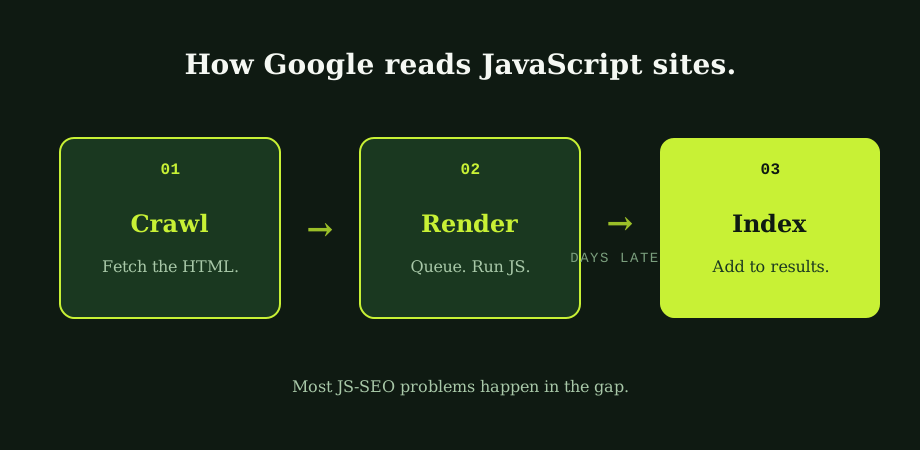
The crawl-and-index process for a JavaScript site is not one step but two. The first step crawls the raw HTML, the bytes the server returns when Googlebot makes a request. The second step queues the page for rendering, which means Google runs the JavaScript in a headless browser, gets the resulting HTML, and only then indexes the rendered output.
The first step happens quickly, in the normal crawl budget Google allocates to a site. The second step happens in a separate, finite render queue that Google has confirmed publicly for years. Pages on prominent, well-maintained sites move through the queue quickly. Pages on smaller or weaker sites wait longer. The gap between the two can be minutes; it can also be days, occasionally weeks.
For sites whose meaningful content depends on JavaScript to appear, that delay is the central JS SEO problem. The page is technically indexable. It just lands in Google's index later, sometimes much later, than the equivalent pre-rendered page would.
The rendering choice that decides everything
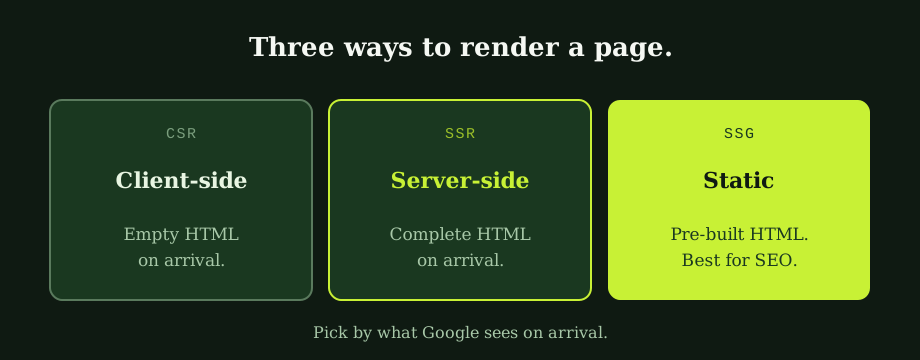
Three rendering strategies cover most of the modern web. Each has a different relationship with Google's indexing pipeline.
Client-side rendering (CSR). The server returns a small HTML shell. The browser downloads JavaScript, runs it, fetches data, and builds the page in place. Google sees the shell on the first pass and queues the page for rendering. This is the default for many React, Vue, and Angular applications built with the basic CLI, and it is what creates most JS SEO problems. CSR is fine for authenticated dashboards and applications behind a login. It is risky for anything that needs to rank.
Server-side rendering (SSR). The server runs the same JavaScript itself and returns complete HTML. The browser then hydrates that HTML to add interactivity. Google sees the full content on the first pass. Frameworks like Next.js, Nuxt, Remix, and SvelteKit all support SSR as their preferred mode for content-heavy pages.
Static site generation (SSG). Every page is built as a static HTML file at deploy time, before any user request. Google fetches a fully rendered file with no JavaScript dependency for content. This is the fastest, cheapest, and most SEO-friendly option for any page whose content does not change per user. Modern documentation sites, marketing sites, and blogs run on SSG for exactly this reason.
For any page that needs to rank, the choice is between SSR and SSG. CSR is a defensible choice only when the SEO cost is genuinely acceptable, which is rarer than developers tend to assume.
Where JavaScript sites typically fail
A short list, drawn from actual audits, of the patterns that quietly cap rankings.
- Single-page applications without real URLs. The whole site is one HTML file, and JavaScript handles navigation by swapping content client-side. Google sees one page. Internal links exist only in JavaScript routing definitions, never in HTML
<a href>tags. The fix is either to add real URLs with proper server responses, or to use a framework that handles this for you. - Content loaded by user interaction. Tabs, accordions, "load more" buttons, and infinite scroll where the deeper content only renders after a click. Googlebot does not click. Whatever requires interaction to appear is, for ranking purposes, not there. The fix is to make the additional content present in the initial HTML, even if visually hidden, or paginate it with real URLs.
- Structured data injected by JavaScript only. JSON-LD added to the page by a third-party tag manager or a client-side script may or may not be seen by Google depending on rendering pipeline timing. The safer pattern is to deliver structured data in the initial server response. The fundamentals sit in the plain guide to robots.txt and canonical tags, which the JS layer can quietly undo if rendering is misconfigured.
- Render-blocking JavaScript bundles. Large JS bundles that block rendering hurt Core Web Vitals as measured by Googlebot, which now indexes the mobile-rendered version. The mobile-first context sits in what mobile-first indexing actually changed, and the performance side of the same problem sits in core web vitals explained.
- Canonical tags or meta robots set by JavaScript. If the canonical or noindex value is determined client-side and only injected after JS runs, Google's first-pass crawl may see a different value than the eventual rendered version. The result is unpredictable indexing. Canonicals and robots directives belong in the server response, every time.
None of these problems are framework-inherent. They are framework-default. Each one has a known, well-documented fix inside React, Vue, Angular, Svelte, and every other major framework. The fixes simply need to be chosen deliberately rather than left at default.
The fix order, in five steps
For a site already in production, the work runs in a fixed sequence. Doing it out of order produces partial wins and confusion.
- Run URL Inspection in Search Console on five important pages. Look at the rendered HTML view. Note what is present, what is missing, and what differs from view source.
- Identify the rendering mode the site is using. CSR, SSR, SSG, or a hybrid. If you can't tell from the codebase, ask the developer who built it. If they can't tell, that is itself the answer: it is probably CSR by default.
- Decide what should change. For most content-led sites the answer is SSR or SSG for pages that need to rank, with CSR reserved for authenticated areas.
- Move the canonical tag, meta robots, and structured data to the server response. These are foundational and should never depend on JS execution.
- Replace JavaScript-only navigation with real URLs. Every link that should be discoverable becomes a real
<a href>in the initial HTML.
Most of this is one-time work, done by the development team in collaboration with whoever runs SEO. After it is done, the rendering strategy compounds: every new page on the site inherits the same fast-indexing behaviour, and JS SEO mostly stops being a topic.
What this looks like for non-developers
Marketing leads and business owners reading this can skip the framework names and reduce it to four questions worth asking your development team.
- Does our site use server-side rendering or static generation for pages that need to rank?
- When Google's URL Inspection runs on our top pages, does the rendered HTML contain the content we want to be found for?
- Are our canonical tags, meta robots, and structured data set in the server response, not by JavaScript?
- Are our internal links real HTML anchor tags, not JavaScript click handlers?
"Yes" to all four means JS SEO is essentially solved on your site. "No" or "I don't know" to any of them is worth a deeper audit, because each "no" represents ranking value being left on the table.
Frameworks are neutral. Rendering defaults are not.
The pattern across nearly every JS-SEO audit lands on the same insight. The problem is not the framework. React, Vue, Next, Nuxt, Svelte, every modern stack can deliver complete HTML on the first request. They can also be configured to deliver an empty shell that Google sees, queues, and partially indexes weeks later. The framework is neutral. The rendering default is the SEO decision. Get that right and JavaScript SEO largely stops being a problem worth thinking about.
Our SEO Bangkok team works with development teams on that decision, ideally before frameworks are picked, and routinely after frameworks are in place. Our technical SEO services include the rendering audit and the strategy conversation. An SEO expert in Bangkok can review the production HTML of your top pages in less time than the rest of a sprint review takes.
Common questions
Can Google index JavaScript sites?
Yes, but not the way many developers assume. Google indexes JavaScript in two passes. The first pass crawls the raw HTML that the server returns. The second pass, queued separately, runs the JavaScript and renders the page, then sends the rendered HTML back to be indexed. The first pass happens quickly. The second pass can take anywhere from minutes to weeks depending on how much rendering work Google has queued for sites it considers a priority. For a content site whose entire content is loaded by JavaScript after the initial HTML, that delay means new content takes much longer to appear in search results, and important content can be missed if the rendering pipeline runs out of budget.
What is the difference between CSR, SSR, and SSG?
Client-side rendering, or CSR, means the server sends a near-empty HTML shell to the browser. The browser then runs JavaScript that fetches data and builds the page in place. Google sees the empty shell first and must come back to render the rest. Server-side rendering, or SSR, means the server runs the JavaScript itself and sends back complete HTML, then the browser hydrates that HTML to make it interactive. Google sees complete content immediately. Static site generation, or SSG, builds every page as a static HTML file at build time, before any user requests it. Google fetches a fully rendered file with no JavaScript dependency for content.
Does Google really have a render queue?
Yes, and Google has confirmed this in its own documentation and developer talks for years. The infrastructure that handles JavaScript rendering is finite. Pages that need rendering wait in a queue. Pages on sites Google considers important and well-maintained move through faster. Pages on sites with weak crawl signals can wait days or longer. For new content on a JavaScript-heavy site, this is the central problem of JS SEO: even when Google eventually renders and indexes the page correctly, the delay between publishing and ranking is meaningfully longer than for an equivalent pre-rendered page.
How do I check if Google can read my JavaScript site?
Two tests, one quick and one definitive. The quick test is to view the page source in your browser, not the developer tools' Elements panel. View Source shows the raw HTML the server sent. If your page content is in that raw HTML, Google can read it on the first pass. If you see only a small skeleton with a div and a script tag, your content depends on JavaScript rendering and is subject to the render queue. The definitive test is Google Search Console's URL Inspection tool. Run it on a page you care about. The tool returns the rendered HTML as Googlebot actually sees it after running JavaScript. Whatever appears there is what Google has to rank.
Rendering problems are hard to confirm from the outside. A technical SEO audit tests what Google actually receives, rather than what the framework claims to output.