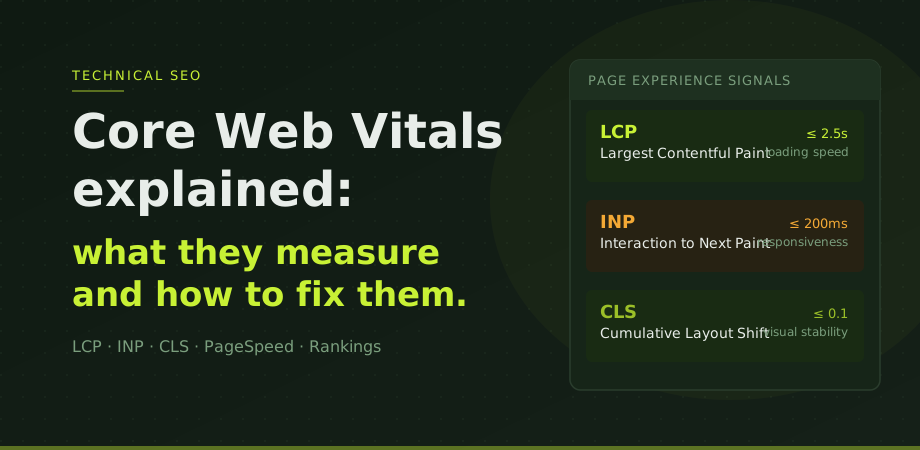
Core Web Vitals are three specific measurements Google uses to judge how good the experience of loading and using a page actually is. Not how it looks. Not whether the content is long. How it actually performs for a real user on a real device.
They became a confirmed ranking signal in 2021 as part of the Page Experience update and have remained one of the few technical factors Google has named publicly with clear, measurable thresholds. That matters because most SEO ranking factors are implied or inferred. Core Web Vitals come with specific numbers: good, needs improvement, or poor. There is no ambiguity about whether you pass or fail.
This guide explains what each metric measures, what the thresholds mean in practice, and what actually moves the numbers, not just what the definitions say.
Why they matter for rankings
Before looking at the individual metrics, it is worth being honest about how much Core Web Vitals affect rankings. Google has been careful not to overstate them. Pages with strong content, clear relevance, and solid authority will still outrank technically perfect but thin competitors. Core Web Vitals are a tiebreaker, not a trump card.
But in competitive searches where two pages are close in quality, the page that loads faster and shifts less will have an edge. More importantly, poor Core Web Vitals almost always reflect real user experience problems that affect bounce rate, engagement, and conversion rates independently of rankings. A page that takes five seconds to show its main content loses visitors before the ranking question even matters.
LCP: Largest Contentful Paint
LCP measures how long it takes for the largest piece of visible content to appear in the viewport. In practice this is usually a hero image, a large heading, or the main block of body text above the fold. See image SEO for the full checklist.
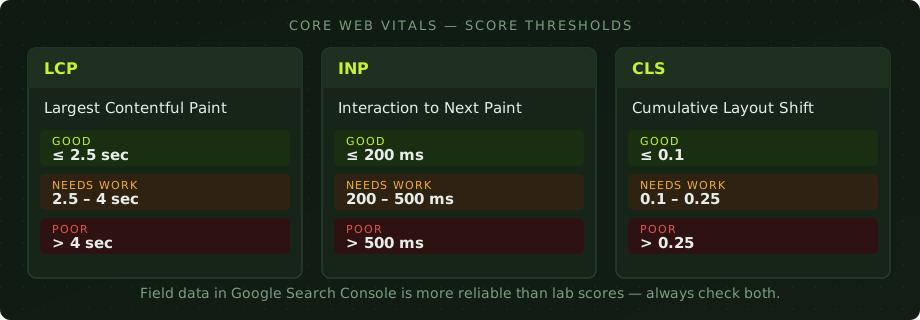
The thresholds are: good at 2.5 seconds or under, needs improvement between 2.5 and 4 seconds, and poor above 4 seconds. These are measured from when navigation begins, not from when the page starts rendering.
The four main causes of slow LCP are slow server response times (high time to first byte), render-blocking JavaScript or CSS that delays the browser from starting to paint, large unoptimised images, and slow third-party scripts that compete with the main content for resources. For the SEO side of the same problem, read alongside JavaScript SEO: when Google can't read your site.
In practice, the single biggest lever for most sites is image optimisation. If your hero image is a 2MB JPEG without explicit dimensions, that is almost certainly your LCP element and the main reason your score is poor. Converting to WebP, compressing properly, adding explicit width and height attributes, and preloading the LCP image if possible will move the score more than most other fixes combined.
The second biggest lever is server response time. In Thailand and across Southeast Asia, shared hosting on local servers frequently produces time to first byte values of 800ms to over 1.5 seconds, before the browser has received a single byte of your page. That alone can push LCP past the 2.5 second threshold regardless of how efficiently the rest of the page is built. I have seen sites that were well-optimised technically still failing LCP purely because of their hosting provider.
INP: Interaction to Next Paint
INP replaced FID (First Input Delay) as a Core Web Vital in March 2024. It measures the delay between a user action (a click, a tap, a keypress) and the next frame being painted to the screen. Where FID only measured the first interaction, INP measures the worst interaction throughout the whole session, giving a more complete picture of a page's responsiveness.
Good INP is 200 milliseconds or under. Needs improvement is 200 to 500 milliseconds. Poor is above 500 milliseconds.
INP problems are caused by heavy JavaScript running on the browser's main thread, long tasks that block interaction handling, and too many event listeners firing simultaneously. For most standard content sites and business pages, INP is rarely the primary failing metric. Where it shows up is on pages with complex interactive elements, heavily loaded analytics stacks, or poorly coded plugins. The kind of site that loads three analytics tools, a live chat widget, a cookie popup, and a social share bar all at once.
When your INP score is poor, start by looking at the total JavaScript payload and how much of it is actually needed on the page. Deferring non-critical scripts is usually the most effective fix.
CLS: Cumulative Layout Shift
CLS measures how much page content moves unexpectedly while the page is loading. When an image loads without declared dimensions and shoves the text down, that is a layout shift. When a sticky banner appears above the fold just as someone is about to tap a link, that is a layout shift. CLS is scored as a value rather than a time; it is a measure of the severity and extent of shifts, not their duration.
Good CLS is 0.1 or under. Needs improvement is 0.1 to 0.25. Poor is above 0.25.
The most common causes are images and video elements without explicit width and height attributes, ads or iframes loading without reserved space, web fonts causing text to reflow as they load, and content injected dynamically above existing content, like a cookie consent bar that loads after the page has already started rendering.
The fix for most sites is straightforward: add width and height attributes to every image and video element in the HTML. This tells the browser how much space to reserve before the resource loads, eliminating the shift entirely. If fonts are causing reflow, using font-display: swap with preloaded font files helps. For ads and iframes, reserve explicit minimum-height containers even before the content loads.
How to actually check your scores
Three tools matter here, and they are not interchangeable.
Google Search Console has a Core Web Vitals report under the Experience section. It shows real user data from Chrome, grouped by page type and URL group. It categorises pages as good, needs improvement, or poor. This is the most important tool because it reflects what actual visitors to your site are experiencing, not a simulated test environment. If you only check one thing, check this.
PageSpeed Insights at pagespeed.web.dev gives both lab data (simulated performance in a controlled environment) and field data (real Chrome user data for that specific URL if available). Use it on specific pages once GSC has told you which ones are failing. The lab data helps diagnose what is causing the problem. The field data tells you whether you have actually fixed it.
Chrome DevTools and Lighthouse are useful for local testing during development. Lighthouse runs the same lab simulation as PageSpeed Insights but lets you run it in your own browser. Useful for developers testing changes before deployment, but not a substitute for field data when assessing the real-world state of a live site.
One thing I see regularly with clients: their lab score looks fine but GSC shows poor scores. The lab environment runs under controlled conditions on a fast connection. Real users may be on mobile devices, slower connections, or geographies where your server is physically far away. The wider context for why mobile is the version Google ranks sits in what mobile-first indexing actually changed. Always treat field data as the authoritative measure.
The Thailand hosting problem
This is worth a section of its own because it comes up on almost every technical audit I run for businesses based in Bangkok or the wider ASEAN region. Shared hosting on Thai or Southeast Asian servers frequently produces server response times of 800 milliseconds to 1.5 seconds before a single byte reaches the browser. The applied Thai-market companion that covers what changes when the audience is on 4G rather than fast WiFi is in Core Web Vitals for Thai networks. That is the time to first byte, before images, scripts, or anything else on the page has even begun to load.
At 800ms TTFB with a reasonably well-built site, you are already starting from behind on LCP. Add a few unoptimised images and a couple of render-blocking scripts and poor scores are almost inevitable.
The fix is at the infrastructure level, not the code level. Options in order of effort: adding Cloudflare in front of your existing host (free tier, takes about 30 minutes to configure, often cuts effective TTFB by 40 to 60 percent through caching and CDN delivery); moving to a VPS or managed hosting provider with proper SSD storage and better regional performance; or moving to a host with a data centre closer to your primary audience.
This applies equally to WordPress sites, static HTML sites, and any other technology. No amount of code optimisation compensates for a slow server. Fix the infrastructure first.
What to fix and in what order
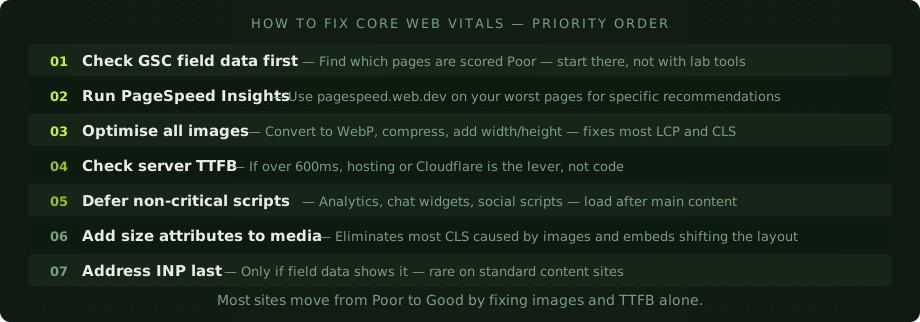
The priority order matters. A lot of teams make the mistake of addressing every issue simultaneously, or spending time on edge cases before fixing the things that actually cause failure. A practical order for most sites:
Start with Google Search Console to find which pages are actually poor. Run PageSpeed Insights on those specific pages. Fix image issues first: WebP format, proper compression, explicit dimensions on every image. Check your TTFB; if it is over 600ms, address hosting or add Cloudflare before touching anything else. Then look at render-blocking scripts and defer what you do not need above the fold. Finally, do a pass on layout shifts by auditing all images and embeds for missing size attributes.
INP should be the last thing you look at unless GSC field data is specifically showing it as a problem. For most content and service sites, it is not the failing metric, and spending time optimising JavaScript before fixing images and TTFB is working in the wrong order.
Core Web Vitals are one slice of technical health. The full picture sits in the SEO audit checklist, which covers the rest of what matters. Our SEO services handle the audit and the work that follows.
Common Core Web Vitals questions
Do Core Web Vitals directly affect Google rankings?
Yes, but they are a tiebreaker rather than the primary ranking factor. Pages with strong content and genuine authority will still outrank technically perfect but thin competitors. Where Core Web Vitals have the most measurable effect is in competitive searches where two pages are otherwise close in quality, and in the indirect effects on bounce rate and engagement that come from slow or unstable pages.
Which Core Web Vital should I fix first?
Fix LCP first. It has the most direct connection to perceived load speed and is the most commonly failing metric on real sites. For most businesses, optimising images and improving server response time will fix LCP and positively affect the other metrics at the same time, since faster servers and cleaner image loading improve the overall rendering chain.
How do I check my Core Web Vitals score?
Start with Google Search Console under Experience > Core Web Vitals. This shows real user data across your whole site. Then use PageSpeed Insights on specific failing pages for detailed diagnostic information. Always prioritise field data over lab scores; field data reflects what real visitors on real devices are actually experiencing.
My PageSpeed lab score is good but GSC shows poor: which is right?
Google Search Console is right. Lab scores simulate a controlled environment with consistent network conditions and device specs. Field data in GSC comes from real Chrome users visiting your actual pages, on their actual devices, connections, and locations. The two can differ significantly, especially on sites with variable server performance or heavy third-party scripts. Always treat GSC field data as the authoritative measure of your real-world Core Web Vitals status.
Core Web Vitals are one input among several. If rankings are the real concern, an SEO audit shows where speed sits relative to indexation, targeting and internal links, so the work happens in the right order.