Faceted navigation is the filtering system on an online shop. The menus that let a shopper narrow a category by colour, size, price, or brand. For users, it is excellent. For SEO, it can be a quiet disaster if you do not manage it.
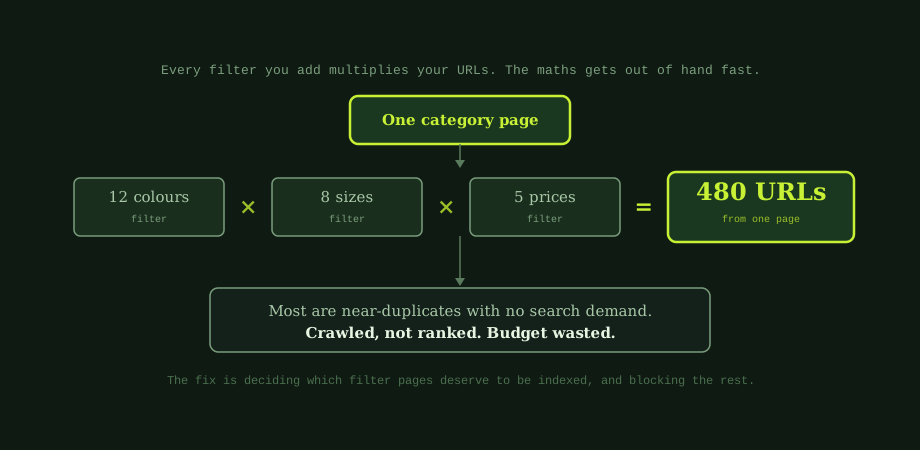
The problem is simple maths. Each filter someone applies usually creates a new URL. See URL structure for SEO. Combine a few filters and the number of possible URLs explodes. One category page can become hundreds or thousands of them. This is one of the most common technical issues on e-commerce sites, and one of the most damaging.
Why filters cause SEO problems
When filters multiply your URLs, three problems follow.
- Wasted crawl budget. Search engines have limited time to crawl your site. If they spend it on endless filter combinations, your important pages get crawled less. This matters most on large catalogues.
- Duplicate content. Many filtered pages are nearly identical. Search engines struggle to tell which one to rank, so none of them rank well.
- Diluted signals. Links and authority spread thin across countless URLs, instead of concentrating on the pages you actually want to rank.
None of this means filters are bad. They help people buy. The goal is to keep the filters for users while controlling what search engines do with the URLs they create. If you are not sure whether this is hurting you, a basic technical SEO audit will usually reveal a bloated URL count.
The key question: which filter pages deserve to rank?
Here is the insight that makes everything else simple. Some filtered pages are valuable. Most are not.
A page for "blue running shoes" can be valuable, because people actually search for that. It is a specific, real query you could rank for and win traffic from. But a page filtered by "shoes between 1,200 and 1,800 baht, in three colours, size 42" has no search demand at all. Nobody searches that. It should never be a page search engines try to rank.
So your whole strategy comes down to one decision, made per filter combination: does this page match something people search for? If yes, make it indexable. If no, keep it out of the index.
The five rules for faceted navigation
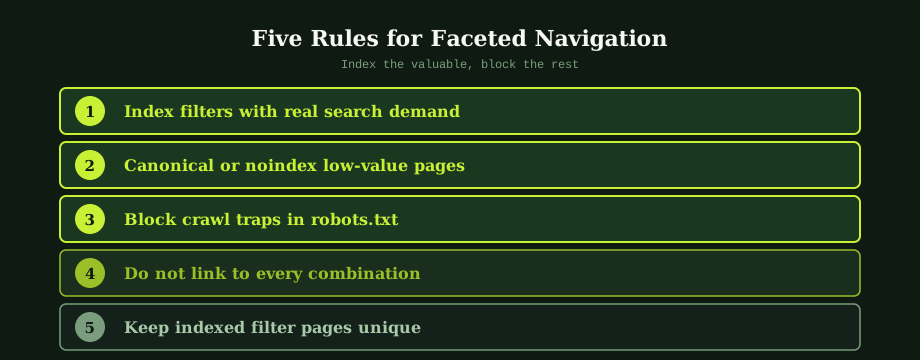
1. Index filters with real search demand
Find the filter combinations people actually search for, often a single attribute like a colour, a brand, or a use case. Turn those into clean, indexable pages with their own title and a short intro. These can rank for specific terms your main category cannot, much like the approach in category page SEO.
2. Canonical or noindex low-value pages
For combinations with no search demand, tell search engines not to treat them as separate pages. A canonical tag pointing to the main category says "this is a variation of that page." A noindex tag keeps it out of the index entirely. Use these so your signals stay on the pages that matter.
3. Block crawl traps in robots.txt
Some filters create near-infinite combinations, like sorting and multi-select options. These are crawl traps. Blocking their URL patterns in robots.txt stops search engines wasting time on them, protecting your crawl budget. If pages are already stuck in the index, fixing that overlaps with fixing indexing problems in Search Console.
4. Do not link to every combination
Search engines find URLs by following links. If your filters generate a crawlable link for every possible combination, you are actively inviting the problem. Use methods that let users filter without creating a clean, followable link for every state. This alone can dramatically cut the number of URLs discovered.
5. Keep indexed filter pages unique
For the filter pages you do choose to index, make them genuinely useful. A unique title, a short paragraph of intro text, and a real selection of products. A thin, templated page with nothing but a product grid will struggle. The same quality bar applies as to any page you want to rank.
A simple plan to fix it
Where you suspect faceted navigation is hurting your site, work through this:
- Find the bloat. Check how many URLs search engines have found versus how many real pages you have. A big gap is the warning sign.
- List your valuable filters. Identify the handful of filter combinations with real search demand.
- Index those, block the rest. Make the valuable ones clean indexable pages, and canonical or noindex everything else.
- Protect crawl budget. Block crawl traps and stop linking to every combination.
This is foundational technical work that supports everything else, including your e-commerce SEO fundamentals. On platforms like Shopify, some of this is handled differently, which we touch on in the Shopify configuration guide.
Faceted navigation is one of those issues that quietly holds back otherwise good e-commerce sites. Get it right and search engines spend their time on your best pages, your signals stay focused, and your important categories rank as they should.
Catalogues with hundreds of products and dozens of filters can spawn tens of thousands of crawlable URLs in a week, almost all of them near-duplicates. Our ecommerce SEO services in Thailand handles the crawl, index, and canonical strategy in this guide. An experienced SEO company in Bangkok can audit your current faceted setup and tell you which combinations should be opened to Google and which should not.
Common questions
What is faceted navigation in SEO?
Faceted navigation is the set of filters on an e-commerce site that let shoppers narrow a category by attributes like colour, size, price, or brand. It is great for users, but it creates an SEO challenge. Each combination of filters usually generates its own URL, so a single category can spawn hundreds or thousands of URLs. Most of these are near-duplicates with no search demand. If search engines crawl and try to index them all, they waste crawl budget, create duplicate content, and dilute the ranking signals of your main pages. Handling it well means letting users filter freely while controlling which filtered URLs search engines can crawl and index.
Why is faceted navigation bad for SEO?
It is not inherently bad; handled poorly, it causes three problems. First, crawl budget waste: search engines spend time crawling endless filter combinations instead of your important pages, which matters most on large sites. Second, duplicate content: many filtered pages are nearly identical, which can confuse search engines about which to rank. Third, diluted signals: links and authority get spread across countless thin URLs rather than concentrated on the pages you want to rank. The goal is not to remove filters, which help shoppers, but to control how search engines treat the URLs those filters create.
Should filtered pages be indexed?
Only the ones with genuine search demand. A filtered page like blue running shoes can be worth indexing if people actually search for that combination, because it can rank for a specific, valuable query. But a page filtered by an arbitrary mix, such as a narrow price range plus three colours plus a size, has no search demand and should not be indexed. The practical approach is to identify the few valuable filter combinations, make them clean indexable pages, and use canonical tags or noindex on the rest. This concentrates your ranking signals on pages that can actually win traffic.
How do I stop Google crawling filter URLs?
There are several tools, used together. Robots.txt can block crawling of URL patterns created by filters, which is the most direct way to protect crawl budget on crawl traps. Canonical tags tell search engines that a filtered page is a variation of the main category page, consolidating signals. The noindex tag keeps a page out of the index while still allowing it to be crawled, useful for pages you want users to reach but not rank. Avoiding internal links to every filter combination also reduces how many URLs get discovered. The right mix depends on your platform and scale.