Shopify is the easiest e-commerce platform to launch on and one of the most complicated to optimise for SEO. The reason is that its defaults are decent enough to make a store look fine in Google for the first few months, then bottleneck once the catalogue grows and competitive pressure kicks in. Most Shopify stores have the same five or six issues, and most are fixable in a couple of days if you know where to look.
This is the configuration guide that should ship with every Shopify store on day one. It covers what Shopify handles for you (so you do not waste effort), what it does not (the specific gaps that need work), and where in the admin or theme code each fix lives.
What Shopify handles well by default
Before listing what to fix, it is worth being clear about what already works. Stores migrating from WordPress or custom platforms often arrive with a list of generic SEO concerns that simply do not apply to Shopify. Five things are handled correctly out of the box on any modern Shopify theme.
HTTPS is mandatory and automatic. Every Shopify store ships with an SSL certificate, applied to the store domain and any custom domain you connect. This is not a configurable option; it just works. The same is true on most modern platforms, but it was a real concern on older WordPress installs and on custom platforms five years ago. On Shopify, you do not need to think about it.
Mobile responsive design is built into every theme in the Shopify theme store, and the underlying templates handle viewport meta tags, responsive images, and touch interactions correctly. Themes vary in how well they perform on mobile (the heavier feature-rich themes are slower), but the responsive layer itself is not something you need to engineer.
XML sitemap generation happens automatically at /sitemap.xml. The sitemap includes products, collections, blog articles, and pages, and updates as you add or remove content. Submit it to Google Search Console once and forget about it.
Image CDN and basic compression are handled by Shopify's infrastructure. Images uploaded through the admin are served from a fast CDN with reasonable compression applied automatically. This handles a lot of what was historically manual work on self-hosted platforms.
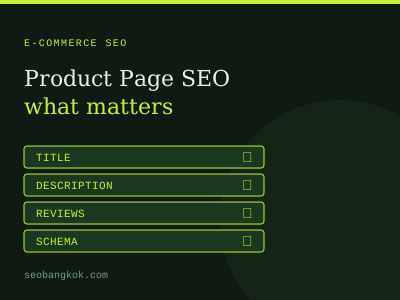
Basic Product schema ships in most current themes, including name, image, description, brand, and offers properties. The schema is template-driven, so once it works on one product, it applies to your whole catalogue. As explored in the product page SEO guide, Product schema is one of the highest-leverage technical signals for e-commerce; having it work by default is a significant advantage.
What Shopify does not handle: the five real config tasks
Now the work. Five specific configuration tasks make the difference between a Shopify store that ranks and one that does not. These are not optional optimisations; they are baseline fixes that every Shopify store needs and that the default install does not address.
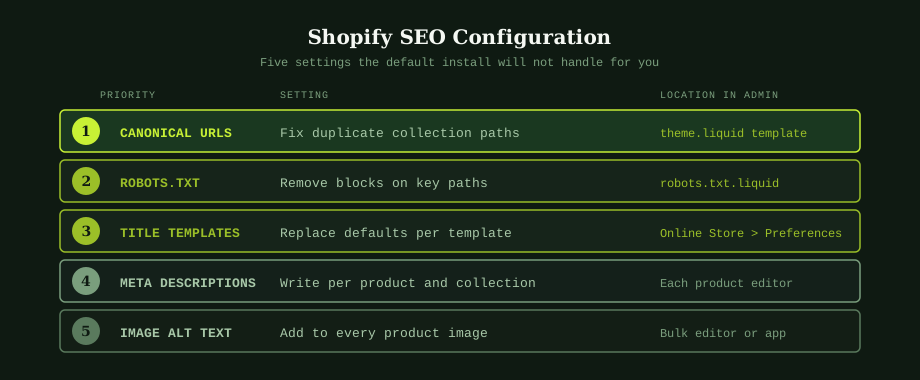
1. Canonical URLs for products in collections
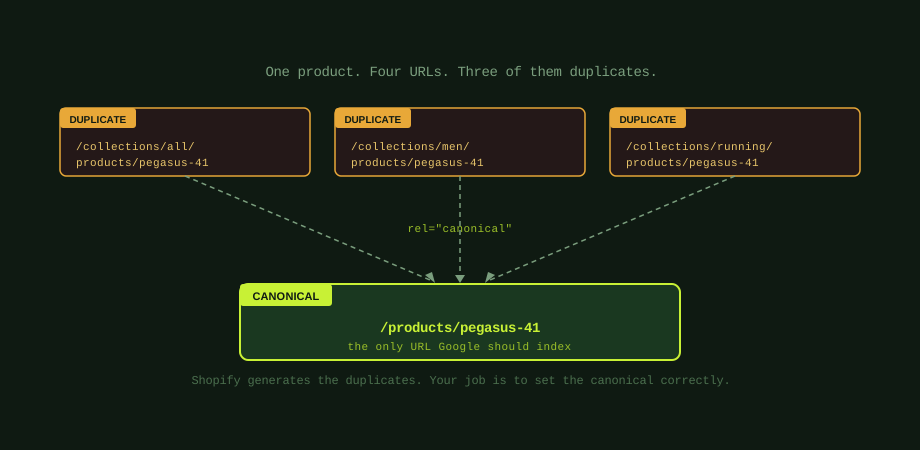
This is the single most important Shopify-specific SEO fix and the one most stores get wrong. The problem: Shopify generates multiple URLs for the same product, depending on how the customer arrives at it. A product called "Pegasus 41" can appear at /products/pegasus-41 (the canonical), but also at /collections/men/products/pegasus-41, /collections/running/products/pegasus-41, /collections/all/products/pegasus-41, and any other collection it sits in.
Without correct canonical configuration, Google sees these as separate pages with duplicate content, and link equity gets split across the variants. The fix lives in your theme files. Open theme.liquid (or product.liquid in older themes) and check the canonical link tag in the head section. It should output the clean product URL regardless of how the page was accessed. Most modern free Shopify themes get this right; older custom-developed themes often get it wrong.
The test is straightforward: navigate to a product through a collection (e.g., go to a collection page, click a product), then view source on the resulting page. Search for "canonical" in the source. The URL in the rel=canonical tag should be /products/product-name, not /collections/collection-name/products/product-name. If the wrong URL appears, that is the bug to fix.
2. Robots.txt customisation
Shopify's default robots.txt blocks several paths that should remain blocked (checkout, cart, account areas) and a few that you may want to allow depending on your setup. Since 2021, Shopify lets you customise robots.txt through a robots.txt.liquid file in your theme. Most stores do not need to change the defaults, but the file is worth reviewing in two situations.
The first is when you want to noindex certain content types that Shopify does not give you a UI option for, such as customer account-related pages that may not be blocked by default. The second is when you have legitimate concerns about specific paths being crawled (search results pages, internal filter URLs). Editing robots.txt.liquid is a templating exercise: you can add Disallow rules that target specific patterns. The Shopify documentation covers the syntax. The mistake to avoid is blocking too much; over-aggressive robots.txt rules can prevent legitimate product or collection pages from being crawled, which is far worse than letting Google see a few low-value pages.
3. Title templates that read like search results
Shopify's default title tag pattern for products is something like "Product Name - Store Name." For collections, it is "Collection Name - Store Name." These technically work but read like CMS field outputs rather than something a person would write to win a click.
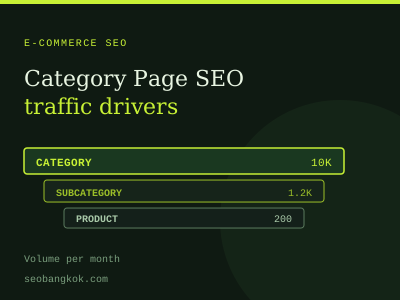
Better templates depend on your product type and market. For products: "Product Name [Key Attribute] | Store Name" works for most categories, where Key Attribute is the descriptor that buyers actually search (model number, size, brand, primary feature). For collections, the structure from the category page SEO guide applies: [Category Name] + modifier + brand context | Store Name.
Title templates can be set globally in Online Store > Preferences (the homepage, search, and 404 templates) and per template in your theme. The per-page override is in each product, collection, page, and blog article: scroll to the "Search engine listing" section in the admin to edit the title and meta description for that specific entry. The pattern is: set sensible defaults in the theme/preferences, override on high-traffic pages where the default is inadequate.
4. Meta descriptions that earn the click
Shopify does not auto-generate meta descriptions; if you leave the field blank, Google will pull text from the page content, which usually means a snippet of your product description that may or may not make sense as a search result snippet. The fix is to write a meta description for every product and collection that has meaningful traffic potential.
For a thousand-product catalogue, writing meta descriptions for everything is impractical. The pragmatic approach is to write them for your top 50 to 100 products by current or potential traffic, and let Google handle the rest. A meta description that works for product pages includes the product name, the key value proposition or differentiator, and a soft call to action (e.g., "free shipping," "in stock now") that competitors are not using. Keep it under 155 characters so it does not get truncated in mobile results.
5. Image alt text on every product image
Shopify's product image upload leaves alt text blank by default. This is a significant accessibility issue and a missed SEO opportunity. Image search drives meaningful traffic for many product categories (fashion, jewelry, home goods particularly), and alt text is how Google understands what an image shows.
Adding alt text manually through the Shopify admin is slow at scale. The pragmatic solutions are either to assign someone to write alt text as new products are added (preventing the backlog from growing), or to use a bulk editor app to handle the existing catalogue in batches. Avoid apps that auto-generate alt text based on product names without human review; the output tends to be repetitive ("Product Name Image 1, Product Name Image 2") and does not serve image search well.
Which Shopify SEO apps are actually worth installing
The Shopify app store has dozens of apps tagged "SEO," ranging from genuinely useful tools to bundled feature collections that promise to "fix your SEO" without specifying what they actually do. Most stores need apps for two specific tasks.
Bulk meta tag and alt text editing. The native Shopify admin makes bulk editing slow because you have to click into each product. An app that exposes title tags, meta descriptions, and alt text in a spreadsheet-like interface lets you work through hundreds of products in an hour rather than a day. Multiple apps do this well; the specific app matters less than picking one and using it.
Schema markup beyond what Shopify provides natively. Shopify handles Product schema reasonably well, but not Article schema for blog posts, FAQPage schema for support content, BreadcrumbList schema for navigation, or Organization schema for the site as a whole. As the bigger picture is in the structured data guide, these schemas enable rich results that lift CTR even when rankings stay flat. An app that handles the schemas Shopify does not is worth the small monthly cost for any store doing meaningful content marketing.
The apps to be wary of are those promising automatic SEO content generation, automatic broken link fixes that rewrite URLs without warning, or comprehensive "SEO suites" that bundle ten unrelated features into a premium tier. Most of these inject content or markup at scale without quality control, and the cleanup work when they cause problems is significantly more expensive than the few months of subscription savings.
Site speed in Shopify: the theme and app trap
Shopify's underlying infrastructure is fast. The speed problems on Shopify stores almost always come from the theme and the app stack, not the platform itself. A theme that ships with eight homepage sections, four font families, and a bundle of third-party JavaScript widgets will be slower than a minimal theme, regardless of what Shopify is doing in the background.
The honest assessment for site speed: check your Lighthouse score, then check it again after temporarily disabling each app you have installed. The difference between scores tells you which apps are adding weight. The apps that load on every page (chat widgets, review widgets, popup tools, analytics extras) typically add the most. The question is whether the value they provide justifies the speed cost; for some apps the answer is clearly yes, for others it is just bloat.
Themes vary as much as apps. The free Shopify themes (Dawn, Sense, Studio, Refresh) are generally lighter and faster than third-party paid themes loaded with features. If site speed is critical for your category, starting with a lightweight base theme and adding features as needed beats starting with a feature-heavy theme and trying to remove what you do not use.
Shopify and Thai market e-commerce considerations
For Thai-market Shopify stores, two specific topics come up regularly. The first is multi-currency and multi-language through Shopify Markets. The feature works well for English-and-Thai stores with consistent product ranges; hreflang tags are inserted automatically once Markets is configured for both languages. For more complex multi-language setups, the hreflang implementation guide covers the validation steps to confirm Markets is doing the right thing.
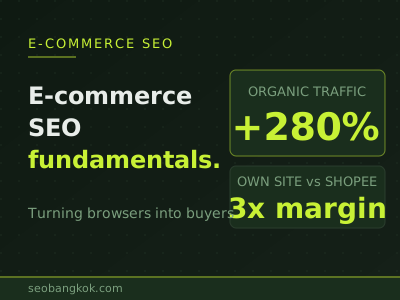
The second is competing with Shopee and Lazada listings of your own products. Many Thai brands maintain both a Shopify storefront and marketplace listings. The SEO problem this creates is that the marketplace listings often outrank the Shopify store for branded product searches, because the marketplaces have higher domain authority. The mitigation is consistent: differentiate your Shopify product pages on content depth (the strategy from the product page SEO post), and accept that for some product searches the marketplace will win regardless. The strategic question is whether your direct margin justifies the SEO investment or whether the marketplace traffic is the more efficient channel for that product.
The implementation sequence
For a Shopify store starting from a standard config, the order of work that produces the most ranking movement in the shortest time: fix canonical URLs (test current state, fix theme if broken), then audit the top 50 products' title tags and meta descriptions and rewrite the weak ones, then add alt text on the same 50 products' main images, then implement any missing schema beyond Product (BreadcrumbList and Organization at minimum), then audit your apps for speed impact and remove anything that is not earning its keep.
This is roughly a two-week project for a single person, or less for a small team. After it is done, the next layer of work shifts to content (category page intros and blog content) which is the longer-horizon investment in organic traffic. For a structured engagement that handles both the config and the content work, our ecommerce SEO service for Shopify stores covers Shopify stores specifically. An experienced SEO services company can also audit your current Shopify install and identify the specific gaps that matter most for your category and market position.
Common questions
Does Shopify handle SEO well out of the box?
Partially. Shopify gives you several things that are genuinely hard to set up on other platforms: HTTPS by default, mobile responsive themes, an auto-generated XML sitemap, fast CDN-hosted images, and basic Product schema on product pages. What it does not handle well: canonical URL configuration for products that appear under multiple collections, title and meta description templates that read as keyword-stuffed rather than human, image alt text (left blank by default), and a robots.txt that you cannot fully customise without editing the theme. The result is that a brand new Shopify store has solid technical foundations but several config-level gaps that prevent it from ranking competitively without intervention.
How do I fix the duplicate product URL problem in Shopify?
Shopify generates the duplicates automatically (any product accessed through a collection path creates a variant URL like /collections/men/products/product-name), and most modern Shopify themes set the canonical tag correctly to /products/product-name regardless of how the page was accessed. Check your theme by viewing the page source on a product accessed through a collection: the link rel=canonical should point to the clean /products/ URL, not the /collections/ URL. If it does not, edit your theme.liquid or product.liquid to fix the canonical output. This is the single most impactful Shopify SEO fix for stores that have not addressed it.
Which Shopify SEO apps are actually worth installing?
Most stores need apps for two things: bulk meta tag and alt text editing (the native Shopify admin makes this slow for catalogues over 50 products), and JSON-LD schema for content types Shopify does not handle natively (article schema for blog posts, FAQPage for support content, breadcrumb schema). Avoid apps that promise to fix SEO automatically by adding tags or rewriting content; they tend to inject low-quality copy at scale and can damage rankings. Avoid apps that bundle five unrelated features into one premium subscription. The best Shopify SEO setup uses two or three focused apps, each doing one thing well, rather than one app promising to do everything.
How does Shopify handle multi-language and international SEO?
Shopify Markets handles the basics: separate currency, language, and pricing per region, with hreflang tags inserted automatically when properly configured. The default implementation works for simple cases (English and Thai versions of the same store), but breaks down for more complex setups involving different product catalogues per market or substantially different content. For Thai stores selling internationally, Shopify Markets is usually sufficient if your product range is consistent across markets and you mainly need language and currency switches. For stores with significantly different inventory per region, a separate Shopify store per market (with manual hreflang implementation between them) may be the cleaner architecture.