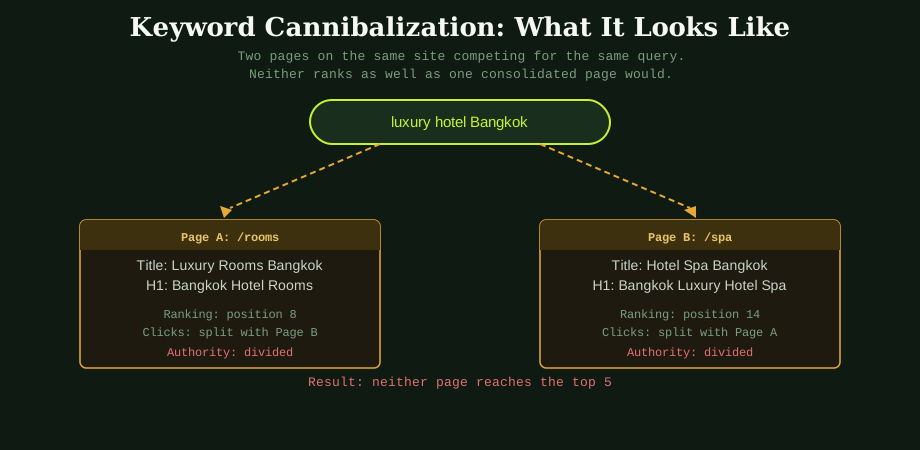
The problem is easier to understand with a concrete example. A Bangkok hotel has a rooms page and a spa page. The rooms page title says "Luxury Rooms Bangkok | Siam Grand Hotel." The spa page title says "Hotel Spa Bangkok | Siam Grand Hotel." Both pages use the phrase "hotel Bangkok" throughout. Both have accumulated backlinks and internal links over time.
When someone searches for "luxury hotel Bangkok," Google indexes both pages as candidates. It is not sure which one is the primary destination. It sends some ranking signals to one, some to the other. The rooms page ranks at position eight. The spa page ranks at position fourteen. Neither earns the click volume that a single well-optimised page at position three would earn.
If those ranking signals were consolidated on one page, that page would have substantially more authority. It might reach position three or four. That is the cost of cannibalization.
Why it happens in the first place
Cannibalization is rarely intentional. It accumulates over time as sites grow. A business adds a blog and starts writing content. A few posts touch on the same topics as the service pages. Nobody is tracking which page is supposed to own which keyword. The site grows, the problem compounds, and by the time it becomes visible in rankings it has been present for months.
It is also common on sites that have been rebuilt or migrated. Old URLs get preserved, new pages get created for similar topics, and the old and new versions end up competing. This is one of the things worth checking during any technical SEO audit.
Blog posts are a particularly common source of cannibalization with commercial pages. A hotel writes a post called "Things to do near our Bangkok hotel" and has a location page called "Bangkok Hotel Location and Neighbourhood." Both target overlapping queries about the hotel's area. The blog post may actually outrank the location page because it has more content and more links, but it has no booking conversion path. Traffic lands on an informational post when the business wanted it to land on a page that converts.
How to find it
Google Search Console is the most reliable free tool for identifying cannibalization. Go to the Performance report, click on a keyword you care about, and then switch to the Pages tab. If more than one page from your site appears for that keyword, you have a cannibalization issue to investigate.
The pattern to look for is two pages ranking for the same query with similar click volumes or fluctuating positions. If you see one page at position six in January, a different page at position six in March, and both alternating, Google is not sure which to prefer. That instability is a strong signal of cannibalization.
A site: search on Google also works quickly. Type site:yourdomain.com [your keyword] and look at what comes up. Multiple pages with similar titles targeting the same phrase is a clear indicator.
For sites with larger content libraries, tools like Ahrefs or Semrush have dedicated cannibalization reports that map keywords to competing pages. These are worth running once per quarter as a standard content health check, alongside the broader keyword mapping process described in the on-page optimisation guide.
The four fixes
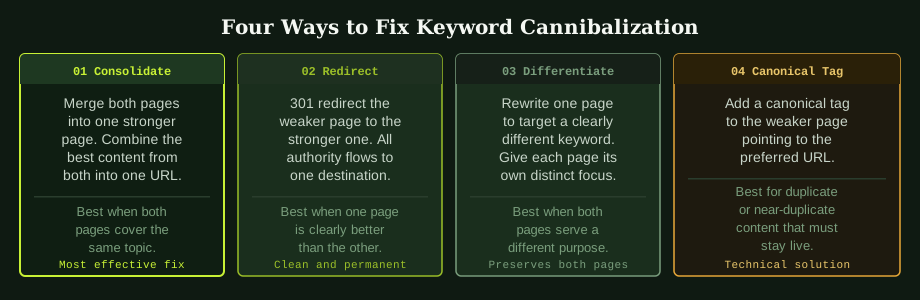
Consolidate. If two pages cover the same topic and serve the same purpose, merge them. Take the best content from both, combine it into one page at the URL that has more authority or more inbound links, and delete the weaker page. This is the most effective fix when the duplication is a genuine mistake rather than an intentional structure.
301 redirect. If one page is clearly stronger and the other adds no unique value, redirect the weaker page to the stronger one with a permanent 301 redirect. All link equity from the redirected page passes to the destination. The weaker page disappears from the index and Google has a single clear answer for the query.
Differentiate. If both pages have a legitimate reason to exist but are accidentally targeting the same query, rewrite one of them to focus on a meaningfully different keyword. A hotel blog post "Why stay near Sukhumvit Bangkok" should target a different intent from the commercial rooms page "Boutique Hotel Sukhumvit Bangkok." Rewrite the post to target "things to do in Sukhumvit" or a similar informational query that does not compete with the page that needs to convert.
Canonical tag. If two pages must remain live because of technical constraints but one is clearly the preferred version, add a canonical tag on the secondary page pointing to the primary. This tells Google which version to index and which to credit with ranking signals. It is a softer fix than a redirect and does not consolidate authority as completely, but it resolves the confusion.
Which fix to choose
The right fix depends on why both pages exist. If the cannibalization is accidental and both pages cover the same ground, consolidate or redirect. If the pages serve genuinely different purposes but have drifted into the same keyword territory, differentiate the content so each page has a clearly distinct focus.
The worst choice is to do nothing. I have worked with sites in Bangkok where cannibalization between a service page and a blog post had been present for over two years. The blog post was consistently outranking the commercial page and generating informational traffic that was not converting. A single afternoon of consolidation work moved the service page from position eleven to position four within eight weeks. The content was already there. The authority was already there. It just needed to be pointing in one direction.
After fixing cannibalization, the next step is to prevent it from recurring. A keyword map that assigns one primary target keyword per page is the practical tool for this. When someone proposes a new page or post, check the map first to confirm no existing page already owns that keyword. The title tag guide covers how keyword ownership flows through the title into the rest of the on-page signals.
For sites with a significant history of unplanned content growth, a full keyword mapping audit is worth doing before any further content production. As an SEO specialist Bangkok-based consultant, one of the first things I check on a new client site is whether the existing pages are competing with each other. Fixing that before adding more content is almost always the higher-value work.
Common questions
How do I know if my site has keyword cannibalization?
The quickest check is Google Search Console. Go to Performance, filter by a specific keyword, and look at which pages are appearing in the results for that query. If more than one page from your site appears regularly for the same keyword, you have cannibalization. You can also use a site: search on Google with your target keyword and look at which pages come up.
Does keyword cannibalization always hurt rankings?
In most cases yes, but the severity depends on how competitive the keyword is. For low-competition keywords, cannibalization may not cause a noticeable problem. For competitive terms where every ranking signal matters, two pages splitting authority can be the difference between page one and page two. The safest approach is to resolve it regardless.
Can internal links cause keyword cannibalization?
Internal links do not directly cause cannibalization, but poor anchor text across internal links can signal to Google that multiple pages are equally relevant for the same query. Using consistent, differentiated anchor text when linking to different pages helps Google understand which page is the intended target for each keyword. This is one reason why a deliberate internal linking strategy matters alongside content planning.
What is the difference between keyword cannibalization and duplicate content?
Duplicate content means two pages have identical or near-identical text. Keyword cannibalization means two pages are targeting the same search intent, even if the text itself is different. Cannibalization is a strategic problem. Duplicate content is a technical one. They require different fixes.
Cannibalisation is a mapping problem, and mapping problems are easiest to see across the whole site at once. That page-to-keyword review is part of every SEO audit we run.