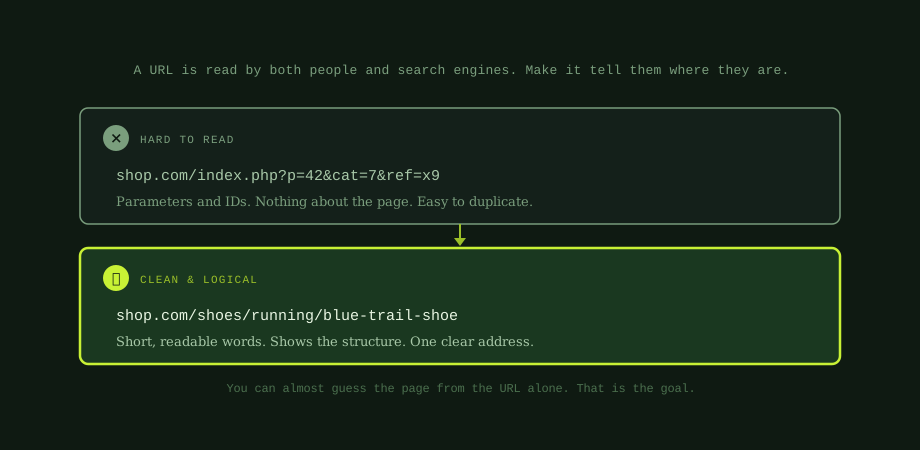
Look at these two URLs for the same page:
- Messy: shop.com/index.php?p=42&cat=7&ref=x9
- Clean: shop.com/shoes/running/blue-trail-shoe
You can guess what the second page is about without even visiting it. You have no idea about the first. That is the whole point of good URL structure: a URL should tell people and search engines where they are. Let us look at how to build them well.
Why URL structure matters
URLs are not a major ranking factor on their own. But they support your SEO in several quiet ways:
- Clarity. A descriptive URL helps search engines understand the page and its place in your site.
- Click-through. URLs show in search results. A clean one looks trustworthy; a cryptic one looks suspect.
- Shareability. People are more comfortable sharing and linking to a readable URL.
- Structure. Logical URLs reflect a logical site, which helps both crawling and your internal linking.
None of these is dramatic alone. Together they make your whole site easier to understand and rank.
The six rules for SEO-friendly URLs
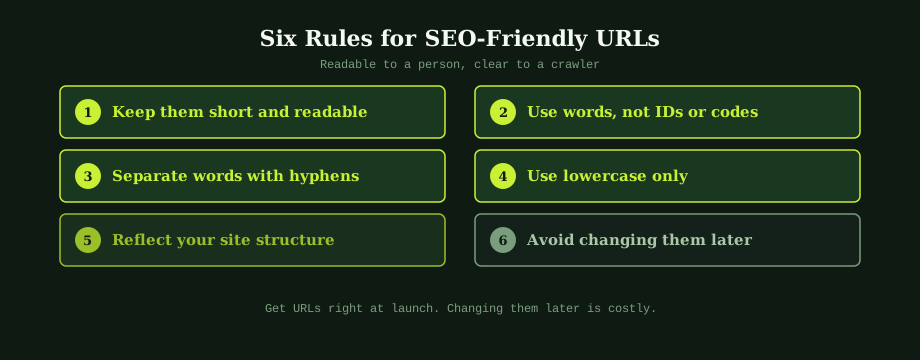
1. Keep them short and readable
Shorter URLs are easier to read, share, and remember. Include what is needed to describe the page and nothing more. Drop filler words like "and," "the," and "of" where they add no meaning.
2. Use words, not IDs or codes
"running-shoes" beats "p=42" every time. Words describe the page; codes describe nothing. Where your platform generates ID-based URLs by default, configure it to use descriptive slugs instead.
3. Separate words with hyphens
Use hyphens between words, not underscores or spaces. Search engines treat hyphens as word separators, so "blue-trail-shoe" reads as three words. "blue_trail_shoe" or "bluetrailshoe" does not separate as cleanly.
4. Use lowercase only
Always use lowercase letters. On many servers, uppercase and lowercase URLs are treated as different pages, which can create accidental duplicates. Lowercase everywhere avoids that and is the convention people expect.
5. Reflect your site structure
Use subfolders to show where a page sits. shop.com/shoes/running/blue-trail-shoe tells everyone this is a running shoe within the shoes section. This logical nesting mirrors a good site structure and supports your category organisation. See also category page SEO.
6. Avoid changing them later
Once a URL is live and earning rankings and links, changing it is costly. Set your structure at launch and stick with it. When a change is truly necessary, handle it with redirects, covered next. If you are moving the site, see how to migrate without losing SEO.
What about keywords in URLs?
Including a relevant keyword in the URL helps, but it should happen naturally. Because a good URL describes the page in plain words, the keyword usually appears on its own. A page about running shoes naturally has "running-shoes" in the path.
What you should not do is stuff keywords or pad the URL to fit more in. One clear, descriptive phrase is the goal. Use the main term once, keep it short, and let the words describe the page rather than chase rankings.
Changing URLs safely
Sometimes you must change a URL, during a redesign or a move to a cleaner structure. The danger is that the old URL stops existing, so any links and rankings pointing to it hit a dead page.
The safe method is a 301 redirect. This permanently points the old URL to the new one, sending visitors and search engines to the right place and passing most of the ranking value across. Plan your redirects before you make changes, and check them afterwards. If broken URLs are already causing problems, that overlaps with fixing indexing problems in Search Console. A change is never completely free of risk, which is exactly why getting URLs right the first time matters.
A note on parameters and duplicates
Parameter-heavy URLs, the ones with question marks and ampersands, are not just ugly. They often create duplicate or near-duplicate pages, which dilutes your signals. This is the same root problem behind faceted navigation, where filters spawn endless parameter URLs. Where you can, prefer clean, static-looking URLs, and manage any necessary parameters carefully.
Not sure whether your URLs are helping or hurting? A quick check is part of any basic technical SEO audit. The fixes are usually one CMS setting away. Look for parameter bloat, uppercase URLs, and pages buried too deep in the structure.
URL structure is foundational. It is easiest to get right at the start and most painful to fix later. If you are building or rebuilding a site and want the structure right from day one, our best SEO in Bangkok cover the technical foundations. An experienced a Bangkok-based SEO consultant can review your URL structure and plan any changes safely.
Common questions
What makes a URL good for SEO?
A good URL is short, readable, and made of real words that describe the page, with a structure that reflects where the page sits on your site. A URL like shop.com/shoes/running/blue-trail-shoe tells both people and search engines exactly what the page is and how it relates to the rest of the site. A poor URL like shop.com/index.php with parameters and IDs means nothing and is easy to duplicate. Good URLs use lowercase letters, hyphens between words, and avoid unnecessary parameters. They are not a huge ranking factor on their own, but they support clarity, are easier to share and link to, and help search engines crawl and understand your site.
Should URLs include keywords?
Including a relevant keyword in the URL is helpful, but naturally, not forced. Because a good URL describes the page in plain words, the keyword often appears on its own. A page about running shoes naturally has running-shoes in the URL. This reinforces relevance and looks trustworthy in search results, where the URL is shown. What you should not do is stuff multiple keywords into a URL or make it long just to fit them in. One clear, descriptive phrase is ideal. Keep it short, use the main term once, and let the words describe the page rather than chase rankings.
Can I change a URL without hurting SEO?
You can, but you must do it carefully, because changing a URL means the old address no longer exists. If you simply change it, anyone who had the old link, and any ranking it earned, hits a dead page. The safe way is to set up a 301 redirect from the old URL to the new one. This permanently sends visitors and search engines to the new address and passes most of the ranking value across. Even done correctly, a change carries some risk and effort, so the best policy is to get URLs right at launch and avoid changing them. When a change is genuinely needed, plan the redirects before you make it.
Do subfolders or subdomains matter for SEO?
For most businesses, using subfolders on one domain, like site.com/blog, is simpler and generally preferable to splitting content across subdomains, like blog.site.com. The reason is that search engines tend to treat a subdomain as a somewhat separate site, so authority can be harder to consolidate. Keeping everything in subfolders on a single domain concentrates your authority and keeps your structure clear. There are valid reasons to use subdomains in some cases, such as a separate app or a distinct regional site, but as a default, organise your content into logical subfolders on one domain.