
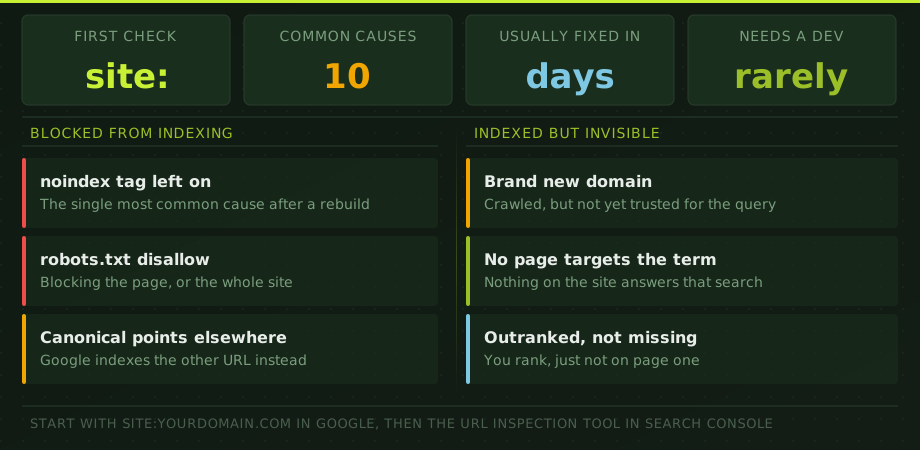
Start by defining the problem precisely. Search for your exact brand name. Search for a sentence copied from the page in quotation marks. Use site:yourdomain.com for a rough discovery check. Then inspect the exact URL in Google Search Console.
The URL Inspection result matters most. It tells you whether the URL is indexed, whether indexing is allowed, which canonical Google selected and when the page was last crawled. Do not rely on the site operator as a complete index count; it is useful, but incomplete.
1. The website is too new
A new domain has no crawl history and few links pointing to it. Google may discover the homepage quickly but take longer to crawl deeper pages. Add the site to Search Console, verify ownership, submit a valid XML sitemap and make sure important pages are linked from the main navigation or other indexed pages.
Do not confuse indexation with ranking. A page can be indexed within days and still take months to rank for a competitive non-brand term. Our guide to how long SEO takes explains the difference.
2. The page returns the wrong status code
An indexable page should normally return HTTP 200. A 301 or 302 sends Google elsewhere. A 404 or 410 says the page is gone. A 5xx response says the server failed. A soft 404 returns 200 but looks empty, broken or equivalent to an error page.
Check the exact public URL without being logged in. Some websites work for administrators while blocking normal visitors or bots through security rules. If only certain countries or user agents receive an error, the problem can be difficult to see without testing from outside your normal session.
3. Robots.txt blocks crawling
A robots.txt rule can prevent Googlebot from crawling a directory or parameter pattern. That does not always remove an already-known URL from the index, but it prevents Google from seeing the page content and important indexing directives.
Open /robots.txt and check the path. Then use Search Console or a crawler to test whether Googlebot is allowed. Be especially careful after staging-to-production launches; a temporary sitewide Disallow: / rule sometimes reaches the live site.
4. A noindex directive is present
A noindex meta robots tag or X-Robots-Tag HTTP header tells Google not to index the page. Content-management systems often add noindex to archives, filters or staging templates. Problems happen when the rule is copied to commercial pages or remains after a redesign.
Check both the HTML and response headers. Removing the visible meta tag does not help if the server still sends an X-Robots-Tag.
5. The canonical points somewhere else
A canonical tag tells Google which URL you prefer when several pages are similar. If a product, category, language or service page canonicals to another URL, Google may index the canonical target instead.
Inspect the declared canonical and the Google-selected canonical in Search Console. They can differ. Common causes include duplicate paths, HTTP and HTTPS variants, www and non-www variants, trailing slash inconsistencies, copied templates and parameter URLs.
Our guide to robots.txt and canonical tags covers the technical distinction.
6. Redirects or migration rules broke the path
After a redesign or domain migration, old URLs should normally redirect in one hop to the closest relevant new URL. Long chains, redirect loops, broad homepage redirects and mixed protocol rules can slow discovery and destroy page-level relevance.
Crawl the old and new URL sets. Confirm that navigation, canonicals and sitemaps point directly to final 200 URLs rather than relying on redirects. If the problem started after a move, use the full website migration checklist.
7. JavaScript hides the important content
Google can render JavaScript, but that does not mean every application renders reliably or quickly. If the HTML response contains an empty shell and the page content depends on blocked scripts, delayed API calls, browser storage or user interaction, Google may see less than users see.
Use URL Inspection's rendered HTML and screenshot, then compare with “view source.” Check whether the title, canonical, main heading, content and internal links are present in the rendered output. For a deeper diagnostic, see our JavaScript SEO guide.
8. The page is orphaned or too deep
A URL in the sitemap but nowhere in the site's internal links is weakly supported. Google may crawl it, but the architecture signals that the page is unimportant. Important commercial pages should be reachable through navigation, category paths or contextual links from related content.
Run a crawl starting from the homepage. If the page is not discovered, it is orphaned. If it takes six or seven clicks to reach, improve the architecture. Internal links are not only a discovery mechanism; their anchor text and placement help Google understand the page's role.
9. Google sees a duplicate or low-value page
“Crawled — currently not indexed” often means Google found the page but did not consider it worth adding as a separate result. The cause may be duplicate product descriptions, near-identical location pages, thin category pages, expired inventory, doorway pages or a page that adds nothing beyond another indexed URL.
Do not keep requesting indexing without changing the page. Improve its unique value, consolidate duplicates, strengthen internal links and make the canonical relationship clear. The goal is not to force every URL into the index. The goal is to make the right URLs clearly worth indexing.
10. The page is indexed but does not rank
This is the most common misunderstanding. Search Console says the URL is indexed, but the owner searches a broad keyword and cannot find it. That is not an indexation problem. It is a relevance, authority, competition or intent problem.
Check the queries the page currently receives impressions for. Compare the page with the top results. Does it match the same intent? Is another page on your site competing for the term? Is the target keyword too broad for the page type? Are stronger internal links pointing elsewhere?
A page should own one clear intent cluster. Our guide to optimising a page for a target keyword shows how to fix the on-page layer after indexation is confirmed.
The diagnostic order
| Check | Question | Tool |
|---|---|---|
| Discovery | Does Google know the URL? | Search Console URL Inspection |
| Access | Can Googlebot fetch a 200 response? | URL Inspection and HTTP test |
| Permission | Are robots and noindex clear? | robots.txt, HTML and headers |
| Canonical | Which URL should be indexed? | Declared and Google-selected canonical |
| Rendering | Can Google see the main content? | Rendered HTML and screenshot |
| Value | Is the page unique and useful enough? | Content and duplicate review |
| Ranking | Does the page deserve the searched position? | Queries, competitors and internal links |
When to request indexing
Request indexing after you have fixed the reason the page was excluded, not as a substitute for fixing it. For a small number of important URLs, URL Inspection is useful. For many pages, correct internal links and an accurate XML sitemap are the scalable route.
If many important pages are missing, run a structured SEO audit. The audit should identify whether the problem is sitewide, template-specific or page-specific and produce a prioritized fix list rather than a screenshot of Search Console errors.
Google visibility questions
How do I check whether my website is on Google?
Search Google for site:yourdomain.com for a rough check, then use Google Search Console URL Inspection for the authoritative status of a specific page. The site operator is incomplete and should not be used as a full index count.
How long does a new website take to appear?
A technically accessible new website can be discovered within days, but important pages may take several weeks to be crawled and indexed consistently. Ranking for competitive non-brand terms usually takes much longer than indexation.
Why is a page crawled but not indexed?
Google may consider the page duplicative, low-value, weakly linked, soft-404-like or less suitable than another canonical page. Improve the page's unique value and internal links, verify the canonical, and avoid repeatedly requesting indexing without changing the cause.
Can I pay Google to index my website?
No. Google Ads can buy paid visibility but does not buy organic indexation or rankings. Anyone selling guaranteed paid inclusion in Google's organic results is misrepresenting the service.